Table of Contents
This guide provides a clear, practical overview of in addition to the blue screen of death, there are 8 other, with useful context, important details, and straightforward takeaways for everyday readers.
Below are the types of error screens that appear on many different platforms.
Blue Screen of Death (BSOD)

Blue screen of death error appears when Windows operating system has STOP error or some serious system error, causing the machine to crash.
- Guide to fix blue screen on computer
- BSOD blue screen of death codes list
Black Screen of Death (BkSOD)

Error black screen of death appeared from the era of Windows 3.x when the system had a serious error. Black Screen of Death is the name given by an IT employee of Coca-Cola, Ed Brown in 1991.
This error also appears on later Windows operating systems such as Windows 7, 8, 10 when it cannot access the MBR formatted hard drive during boot. When the operating system cannot extract the hard drive fast enough after it has been compressed before or some important .dll files disappear, BkSOD will appear.
Red Screen Of Death (RSOD)
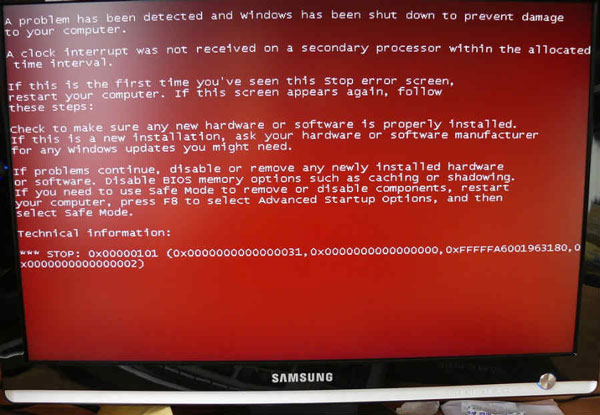
The red screen of death will appear when Windows detects a problem with the video card. RSOD appears on Windows 98, Windows Vista and on Sony Playstation when an error occurs. In addition, a red screen of death also appeared on the Amazon Kindle Fire tablet when the device was turned into… 'bricked'.
Green Screen of Death (GSOD)

The green screen of death appears when the Xbox One update fails, causing the device to freeze.
Since April 2017, Microsoft has changed the background color of the blue screen of Windows Insider Preview to green screen to help users distinguish which version of Windows is using.
Purple Screen of Death (PSOD)
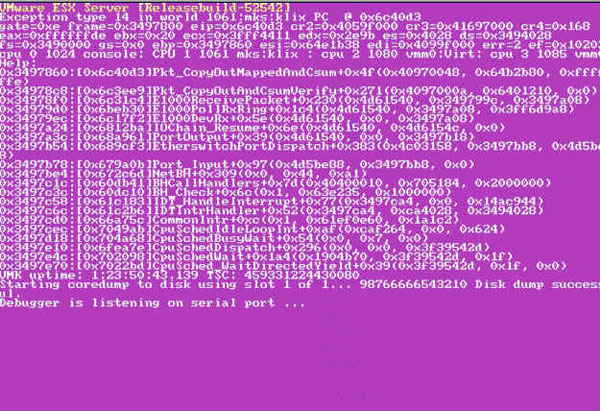
The screen of death will appear when there is a serious problem with the kernel on the VMWare ESX / ESXi Server platform.
On the Nintendo DS when you remove the game tapes while using the Pictochat app, the PSOD will also appear.
Gray Screen of Death (GSOD)
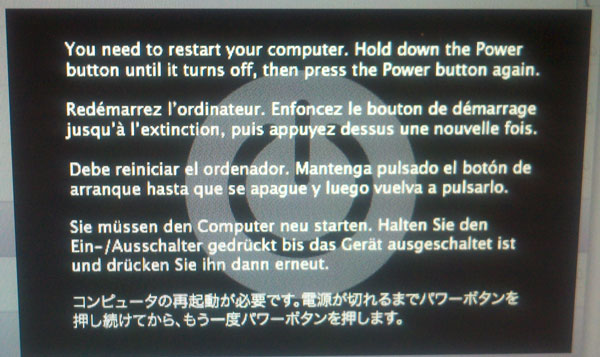
The gray screen of death appeared on the Microsoft Surface running Windows 8.1 RT after the May 2015 Windows RT update, causing the machine to operate unstable. To completely fix this error, users need to restore the machine to factory settings and disable those updates.
One trick shared by the user is to press Windows key + volume up (Volume up) to open the Narrator feature and the gray screen disappears.
White Screen of Death (WSOD)

A white screen of death with a black Apple logo appeared first on the white iPhone 5 and its descendants. In addition, it will appear on the white iPod Touch 5th generation after iOS 7 update. When WSOD appears, your device will reboot and you cannot do anything Then.
This error turns into a black background and a white Apple Apple logo on a black iPhone.
Yellow Screen of Death (YSOD)

The yellow screen of death appears in Mozilla Firefox when the XML parser (a tool used to convert XML code into computer language) cannot process the XML document, causing a parsing error.
Additionally, YSOD also appears when a web application developed with ASP.NET crashes or crashes.
Brown Screen of Death

The brown screen of death is related to the graphics hardware and software. When you open a PC that is using an old driver, an error or a damaged video card, Brown Screen of Death will appear. This error also occurs when overclocking CPU and GPU to increase gaming performance.
Key Takeaways
Use the information above as a practical reference for in addition to the blue screen of death, there are 8 other. Review each step carefully, confirm any requirements, and choose the option that best fits your situation.
FAQ
What does this guide explain about In Addition to the Blue Screen of Death, There Are 8 Other?
It explains the main concepts, practical considerations, and useful steps related to in addition to the blue screen of death, there are 8 other without requiring advanced knowledge.
Who can benefit from learning about In Addition to the Blue Screen of Death, There Are 8 Other?
This information is useful for readers who want a clear overview, practical guidance, and reliable steps related to in addition to the blue screen of death, there are 8 other.
What should I check before applying this information?
Review the requirements, confirm that your device, software, or situation matches the instructions, and back up important data before making major changes.
Related Articles
 Ways to Fix BSOD Blue Screen Error19 minutes read
 Do You Know That Microsoft Also Has Blue Screensaver Screensavers?5 minutes read
 Prevent 'Blue Screen Errors' on Windows 82 minutes read
 How to Find the Cause of Blue Screen Death and Minidump Errors?8 minutes read
 How to Fix Blue Screen of Death on Windows11 minutes read
 How to Create a Blue Screen of Death (BSOD) to 'Prank' Friends1 minutes read
Reader Comments 0
Sign in with email or Google to join the discussion.