Table of Contents
This updated guide explains how to Use Headphones on Xbox One through clear steps, practical examples, and important checks that help prevent common errors.
How to Connect Headphones to Xbox One
This part is extremely simple as long as you're using the new versions of the Xbox One gaming controller. These handles have a 3.5mm headphone jack on the bottom, and so to use them, all you have to do is plug the headset into the handle.
 How to connect headphones to Xbox One
If you're using the first generation Xbox One controller, unfortunately, it doesn't have a headphone jack. Therefore, you will have to pay for a Stereo Headset Adapter. You also get handy features like volume control, chat / game audio and mute button.
How to Control Audio Without Adapter
 You can control the sound directly on the console
You can control the sound directly on the console. Though not complicated, with the latest update to the Xbox One dashboard, the audio controls are slightly hidden. Follow these steps:
- Press the Xbox button on the controller to open the guide.
- Scroll to the right to get to the System section .
- Select Audio.
You will now have options to turn on and off any mounted microphones, adjust the volume, monitor mic, etc.
Add a Microphone to the Headset
There are a number of easy, reliable ways to add a microphone to the headset on Xbox One.
Another product worth investing in is Antlion Modmic Uni. This is a microphone that you can attach to your headphone to create a gaming headset. You use a divider to attach a microphone to the headset, so you can have a full gaming headset basically plugged into the handle.
 Antlion Modmic Uni
You can turn off the microphone and then continue using your headset. Not all gaming headsets have a detachable microphone, so you can take advantage of products like the Antlion Modmic Uni.
If you may need to be unique, especially if you're a streamer, you can use Astro's Mixamp to integrate headphones with PCs, consoles and even the sound of mobile devices.
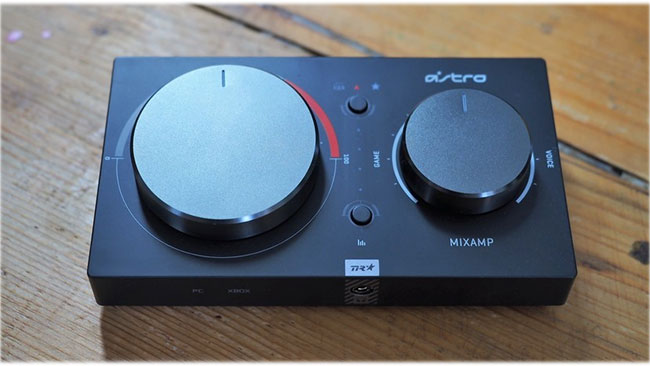 Astro's Mixamp
Connect the console via the optical audio port, plug the USB into the PC and connect the headset or smartphone to the 3.5mm headphone jack.
FAQ
What is the easiest way to Use Headphones on Xbox One?
Start with the requirements in this guide, then follow each step in order. Check the result after every major change so problems are easier to identify.
Can beginners follow these instructions?
Yes. The process is organized into practical steps, and you can repeat any step before moving forward.
What should I check if the method does not work?
Confirm your software or device version, permissions, settings, file format, and internet connection when the task depends on online services.
Related Articles
 Xbox Kinect - How to Connect to Xbox One and Windows PC7 minutes read
 Top 7 Best Wired Headphones: What You Need to Know8 minutes read
 What Is Xbox Game Bar? Features, Uses, and Key Details6 minutes read
 3 Best Methods to Play Xbox 360 Games on Windows PC7 minutes read
 How to Connect Two TVs to an Xbox: Step-by-Step Guide9 minutes read
 How to Connect Xbox One to the Internet: Practical Guide5 minutes read
Reader Comments 0
Sign in with email or Google to join the discussion.