Table of Contents
Learning how to use the new brave tab focus mode to organize your browser doesn't have to be complicated. This updated guide presents a clear workflow, practical checks, and troubleshooting advice you can use while completing the process.
Key Takeaways
- Understand what is brave tab focus mode.
- Learn how to enable and use tab focus mode in brave.
- Understand pros and cons of brave tab focus mode.
What Is Brave Tab Focus Mode?
Brave Tab Focus Mode is like a personal assistant that helps organize your browsing. Just tell Leo AI your topic, like work, recipes, or travel plans, and it will pull relevant tabs into a new window.
This is not just a soulless keyword matching tool, but actually understands the context of what you are browsing.
Among Brave's other useful features that make tab management easier, this one stands out; perfect for anyone who's drowning in open tabs. It's fast, smart, and organizes information instantly.
Enable and Use Tab Focus Mode in Brave
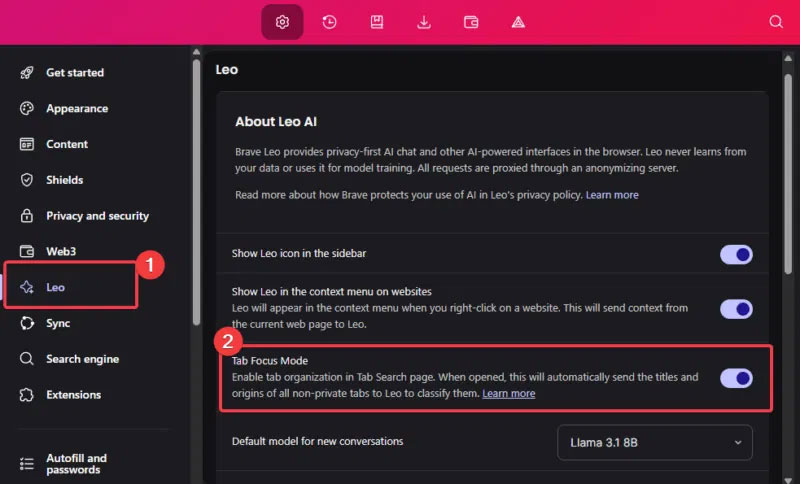
Enabling Tab Focus Mode in Brave is super easy. Just download the Brave Nightly version. Launch it, tap the Menu (three horizontal lines) and select Settings. Now, tap on the Leo section and enable Tab Focus Mode.
Click the Search Tab button (down arrow in the upper right corner), select Organize, and enter your topic in the search field or choose from the suggested topics.
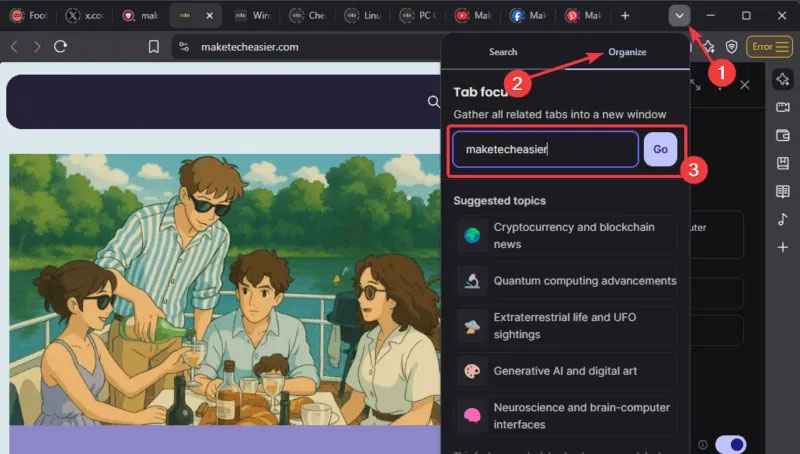
Leo will analyze open tabs, select tabs that match the topic, and pop them into a new window.
Note: This feature is currently only available on desktop, mobile support is coming soon. You can further increase your productivity by pairing this feature with other AI tools in your browser.
Pros and Cons of Brave Tab Focus Mode
Let's analyze and see if this feature is worth it.
Advantages of Brave Tab Focus Mode
- It's fast, straightforward to use, and clears up tab clutter in seconds. It's a game-changer for people who have to juggle between projects or multitask while having multiple tabs.
- The free version works perfectly and you don't need to upgrade to the premium version. However, premium users will have a higher daily limit.
Disadvantages of Brave Tab Focus Mode
- Tab Focus Mode doesn't work on private windows or Tor, it can only be used on regular windows.
- This feature is only available on desktop, mobile devices are not currently supported.
- Leo AI sees the tab title and domain to work. This could be an issue if you are extremely privacy conscious.
- Free users reach a daily limit on the number of searches they can perform.
The benefits outweigh the drawbacks, and it's a good trade-off for a clutter-free browser. Additionally, Tab Focus Mode isn't enabled by default; it's optional.
Note: If you are concerned about your privacy, try Brave's private search engine.
Brave's Tab Focus Mode is your new friend that turns your tab-filled browser into a clean, clutter-free space. It's not perfect, as it's still in beta, but it's worth a try. Download Nightly, enable it, and let Leo AI manage your tabs.
Final Thoughts
The most reliable way to handle use the new brave tab focus mode to organize your browser is to follow the process in order, verify each important setting, and test the result before moving on. Use the guidance above as a practical reference, then adjust the details for your device, software version, or specific goal.
FAQ
What should I check before I use the new brave tab focus mode to organize your browser?
Use the latest available software, confirm that your device meets the requirements, and make sure you have the necessary permissions, account access, or backup before changing anything.
Why might I be unable to use the new brave tab focus mode to organize your browser?
Common causes include outdated software, missing permissions, incompatible settings, incomplete setup steps, or a temporary network problem. Recheck the process from the beginning and restart the app or device if needed.
Is it safe to use the new brave tab focus mode to organize your browser?
It is generally safe when you use official tools, review every permission, and back up important data before making system-level or account-level changes.
Related Articles
 Learn Brave Browser, What Makes Brave Special?9 minutes read
 How to Use Your Phone's Focus Mode to Focus More on What You're Doing8 minutes read
 Brave - Fast and Secure Personal Web Browser: What You Need to Know16 minutes read
 Brave Search Will Now Let Users 'Downvote' Bad Website Results6 minutes read
 Learn Brave Search, a Formidable Competitor of Google4 minutes read
 Focus Mode Is Ready with Many New Features Worth Experiencing3 minutes read
Reader Comments 0
Sign in with email or Google to join the discussion.