Table of Contents
Brave Search’s Rerank feature lets you move a domain up or exclude it from your own results. Use it to surface documentation you regularly consult or hide a site whose results you consistently ignore. Your choices apply to your searches.
Raise or discard a domain
- Run a search in Brave Search.
- Open the Rerank panel from the up-and-down arrows near the top right of the results page.
- Choose Raise to give a domain a ranking boost or Discard to exclude it. Open the panel again to undo a choice.
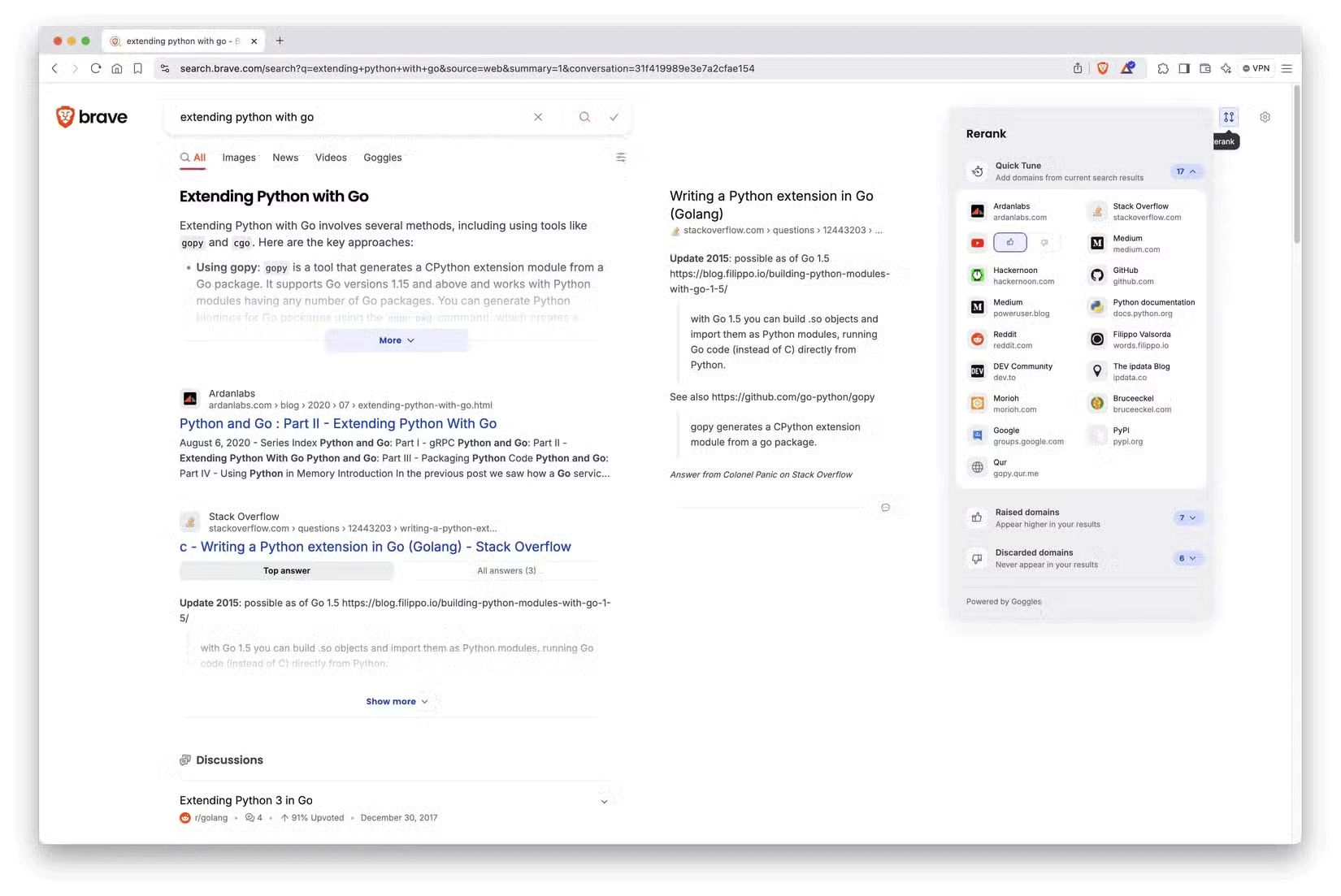
For example, if you frequently look up the same software, raise its documentation site. A boost can move a matching result up, but it does not guarantee the site will have a relevant page for every search.
Where the rules apply
Brave’s Rerank documentation says the rules are stored in cookies on your device. If the settings disappear after clearing site data or switching browser profiles, recreate them in the profile you are using. Before discarding a whole domain over one poor result, remember that the rule applies to future queries too.
Related Articles
 Learn Brave Search, a formidable competitor of Google
 Facebook tested the downvote button in place of the dislike button to prevent comments from adversely affecting the community
 Google improves Search to provide more in-depth results for questions
 Build high quality sites to improve search results
 Factors determining website rankings on search results in 2016
 Bing updates the search suggestion feature similar to Google
Reader Comments 0
Sign in with email or Google to join the discussion.