Table of Contents
This updated guide explains how to try on clothes at home on Google with clear steps, practical tips, and useful context. Google has just introduced a new Try-On feature that lets you try on different outfits right at home. This is a new feature in Google's AI mode, allowing you to preview how the clothes you like will look on you. This also helps you save more time before choosing the right outfit.
How to Try on Clothes at Home Using Google AI
Note, this feature is currently only available in the US region.
Step 1:
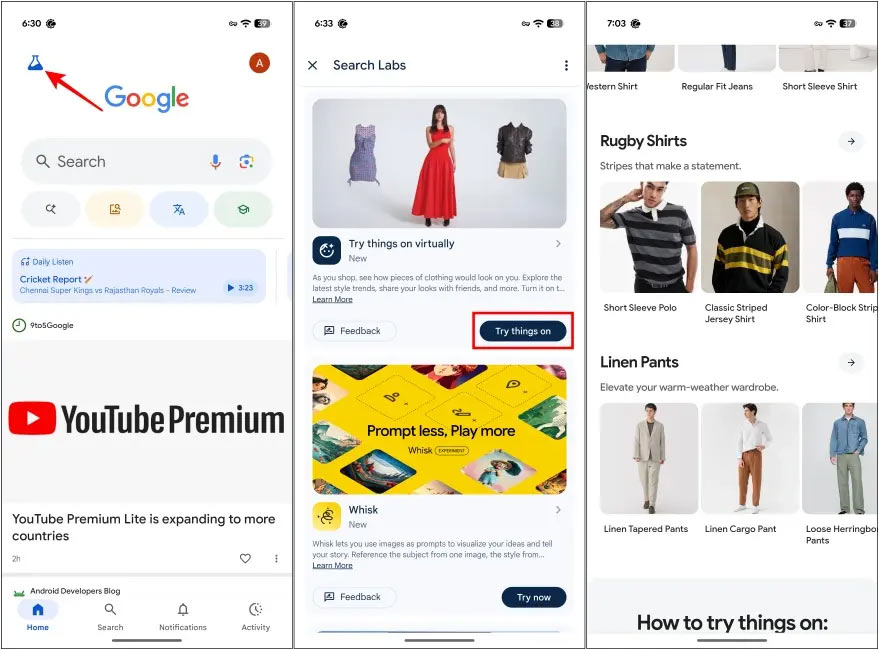
At the interface on Google, users select the Google Labs icon in the left corner. Next, select Try things on at Try things on virtually . Now, users choose one of the different styles and tap the outfit to try.
Step 2:
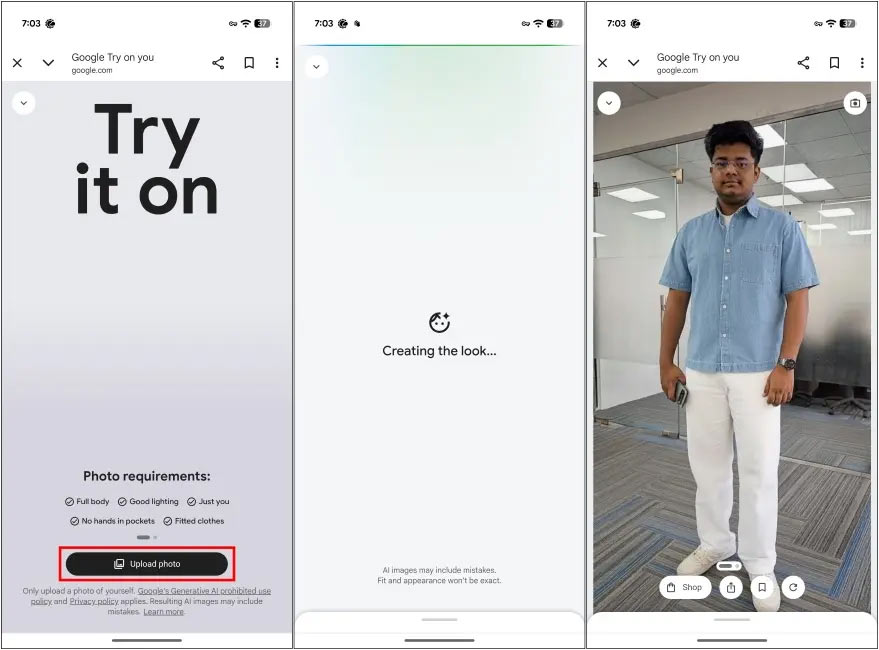
You will then need to upload a full body photo with a clear, unobstructed view so that Google can recognize your image.
Wait a moment for Google to try on clothes for you and when the results come back you will know if the outfit is suitable for you or not.
If you want, you can try on more styles in Google Shopping. Currently, the new try-on feature is not widely developed and there are also errors with some outfits that do not allow trying on.
FAQ
What should I prepare before I try on clothes at home on google?
Review the requirements and options in the guide first. Having the correct device, app version, account access, or materials ready helps prevent avoidable errors.
How long does it take to try on clothes at home on google?
The time depends on the task and your setup. Most basic steps can be completed quickly, while downloads, updates, scans, or troubleshooting may take longer.
What should I do if the steps do not work?
Repeat the instructions in order, confirm that your software or device is supported, and check permissions, connectivity, and available updates before trying again.
Related Articles
 How to Remove the Simplest Anti-theft Clothes at Home6 minutes read
 What Is Google Home? Should You Buy Google Home?7 minutes read
 Why Do Clothes Shrink When Washed? How Can This Be Resolved7 minutes read
 How to Disinfect Clothes at Home to Prevent the Covid-192 minutes read
 5+ Best Clothes Dryers to Cope with Drizzle and Humid Weather10 minutes read
 Distinguish Clothes Dryer and Clothes Dryer5 minutes read
Reader Comments 0
Sign in with email or Google to join the discussion.