Table of Contents
Follow the instructions below to shoot art bokeh beautiful and sparkling 'virtual' on galaxy efficiently and safely. Each section focuses on the actions, settings, and troubleshooting details that matter most.
The reason Art Bokeh on the Galaxy S9 + does so is by using the real Bokeh recognition algorithm and re-processing it in different shapes with fully adjustable sharpness, making the photo shoot bokeh so unique and sparkling that no smartphone has done so effectively. Let's learn about this "god" feature now!
- Instructions for creating GIF images using the capture button on Galaxy S9
- Create shortcuts for front and back cameras on Galaxy S9
- How to create slow-motion video with Super Slow Motion on Galaxy S9
How Shoot Art Bokeh Beautiful and Sparkling 'Virtual' on Galaxy Works
How to take photos of Art Bokeh beautiful sparkling and "magic" on Galaxy S9 +
To capture Art Bokeh, you first need to activate Dynamic Focus mode. The way to let you know whether this mode is activated or not is when taking photos of the appearance of yellow text like the image below.
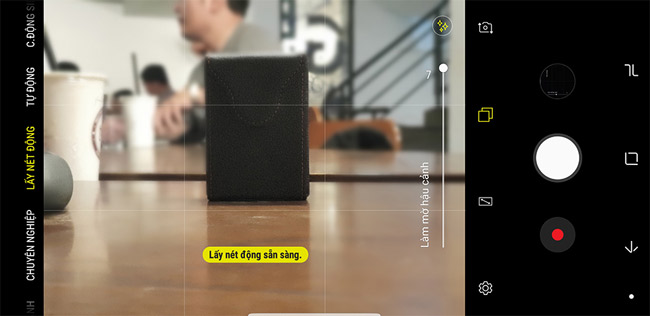
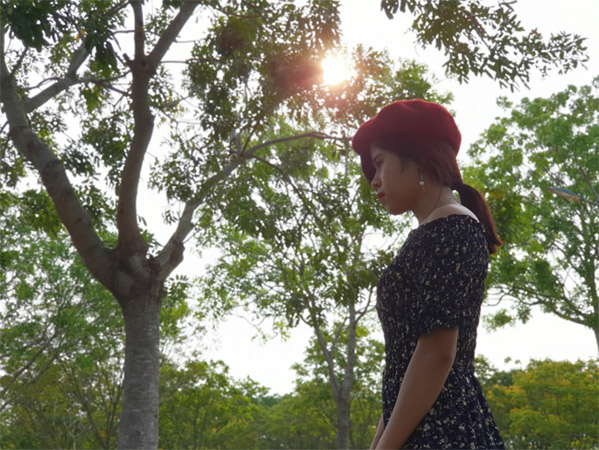
One thing to note, is not always the Art Bokeh feature. It only works when the background blur blur behind has details of small font deletion such as light bulbs in the distance, foliage, sunshine through the foliage,. and the number must be relatively large. If only a few lights or a flat background, clear blue sky, a wall,. then you can use Art Bokeh. For example, photos taken under tree foliage like this we all use Art Bokeh.
Another way to help you check if Art Bokeh works is, after you have finished shooting, open the image and choose to blur the background. In the case that only appears to adjust the level of font removal, Art Bokeh does not work on that photo, but if it appears like the image below, congratulations, you took Art Bokeh photos on Galaxy S9 + successfully there.
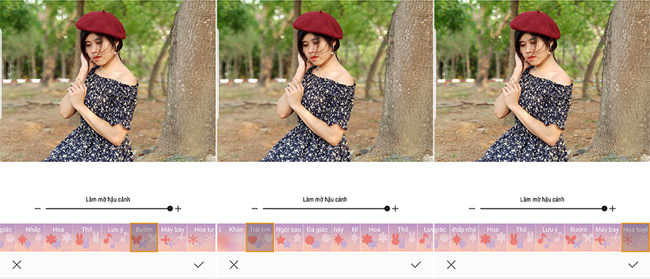
In particular, you can choose from a variety of different bokeh icons such as hearts, stars, snowflakes, flowers, planes, polygons instead of just circular bokeh like professional cameras. You can also save as many photos with different effects.
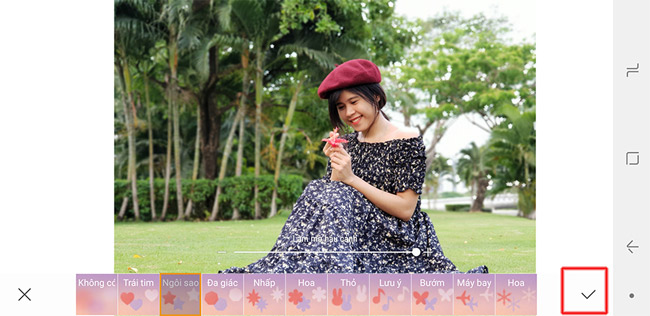
When selecting a certain effect, remember to tick the tick in the right corner. Next, select the 3 dot mark icon and select Save as new file , the applied effect will be saved.
Note: For newly saved images, you will not be able to change the effect, but the original image can be changed at any time, even if you transfer the original file to another S9 +, it can be edited. normally.
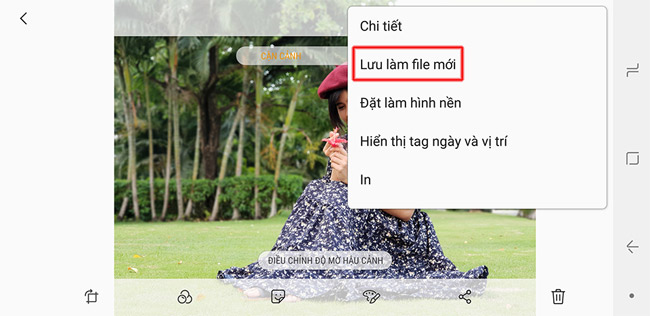
In general, using Art Bokeh is not difficult at all. You can take advantage of beautiful view locations like parks and cafes with lots of lights. Certainly, Art Bokeh on Galaxy S9 + will create extremely illusionary font deletion.

You see, the photos have become much more sparkling right. Try the photography experience with Art Bokeh effect on Galaxy S9 + to show off to your friends right away.

Having fun!
- 5 notes to help capture beautiful and virtual fonts
- Take photos of the fanciful sky landscape with the following 5 tips
- Instagram integrates Focus shooting mode (removing fonts) without a dual camera
FAQ
What should I prepare before I shoot art bokeh beautiful and sparkling 'virtual' on galaxy?
Review the requirements in the guide, confirm that your device or software is compatible, and save important work before changing settings related to shoot art bokeh beautiful and sparkling 'virtual' on galaxy.
Why might shoot art bokeh beautiful and sparkling 'virtual' on galaxy not work as expected?
The most common causes are incompatible versions, missing permissions, incorrect settings, or an interrupted internet connection. Recheck each step and restart the app or device when appropriate.
Can beginners follow these shoot art bokeh beautiful and sparkling 'virtual' on galaxy steps?
Yes. Follow the steps in order, avoid skipping confirmation screens, and compare your interface with the screenshots because labels may differ slightly between versions.
Related Articles
 5 'Very Toxic' Tips Help Improve Photography Skills in Just 1 Minute3 minutes read
 How to Bring Enhanced Bokeh Effect Mode on iPhone Xs Onto Older5 minutes read
 How to Turn Off the Notification Prompt on Bixby Galaxy S84 minutes read
 How to Experience Bixby Virtual Assistant of Galaxy S8 on Older5 minutes read
 AfterFocus: App of Good Font and Bokeh Removal on Android4 minutes read
 How to Shoot Sparkling Videos with Kirakira + iPhone App5 minutes read
Reader Comments 0
Sign in with email or Google to join the discussion.