Table of Contents
This practical guide walks through how to locate airtag correctly on iPhone 11 and iPhone 12, explains the main requirements, and highlights common issues that may appear along the way.
If you are looking for a lost item and own the iPhone 11 or 12, the exact search feature will direct you to the exact location of the lost AirTag using the camera sensor, accelerometer and gyroscope, with guidance provided through sound, feel and intuitive feedback. Here's how.
How to precisely locate the position of AirTag
Open the Find My app on iPhone.
Click Items.
Select the AirTag you want to find the exact location.
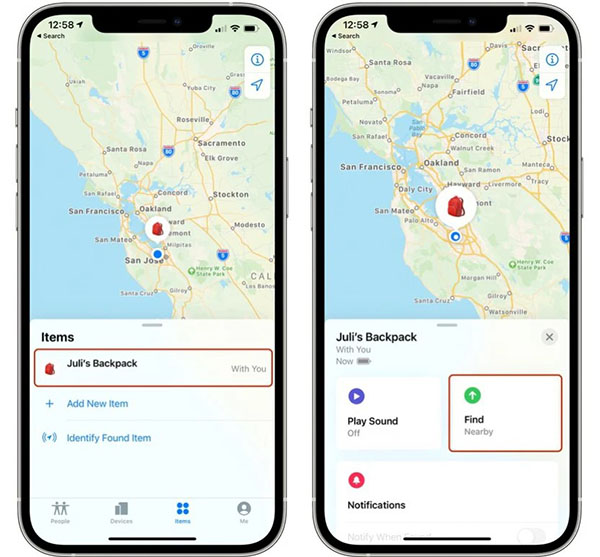
Select Find. It will show Nearby if exact search is enabled.

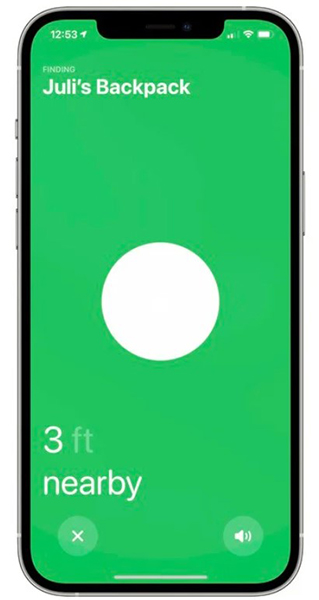
Now start moving around to locate the AirTag and follow the on-screen instructions. You will see an arrow pointing in the direction of the AirTag, approximate distance tells you its distance and note if it is on another floor.
When you approach an object, you will feel your phone vibrate and will hear an audible signal that you are near the object you are looking for. The AirTag graphics on iPhone will also change as you get closer to it. Exact search disappears once you successfully locate the AirTag card or your Apple devices are very close together.
Note that Ultra Wideband is not widely supported worldwide, so exact search won't work in some countries.
Key Takeaways
Use the information above as a practical reference for how to locate airtag correctly on iPhone 11 and iPhone 12. Review each step carefully, confirm any requirements, and choose the option that best fits your situation.
FAQ
What does this guide explain about Locate Airtag Correctly on iPhone 11 and iPhone 12?
It explains the main concepts, practical considerations, and useful steps related to locate airtag correctly on iPhone 11 and iPhone 12 without requiring advanced knowledge.
Who can benefit from learning about Locate Airtag Correctly on iPhone 11 and iPhone 12?
This information is useful for readers who want a clear overview, practical guidance, and reliable steps related to locate airtag correctly on iPhone 11 and iPhone 12.
What should I check before applying this information?
Review the requirements, confirm that your device, software, or situation matches the instructions, and back up important data before making major changes.
Related Articles
 How to Set up and Pair Airtag with an iPhone or iPad5 minutes read
 How to Share Airtag with Others on iPhone3 minutes read
 How to Locate Your iPhone Quickly3 minutes read
 Instructions on How to Use AirTag: Main Insights8 minutes read
 Get the Most Out of the Convenience of Apple Airtag5 minutes read
 How to Add Airtag to the Find My App on iPhone3 minutes read
Reader Comments 0
Sign in with email or Google to join the discussion.