Table of Contents
This practical guide walks through how to download and Play Fallout New Vegas PC for Free. It organizes the required steps, settings, and checks so you can complete the task with fewer mistakes.
Unlike the regular version, Fallout New Vegas Ultimate Edition is a version with all previously released DLC of Fallout New Vegas Worth 19.99 USD (450K VND). If you are interested, you can permanently get this game after following TipsMake's instructions.
Requirements Before Downloading Fallout New Vegas on PC
- Need an Epic Games Store account, if you don't have one, register for a new Epic Games account The official source . - Fully meets the requirements and configuration to play Fallout New Vegas on PC + Operating system: Windows XP/7/8/10/11/Vista + Video card: NVIDIA GeForce 6 series, ATI 1300XT series + CPU: Dual Core 2.0GHz + Memory: 2GB RAM + Storage: 40GB available space
Instructions for Downloading and Playing Fallout New Vegas for Free on PC
Step 1: First you need To install Epic Games Launcher On your computer. - Link to download Epic Games Launcher Latest version
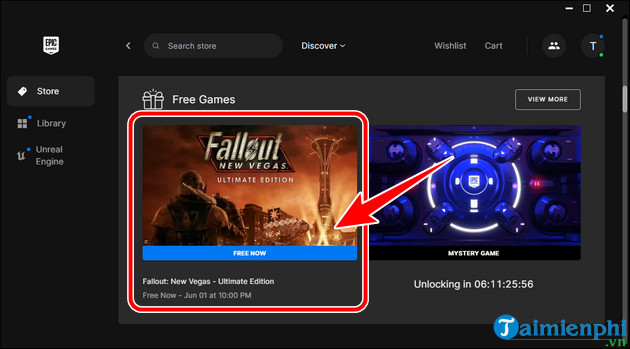
Step 2: Open Epic Games Launcher => log in and select Fallout New Vegas Ultimate Edition In the Free Games Section.
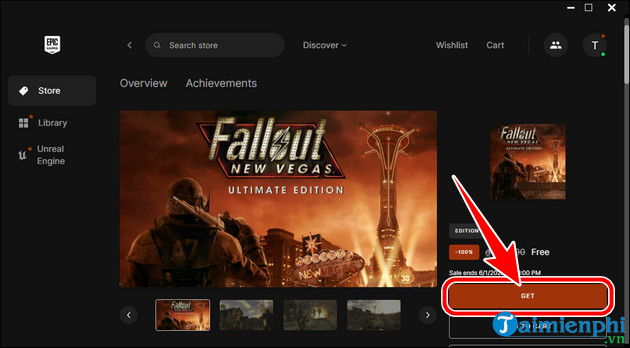
- select Get => Place Order To receive free Fallout New Vegas Ultimate Edition .
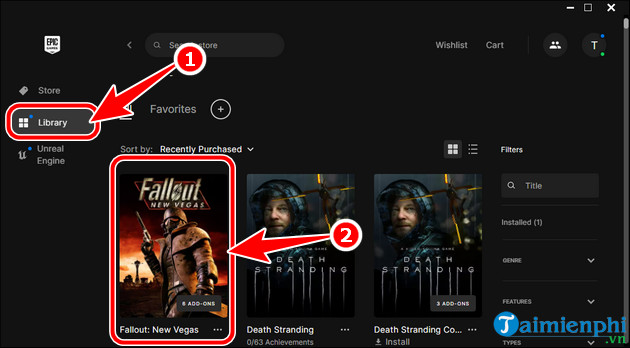
Step 3: Select Library => select Fallout New Vegas .
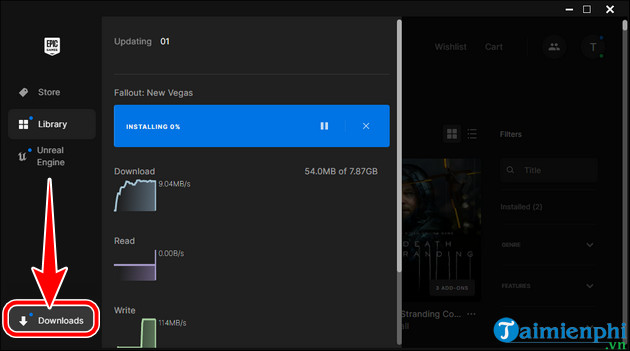
- select Install To install Fallout New Vegas on PC. After finishing, you can open and play Fallout New Vegas Ultimate Edition on your computer, standard version and 6 free DLCs.
Feel the heat in New Vegas, explore the vast wastelands of the desert, see the great Southwest of Sin City. Everything is in Fallout New Vegas Ultimate Edition, the masterpiece role-playing game on PC.
FAQ
What do I need before I download and Play Fallout New Vegas PC for Free?
Prepare the required device, software, account access, and any files mentioned in the steps. Back up important data before changing system settings.
Why does the process look different on my device?
Menus and options can vary by operating system, app version, device model, or region. Use the closest matching setting and check the official documentation when needed.
What should I do if a step does not work?
Restart the app or device, confirm permissions and connectivity, update the software, and repeat the step carefully. Avoid unofficial downloads or tools.
Related Articles
 Cheat Fallout: New Vegas, Code for Fallout New Vegas4 minutes read
 How to Download and Play Fallout 3 for Free on PC3 minutes read
 Expected Configuration Fallout 5 PC4 minutes read
 Some Classic Fallout Games Are Free on the Epic Games Store: What You Need to Know5 minutes read
 Download the Professional Video Editing Software VEGAS Movie Studio4 minutes read
 Successfully Install Windows 10 ARM and Play Fallout on Lumia 950 XL3 minutes read
Reader Comments 0
Sign in with email or Google to join the discussion.