Table of Contents
Learn how to change the Player's name on rules of survival. It also highlights practical details and common issues to consider.
To help gamers have more options, in the updated version of the Rules of Survival users can change the player's name, change the name of the game's character to whatever name he likes. According to the rules of the game, each month we will be able to change the player's name once, but each time it will cost 300 diamonds. Changing names is also simple and fast, creating a rich Rules of Survival playground for gamers.
- How to install the Rules Of Survival game on PC
- How to play the Rules Of Survival game on the computer
- How to fix errors hanging game Rules of Survival
Instructions to Rename the Character Playing in Rules of Survival
- Download the Rules of Survival PC game
- Download the game Rules of Survival Android
- Download Rules of Survival iOS
You can now change the Rules of Survival interface to Vietnamese so it will be easier to adjust.
Step 1:
At the interface of the game select the Rank item in the left corner of the screen interface.

Step 2:
Continue to click the Stats item on the left side and then look to the right, the player will see his current name when logging into the game. select the pen icon next to the name to proceed to edit the new name.

Step 3:
The Name Change interface appears. First of all, enter a new name of up to 14 characters. Then click 300 Change to proceed to change the name of the new character to play.
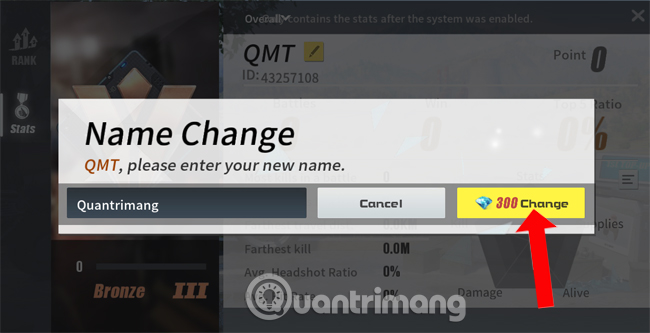
Changing this player's name will cost you 300 diamonds so when you change or think carefully. If you want a unique, strange name in Rules of Survival, you should only change it once. Keep the precious diamonds for the battle in Rules of Survival.
See more:
- Shortcuts control the Rules of Survival game
- Tips for playing Rules of Survival for newbies should not be ignored
- How to reduce lag when playing Rules of Survival on a weak configuration machine
Version note: Menus, features, and availability can change between versions. If the interface differs, consult the current official documentation for your device or app.
FAQ
How do I change the Player's Name on Rules of Survival?
Learn how to change the Player's name on rules of survival. It also highlights practical details and common issues to consider.
What should I check before following the steps?
Confirm that your device, software version, account permissions, files, and connection meet the requirements described in the guide. Back up important data before making system-level changes.
What should I do if the process does not work?
Repeat the steps in order, verify settings and permissions, restart the app or device, and compare your screen with the provider's current documentation for your version.
Related Articles
 Situations Should Escape Quickly in Rules of Survival5 minutes read
 How to Adjust Sensitivity for Rules of Survival8 minutes read
 How to Fix Errors Hanging Game Rules of Survival5 minutes read
 How to Experience 4 Seasons in Rules of Survival5 minutes read
 Changing the Language of Rules of Survival to Vietnamese5 minutes read
 How to Log in Rules of Survival with Facebook5 minutes read
Reader Comments 0
Sign in with email or Google to join the discussion.