Table of Contents
The process for block ads on safari with adblocker⁺ is straightforward once you know where to find the right controls. The steps below explain what to do and what to check.
Browser blocking applications, or browser-based ad-blocking software, allow users to surf the web more freely, without being bothered by ads. AdBlocker⁺ is an ad blocking application on Safari, plus many other features. the app provides an interface with content blocking settings, video spontaneous disabled on YouTube, etc., and users can choose to apply it to each site. While surfing the web on Safari, we can use the Mange button to quickly bring the website to the Whitelist Ads list, without blocking ads if desired. The steps below explain how to use AdBlocker⁺ to block ads on Safari.
- How to block ads when surfing the web
- How to block ads on Windows 10
- How to use StopAd blocking ads on Windows
Guide to block ads on Safari
Step 1:
Users click the link below to download AdBlocker⁺ application for iOS device.
- Download the AdBlocker⁺ iOS app
Step 2:
After installation is complete, go to Settings And click Safari . click Content blocker . In the new interface, please Click Adblocker application To use the features of the app on Safari.


Step 3:
When surfing the web on Safari, there are 3 default features that are blocking ads, not being tracked from other websites and blocking anti-Adblock programs.
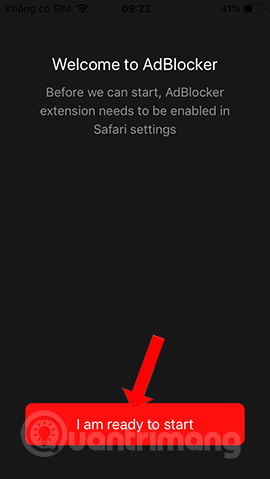
Then click the app to change the settings for the app. Click I am ready to start To use the app. Next you will see options to block content that AdBlocker⁺ provides to users.
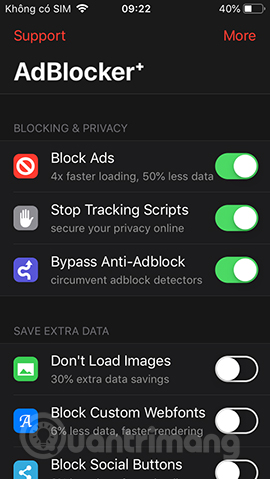
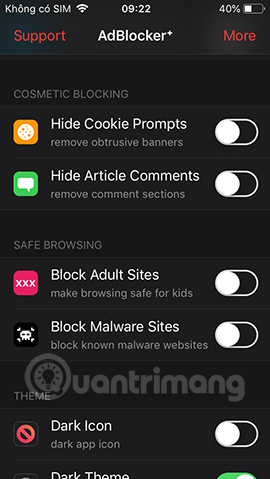
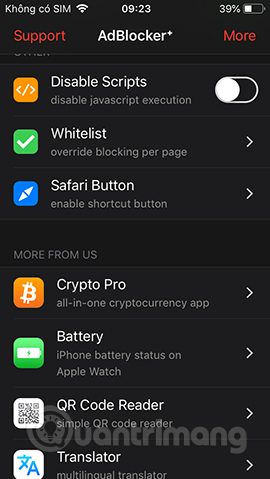
Some necessary options like:
- Don't load images: Don't download web images, help speed up opening websites by 30%.
- Custom webfonts Block: Block large fonts, improve page opening speed.
- Block social buttons: Block like buttons, share social networks embedded on websites.
- Hide cookie prompts: Hide the request bar to allow cookies on the site.
- Hide article comments: Hide comments on the site.
- Block adult sites: Block access to adult content sites.
- Block malware sites: Block malicious sites that contain viruses and malware.
- Dark icon: Change the app icon color on the main screen.
- Dark theme: Switch theme light / dark theme on the app.
- Disable scripts: Turn off javascripts.
- Whitelist: Add, manage a list of white websites with many features disabled.
Step 4:
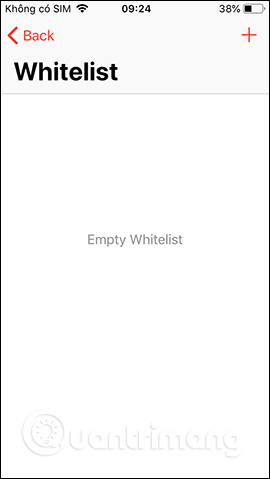
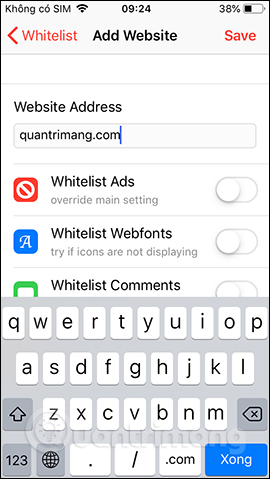
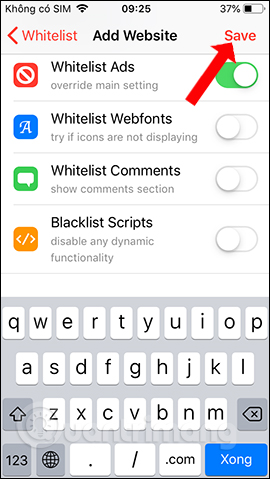
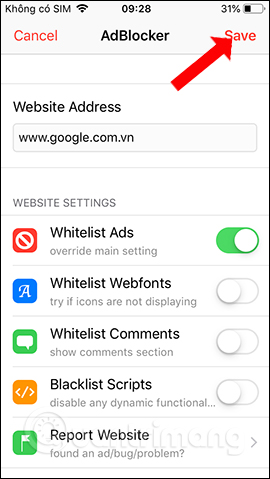
The Whitelist list Will add web pages if users want to cancel blocking some content. Click The plus icon To add the site. Enter the website In the top bar, then Activate the content you want to unblock Below, for example, if you don't want to block ads, activate Whitelist Ads. Finally click The Save button In the top right corner to save.
Step 5:
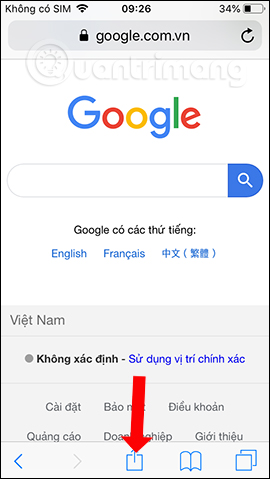
When visiting any website on Safari, when needed to put the website on the Whitelist list, click The Share icon Below, then click The Add item .
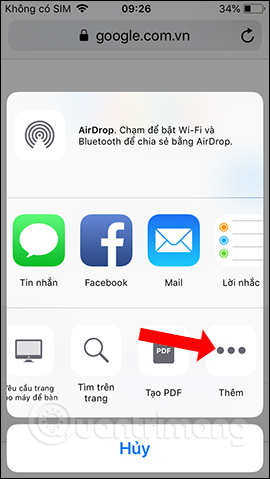
Step 6:
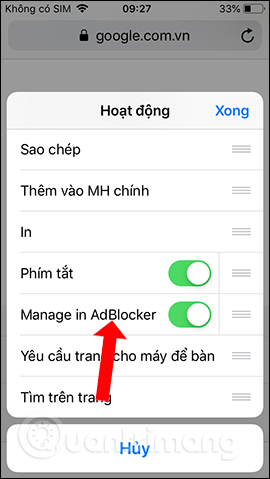
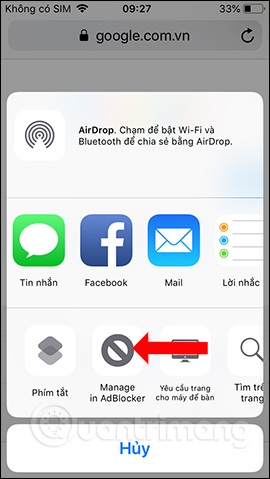
Display the Activity interface, Activate the Manage in Adblocker option To bring up the sharing interface. Click Manage in Adblocker again and display the interface to choose to disable content blocking options.
AdBlocker⁺ application helps you surf Safari more freely, block ads, banners, turn off YouTube video ads in the browser. With individual websites, we can also put them on the ad block cancellation list on the page.
- How to block hateful ads on Microsoft Edge browser
- Instructions for removing DNS Unlocker adware
- How to use the Bitdefender Adware Removal Tool to remove adware on Windows
I wish you all success!
FAQ
What should I prepare before I block ads on safari with adblocker⁺?
Review the requirements in the guide, confirm that your device or software is compatible, and save important work before changing settings related to block ads on safari with adblocker⁺.
Why might block ads on safari with adblocker⁺ not work as expected?
The most common causes are incompatible versions, missing permissions, incorrect settings, or an interrupted internet connection. Recheck each step and restart the app or device when appropriate.
Can beginners follow these block ads on safari with adblocker⁺ steps?
Yes. Follow the steps in order, avoid skipping confirmation screens, and compare your interface with the screenshots because labels may differ slightly between versions.
Related Articles
 How to Use Cloudopt Adblocker to Block Ads to Surf the Web5 minutes read
 Block Iphone Ads: Block Ads on Iphone with Adguard3 minutes read
 How to Block Any Web Page on Safari for iPhone, iPad3 minutes read
 How to Fix 5 Safari Bugs on iPhone8 minutes read
 Block Websites with Bad Content on Iphone Safari: Restrictions4 minutes read
 How to Fix Safari's Status Is Slow6 minutes read
Reader Comments 0
Sign in with email or Google to join the discussion.