Table of Contents
Google Advanced Search provides a form for building a precise query without memorizing every search operator. It is useful when a normal search returns too many results or when you need a particular phrase, domain, language, file type, date range, or usage-rights filter.

Open Google Advanced Search
Go to Google Advanced Search. You can also start a normal Google search and open the advanced controls when they are available from the search tools.
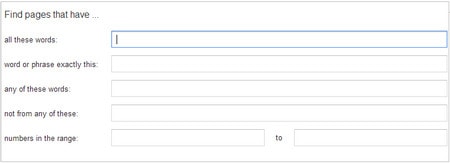
The form has two parts: fields that define the words you want, and filters that narrow where and how Google should look.
Choose which words must appear
All these words finds pages containing the important terms, although they may appear in a different order.
This exact word or phrase keeps the wording together. Use it for a quotation, product model, error message, report title, or person's full name.
Any of these words broadens the query. It is useful for alternatives and synonyms, such as laptop notebook.
None of these words excludes meanings you do not want. A search for the animal jaguar, for example, could exclude car and vehicle.
Numbers ranging from limits results to a numeric range. This can help with prices, measurements, model years, or other quantities, but you should still verify that the number is used in the intended context.
Narrow by source, format, and location
- Language: Prioritize pages written in the selected language.
- Region: Focus on pages associated with a country or region.
- Last update: Limit results to a recent period. Treat this as a filter, not proof that every fact on a page is current.
- Site or domain: Search one website, such as tipsmake.com, or a domain category such as .gov.
- Terms appearing: Require the terms in the whole page, title, text, URL, or links to the page.
- File type: Focus on formats such as PDF, Word, Excel, or PowerPoint.
- Usage rights: Filter for pages marked with selected reuse permissions. Always open the source and verify the exact license before reusing an image or other work.
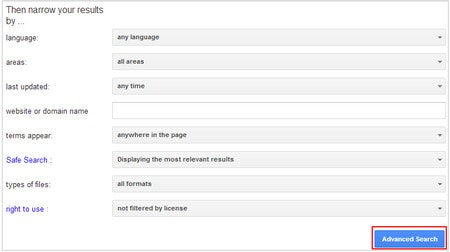
After completing the relevant fields, select Advanced Search. You do not need to fill every field; excessive filters can remove useful results.
Example: find a recent technical PDF
Suppose you need a recent zero-trust security PDF from a government source:
- Enter zero trust in This exact word or phrase.
- Choose a recent period under Last update.
- Enter .gov under Site or domain.
- Select Adobe Acrobat PDF under File type.
- Run the search, then confirm the document's publisher and actual revision date on the document itself.
Equivalent search-box operators
You can express many of the same restrictions directly in the search box:
- Exact phrase: "zero trust"
- Exclude a word: -vendor
- Either term: policy OR framework
- One domain: site:nist.gov
- One file format: filetype:pdf
- Date limits: after:2025-01-01 before:2026-01-01
- Number range: 10..35
The plus sign, tilde, question-mark wildcard, and other syntax promoted in old tutorials should not be assumed to work as described. Use the options shown on Google's current form or its official search refinement guide.
Get better results without over-filtering
- Start with one or two strong restrictions and add more only when necessary.
- Remove the least important filter if the result set is empty.
- Check the original source, author, date, and evidence instead of trusting the snippet alone.
- For time-sensitive topics, prefer current primary sources.
For a broader set of query examples, see TipsMake's Google search tips. If one engine does not surface the right sources, use the browser workflow for comparing multiple search engines.
Related Articles
 This Is the Most Effective Way to Search on Google2 minutes read
 Useful Google Search Tips You Can't Miss7 minutes read
 Top Most Effective Google Alternative Search Engines5 minutes read
 The Fast Google Search Tips You Should Know16 minutes read
 Search for What When Google 'Sudden Death'?3 minutes read
 Google Improves Search to Provide More In-depth Results for Questions3 minutes read
Reader Comments 0
Sign in with email or Google to join the discussion.