Table of Contents
This guide provides a practical overview of free 6-month license for mcafee antivirus plus 2018 antivirus with clear explanations and useful details. It focuses on the information users are most likely to need.
Some key features of McAfee AntiVirus Plus 2018:
- Continuous updating of virus and malware data.
- The system will check all activities of the machine, if suspicious activity will immediately alert users.
- Works on multiple platforms, including Android, iOS, PC.
- The operation of antivirus software does not affect the speed of the device.
- .
How Free 6-month License for Mcafee Antivirus Plus 2018 Antivirus Works

Usually McAfee AntiVirus Plus 2018 software is priced at US $ 55 but now McAfee / Intel Security is offering a free 6-month license. If you have a need, please follow the instructions below to get 6 free copyright months for McAfee AntiVirus Plus 2018 software.
Instructions for receiving free 6 months copyright of McAfee AntiVirus Plus software 2018:
Step 1: Visit the link below -> click 6 Month Subscription -> select Download Now.
- Virus, Spam, Spyware Protection Software for Your PC | McAfee

Step 2: Enter your email address and password -> click Agree & Continue .

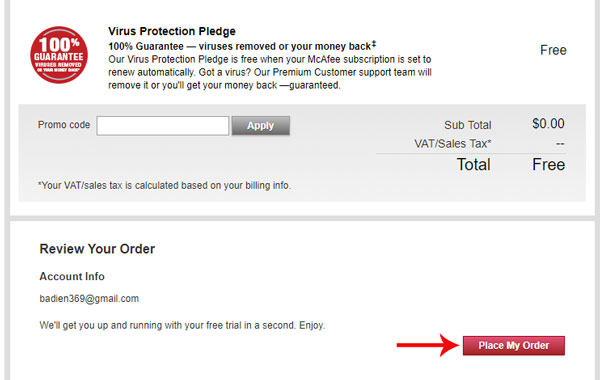
Step 3: Click the Place My Oder Button -> at the newly opened interface, click Get My Trail .

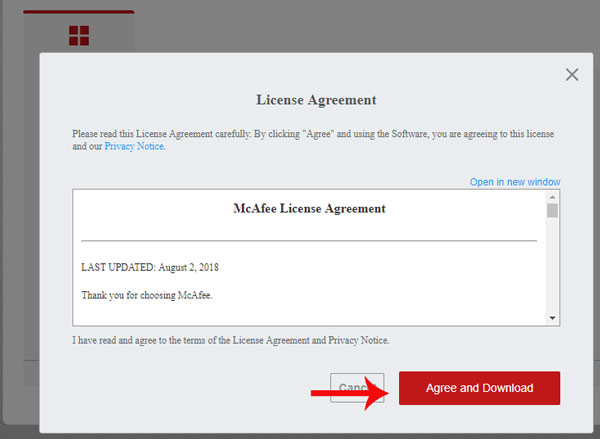
Step 4: Click Download -> Agree and Download to receive the installation file and serial number to activate the copyright.


- Installing Windows without USB with WinToHDD Professional V3.2 software, priced at 29.95 USD is free
- Invite Any Data Recovery - software that helps recover lost data on a Mac, costing 56 USD, is free
- 10 most effective antivirus software for Windows 2018
FAQ
What is the main benefit of free 6-month license for mcafee antivirus plus 2018 antivirus?
The main benefit is a clearer understanding of the topic and a practical way to apply the information covered in this guide.
What should I check before using free 6-month license for mcafee antivirus plus 2018 antivirus?
Confirm compatibility, review the required settings, protect important data, and use the latest supported version whenever possible.
What should I do if the result is different?
Repeat the steps carefully, verify permissions and version differences, and consult the product's official support documentation for changes not shown in the article.
Related Articles
 Free 6-month Subscription to Mcafee Internet Security 2019 License4 minutes read
 Mcafee Officially Has a New Name3 minutes read
 Offer Free Monthly Eset Antivirus Software License for PC and4 minutes read
 Top 10 Best Antivirus Software in Early 2018 for Windows 102 minutes read
 Click: How to Disable Mcafee6 minutes read
 Top Free Antivirus Software, No Bloatware and Requires Upgrade to6 minutes read
Reader Comments 0
Sign in with email or Google to join the discussion.