Table of Contents
This guide provides a clearer, better-organized overview of Firefox Will Soon Have Vertical Tabs, Profile Management. It focuses on the essential facts, practical steps, and common questions readers are most likely to have.
Overview
Mozilla prioritizes browser productivity by adding Tab Groups, Vertical Tabs, and Sidebars, which are useful for those who often have multiple tabs open. Instead of displaying all open tabs in the window, Simply manage them through a vertical tab interface similar to Edge.
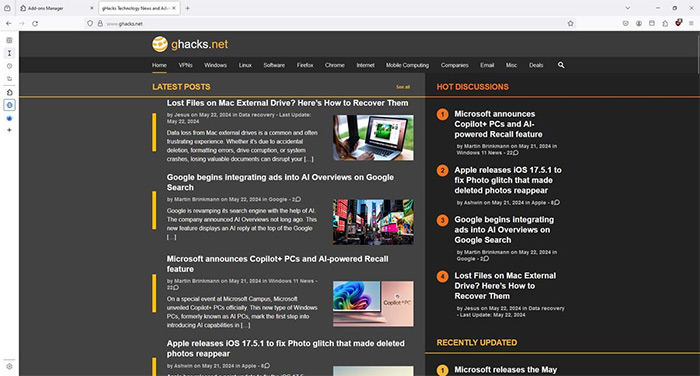
Firefox also has a Profile Management feature to separate your work, school, and personal profiles, just like the account switcher in Chrome and Edge. Mozilla is also working on faster page load speeds, faster boot times, and reduced battery consumption on mobile devices when using the browser.
The Firefox interface has also been refreshed with tab wallpaper options such as live photos, color photos, and abstract images. Mozilla says it will streamline menus to reduce clutter. The new design prioritizes familiar and frequently used user actions so you can access them faster.
Mozilla is also researching the use of AI in Firefox, prioritizing AI models to enhance the browsing experience while protecting user privacy.
Currently, Mozilla does not specifically inform which version of the browser will have all the new features, or gradually update it through new versions released to users. Please wait for official information from the company for each new version of Firefox.
FAQ
What is the main point of Firefox Will Soon Have Vertical Tabs, Profile Management?
Mozilla prioritizes browser productivity by adding Tab Groups, Vertical Tabs, and Sidebars, which are useful for those who often have multiple tabs open.
Why might the details change over time?
Software versions, prices, policies, services, and product availability can change. Check the official source before making a purchase or changing important settings.
How can I use this information safely?
Follow official instructions, verify downloads and claims, back up important data, and avoid sharing passwords or sensitive account information.
Related Articles
 Instructions for Activating Vertical Tabs on Firefox3 minutes read
 How to Use Vertical Tabs on Microsoft Edge: Step-by-Step Guide3 minutes read
 5 New Tab Management Utilities for Chrome and Firefox9 minutes read
 How to Hide Firefox Private Tabs with Fingerprint2 minutes read
 Instagram Will Test a Vertical Profile Grid: What You Need to Know5 minutes read
 How to Select and Close Multiple Chrome or Firefox Tabs at the Same4 minutes read
Reader Comments 0
Sign in with email or Google to join the discussion.