Table of Contents
This updated guide examines Facebook Updated the New Interface for Messenger Computer and organizes the essential facts, background, and practical takeaways in clear American English.
Today, only some users receive this new update of the Messenger web-app. According to their comments, the new Facebook Messenger interface of the computer platform for the experience is quite similar to the version for smart mobile devices. The major change on Messenger is that the computer platform is a more minimalist design, focusing on basic features such as listening to calls, messaging and adding some useful new features to users.
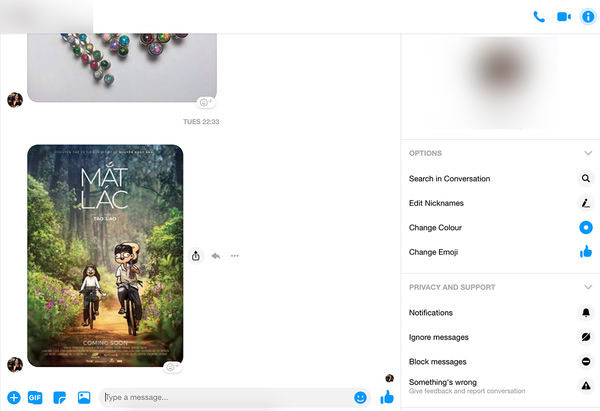
The new interface of Messenger PC version promises to give users a better experience.
At the beginning of May 5/2019, at the F8 event for programmers, Facebook CEO Mark Zuckerburg announced a completely new interface of this social network, including Messenger. Facebook CEO adds, this new interface is 'simpler, faster and puts your community at the center'. In addition, Facebook also announced that it will launch a separate Facebook Messenger application for computers and MacBooks later this year.
- The new Messenger app is coming soon with 1/4 of the old version, smoother and less expensive
- Invite to admire the new interface of Facebook, Dark Mode, focus on the group, has appeared on mobile applications
FAQ
What is Facebook Updated the New Interface for Messenger Computer about?
It provides a structured overview of Facebook Messenger on the computer, explains the main context, and highlights practical takeaways for readers.
Why does this topic matter?
Understanding the main concepts helps readers evaluate the issue, avoid common mistakes, and make better-informed decisions.
How should readers use this information?
Use the guidance as a practical starting point, confirm details that may have changed, and follow current product, safety, or security recommendations.
Related Articles
 Messenger Returns to the Old Interface After Only a Few Hours of Testing the New Interface4 minutes read
 Facebook Messenger Has a New Minimalist Design2 minutes read
 Twitter Refreshes the Mobile Web-like Interface3 minutes read
 Facebook Refreshes Messenger with a Minimalist Interface, Adding Dark Mode, Running Faster4 minutes read
 Facebook Messenger Has Been Updated with the New Interface3 minutes read
 White Background Image for Xiaomi2 minutes read
Reader Comments 0
Sign in with email or Google to join the discussion.