Table of Contents
This guide provides a clear, practical overview of "Don't Trust Chrome's Incognito Mode! Use DuckDuckGo Browser". It organizes the most useful details, explains important considerations, and highlights the steps or choices that matter most.
Why use DuckDuckGo browser?
Instead of Chrome, use the DuckDuckGo browser whenever you don't want to be tracked online (which is most of the time!). DuckDuckGo is already a popular privacy-focused search engine and a viable alternative to Google. However, the DuckDuckGo browser takes it to the next level.
Set privacy by default
One of DuckDuckGo's biggest strengths is that it's built to protect privacy from the get-go. This means you don't have to go around messing with settings. Sure, you can make Chrome much more secure by tweaking the right settings and installing a few extensions, but DuckDuckGo offers all of these features built-in and enabled by default.
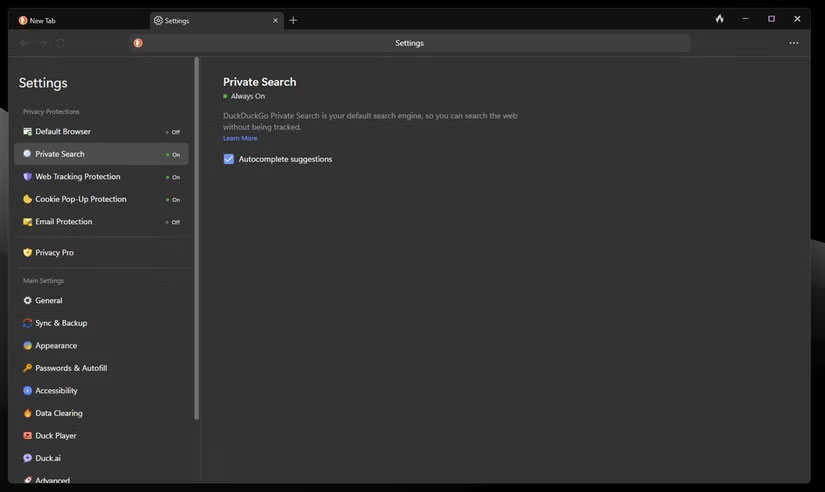
You're also protected from personalized ad tracking, at least when you use the DuckDuckGo search engine. Privacy protection is easy to set up, too, with all the major settings highlighted at the top of the settings menu with clear explanations. It even has unobtrusive AI summaries that prioritize user privacy.
Clear history with just one click
Perhaps the most prominent feature of the DuckDuckGo browser is the Fire button. Unlike Chrome, where you often have to navigate through several menus to clear your browsing data, DuckDuckGo puts this feature right next to your URL bar. Just click the button and all your browsing data, including history, cookies, cached data, and site permissions, will be erased.
This feature lets you erase all traces of your internet activity on your device with a single click. It's also useful if you frequently switch between multiple accounts on the same website and don't want to go through the hassle of setting up each browser profile. It's also different from Chrome's incognito mode because it essentially resets your entire browser instead of preventing data from being saved locally.
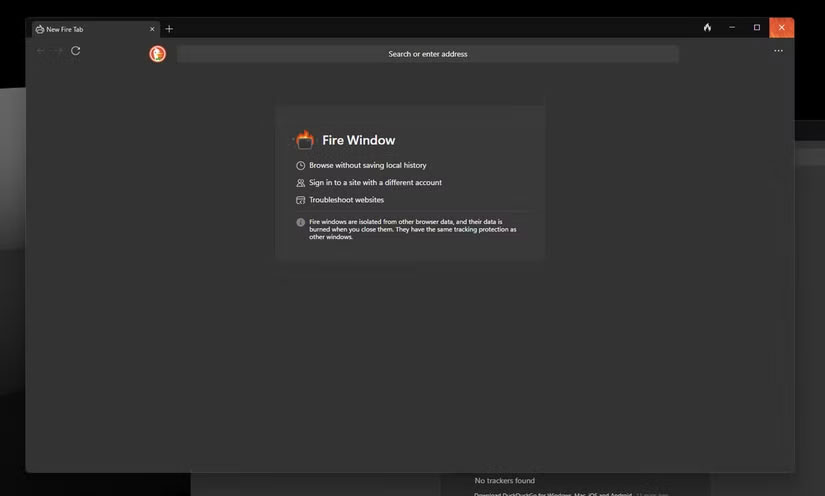
There is an option to 'fireproof' specific sites so they are not affected by the Fire button. Additionally, DuckDuckGo has a separate Fire Window option that allows you to browse without saving any local history. These windows are also isolated from the rest of the browser, and any data collected during the browsing session is automatically deleted after you close all Fire windows.
Lightweight and works well with VPN
Last but not least, the DuckDuckGo browser is incredibly lightweight for the features it offers. Chrome can become a memory hog very quickly, but when using DuckDuckGo, you actually have to open an unreasonable number of tabs for the browser to consume a lot of system resources.
Aside from not pushing your system to the limit like a AAA game, DuckDuckGo's minimal impact also translates to very fast browsing performance. However, if you're running a lot of graphics-intensive workloads or using complex web apps, the browser's relatively bare-bones nature may limit performance. Regardless, it's great for everyday use, and you shouldn't notice any issues with regular stuff.
The DuckDuckGo browser is also built from the ground up to work with a variety of VPNs. You can opt to subscribe to DuckDuckGo Privacy Pro, which includes a VPN, identity theft protection, and a privacy tool. However, the browser works pretty well with third-party VPNs, apps, and extensions. Chrome often has trouble when you accidentally launch a VPN in the middle of a browsing session because you need to access a site from a different IP address or don't want to be tracked.
Chrome almost always takes a while to start displaying modified websites properly. In some cases, the browser won't even display websites when connected to a VPN—a problem you won't encounter with DuckDuckGo.
Overall, browsers are much safer when it comes to anonymizing your digital footprint. You don't have to mess with settings, install extensions, or even worry about navigating through menus to find important settings. If you've ever relied on Chrome's incognito mode to protect yourself online, it's time to give DuckDuckGo a try.
FAQ
Why use DuckDuckGo browser?
Instead of Chrome, use the DuckDuckGo browser whenever you don't want to be tracked online (which is most of the time!). DuckDuckGo is already a popular privacy-focused search engine and a viable alternative to Google. However, the DuckDuckGo browser takes it to the next level.
What should you know about set privacy by default?
One of DuckDuckGo's biggest strengths is that it's built to protect privacy from the get-go. This means you don't have to go around messing with settings. Sure, you can make Chrome much more secure by tweaking the right settings and installing a few extensions, but DuckDuckGo offers all of these features built-in and enabled by.
What should you know about clear history with just one click?
Perhaps the most prominent feature of the DuckDuckGo browser is the Fire button. Unlike Chrome, where you often have to navigate through several menus to clear your browsing data, DuckDuckGo puts this feature right next to your URL bar. Just click the button and all your browsing data, including history, cookies, cached data.
What should you know about lightweight and works well with VPN?
Last but not least, the DuckDuckGo browser is incredibly lightweight for the features it offers. Chrome can become a memory hog very quickly, but when using DuckDuckGo, you actually have to open an unreasonable number of tabs for the browser to consume a lot of system resources.
Related Articles
 How to Enable Incognito Mode: Step-by-Step Guide9 minutes read
 6 Threats That Incognito Mode Can't Protect You from8 minutes read
 Incognito Mode in the Browser Is Not as Safe as You Think8 minutes read
 5 Ways to Open Microsoft Edge Browser in Incognito Mode3 minutes read
 Pros and Cons of Privacy-Friendly Desktop Browser DuckDuckGo7 minutes read
 Google Maps Adds Incognito Mode to the Incognito Mode3 minutes read
Reader Comments 0
Sign in with email or Google to join the discussion.