Table of Contents
This article explores convert iPhone mov video format with Windows live movie maker with straightforward explanations and useful context. It also highlights common questions and important details to consider.
If you do a search on the Internet, you will see many ways and support software to perform the process, but most require additional Quicktime applications to be able to rotate Apple's *. MOV file. In the following article, the author will apply this by using Microsoft 's built-in utility, Windows Live Movie Maker , with the ability to support extremely diverse video files: Wmv, asf, wm, m2ts, m2t, mov, qt, avi, dvr-ms, wtv, mp4, m4v, 3gp, 3g2, k3g, mpeg, mpg, mpe, m1v, mp2, mpv2, mod and vob.
How Convert iPhone MOV Video Format with Windows Live Movie Maker Works
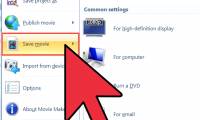
Simply launch the program, then drag and drop the *. mov file into the right-hand pane with the text: Click here to browse for videos and photos . And to rotate the video, just press the Rotate Right button on the Menu, then choose File> Save Movie> For email To reduce the size of the video, along with the original file size:

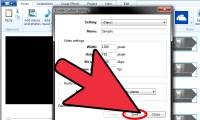
With this test, Windows Live Movie Maker Completes the process in about 21 seconds, and the capacity is only 9.38MB . Besides, when needed to convert the format as you like, use the Create Custom Settings option From the Save Movie Menu :

One point to note here is that Windows Live Movie Maker is not available during Windows 7 installation, so you need to use Windows Live Essentials 2011 To download the app package. Once completed, the Live Essentials installer allows users to use Mail, Windows Live Mesh, Bing Bar, Outlook Connector Pack, Writer, Family Safety, Messenger Companion, Messenger, Photo Gallery and Movie Maker . Good luck!
FAQ
What is the main benefit of convert iPhone mov video format with Windows live movie maker?
The main benefit is a clearer understanding of the topic and a practical way to apply the information covered in this guide.
What should I check before using convert iPhone mov video format with Windows live movie maker?
Confirm compatibility, review the required settings, protect important data, and use the latest supported version whenever possible.
What should I do if the result is different?
Repeat the steps carefully, verify permissions and version differences, and consult the product's official support documentation for changes not shown in the article.
Related Articles
 How to Rotate the Video in Reverse, Tilt with Windows Movie Maker6 minutes read
 Music: How to Create a Video in Windows Live Movie Maker5 minutes read
 How to Create Custom Settings in Windows Live Movie Maker3 minutes read
 Add: How to Make a Video in Windows Movie Maker8 minutes read
 50 Useful Shortcuts for Windows Movie Maker4 minutes read
 Invite to Download 7 Free Applications on Windows 10, Total Value5 minutes read
Reader Comments 0
Sign in with email or Google to join the discussion.