Table of Contents
Qwen 3.5 and Gemma 4 are open-weight model families designed for local or self-hosted AI, but there is no single fair winner across every size. Qwen 3.5 offers a wider range, from compact models to very large mixture-of-experts systems. Gemma 4 focuses on a smaller set of deployment tiers, including edge-oriented models, dense workstation models, and an efficient 26B mixture-of-experts option.
The useful comparison is not “Which family has the highest benchmark score?” It is “Which models fit my hardware, modalities, license requirements, and actual tasks?”
Family overview
| Category | Gemma 4 | Qwen 3.5 |
|---|---|---|
| Published sizes | E2B, E4B, 12B, 26B A4B, and 31B | 0.8B, 2B, 4B, 9B, 27B, 35B-A3B, 122B-A10B, and 397B-A17B |
| Architectures | Dense, effective-parameter edge models, and mixture of experts | Dense and mixture of experts |
| Typical deployment range | Supported mobile/edge runtimes through workstations and servers | Small local devices through multi-accelerator servers |
| License | Apache 2.0 | Apache 2.0 for the cited Qwen 3.5 model releases |
| Core capabilities | Reasoning, coding, multimodal understanding, and agent workflows; exact support varies by model and runtime | Reasoning, coding, native vision-language tasks, and agent workflows; exact support varies by model and runtime |
Google's current Gemma 4 documentation and Qwen's official Qwen 3.5 model collection should be checked before deployment because runtimes, quantizations, and supported features continue to change.
Why parameter labels do not tell the whole story
A dense model uses the same parameter set for each token. A mixture-of-experts (MoE) model contains a larger pool of parameters but routes each token through only part of it. For example, “35B-A3B” describes a Qwen model with about 35 billion total parameters and roughly 3 billion active per token. Gemma 4 26B A4B follows the same broad idea with about 26 billion total and roughly 4 billion active per token.
Active parameters help explain compute efficiency, but they do not equal the amount of memory required to load a model. The full weights still need storage and, for fast inference, generally need to be available to the runtime. Quantization can reduce memory use, while long contexts, larger batches, and vision inputs increase it.
Gemma's E2B and E4B names refer to effective parameter tiers rather than simple raw-weight totals, so treating them as exact equivalents of Qwen's 2B and 4B models is misleading. They are reasonable candidates for the same deployment shortlist, not identical hardware matches.
Useful model pairings
| Deployment goal | Gemma candidate | Qwen candidate | What to verify |
|---|---|---|---|
| Mobile or edge testing | Gemma 4 E2B | Qwen3.5 0.8B or 2B | Supported device runtime, quantization, memory, and battery impact |
| Small laptop or desktop | Gemma 4 E4B | Qwen3.5 4B or 9B | Tokens per second, context size, and task quality at the chosen quantization |
| Single powerful workstation | Gemma 4 12B, 26B A4B, or 31B | Qwen3.5 27B or 35B-A3B | VRAM/RAM fit, tool reliability, and latency under expected load |
| Large server deployment | Gemma 4 31B or 26B A4B | Qwen3.5 122B-A10B or 397B-A17B | Multi-accelerator topology, throughput, serving cost, and operational complexity |
These pairings are shortlists, not claims of equal intelligence. The largest Qwen models occupy a scale that Gemma 4 does not directly match. Conversely, Gemma's edge-oriented models are designed around Google's supported on-device ecosystem.
If you are new to self-hosting, see TipsMake's guide to tools for running LLMs on a computer and its overview of offline versus online AI.
How to interpret the benchmark charts
Public model cards report useful results, but they do not always use identical prompts, tool settings, reasoning modes, or evaluation harnesses. Compare a row only when both sides clearly document the same benchmark version and conditions. A model's own launch table is evidence about that release, not an independent head-to-head test.
User-preference leaderboards measure a different quality: which response anonymous voters preferred in a chat comparison. They can capture writing and assistant behavior that static tests miss, but scores change over time and may not predict performance on your workload.
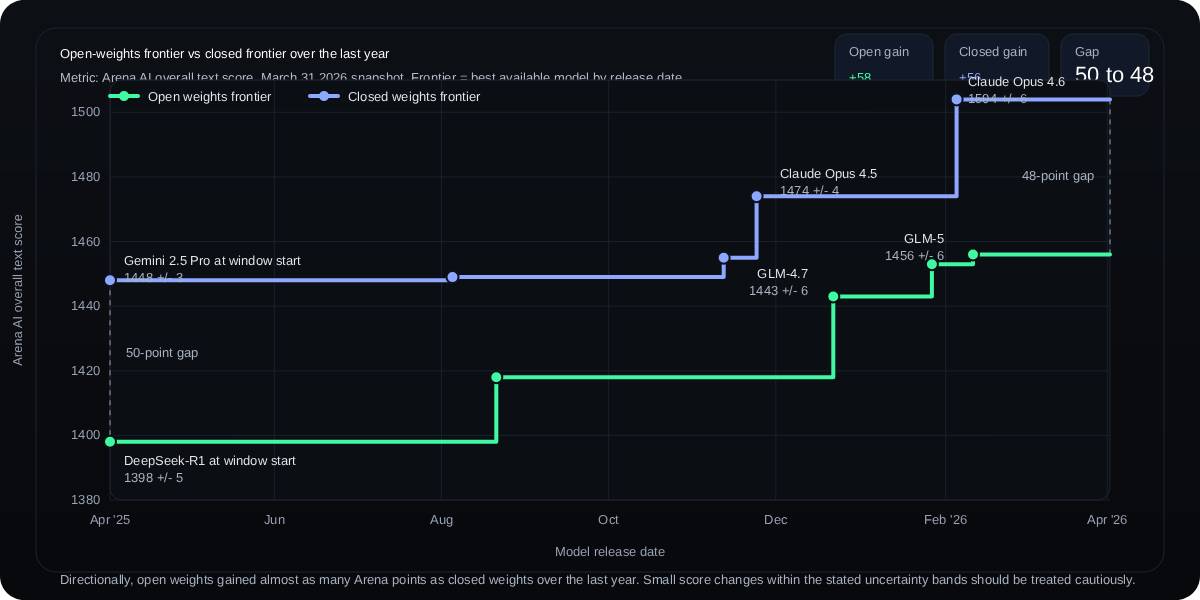
The chart above is a historical snapshot assembled from an Arena-style text leaderboard in early 2026. It suggested that leading open-weight chat models were improving at a similar rate to leading closed models during the selected period. It should not be read as a current ranking or proof that the gap is fixed: the model roster, scores, and uncertainty ranges change as votes and releases accumulate.
Use benchmarks as a filter, not a verdict
A sound comparison keeps several evidence types separate:
- Model-card benchmarks help identify likely strengths in reasoning, coding, multilingual work, vision, or tool use.
- Independent preference tests indicate how users respond to assistant-style output at a particular time.
- Hardware tests reveal whether the chosen build actually fits and reaches usable speed.
- Task-specific evaluations show whether the model follows your schemas, cites supplied material, calls tools correctly, and handles failures safely.
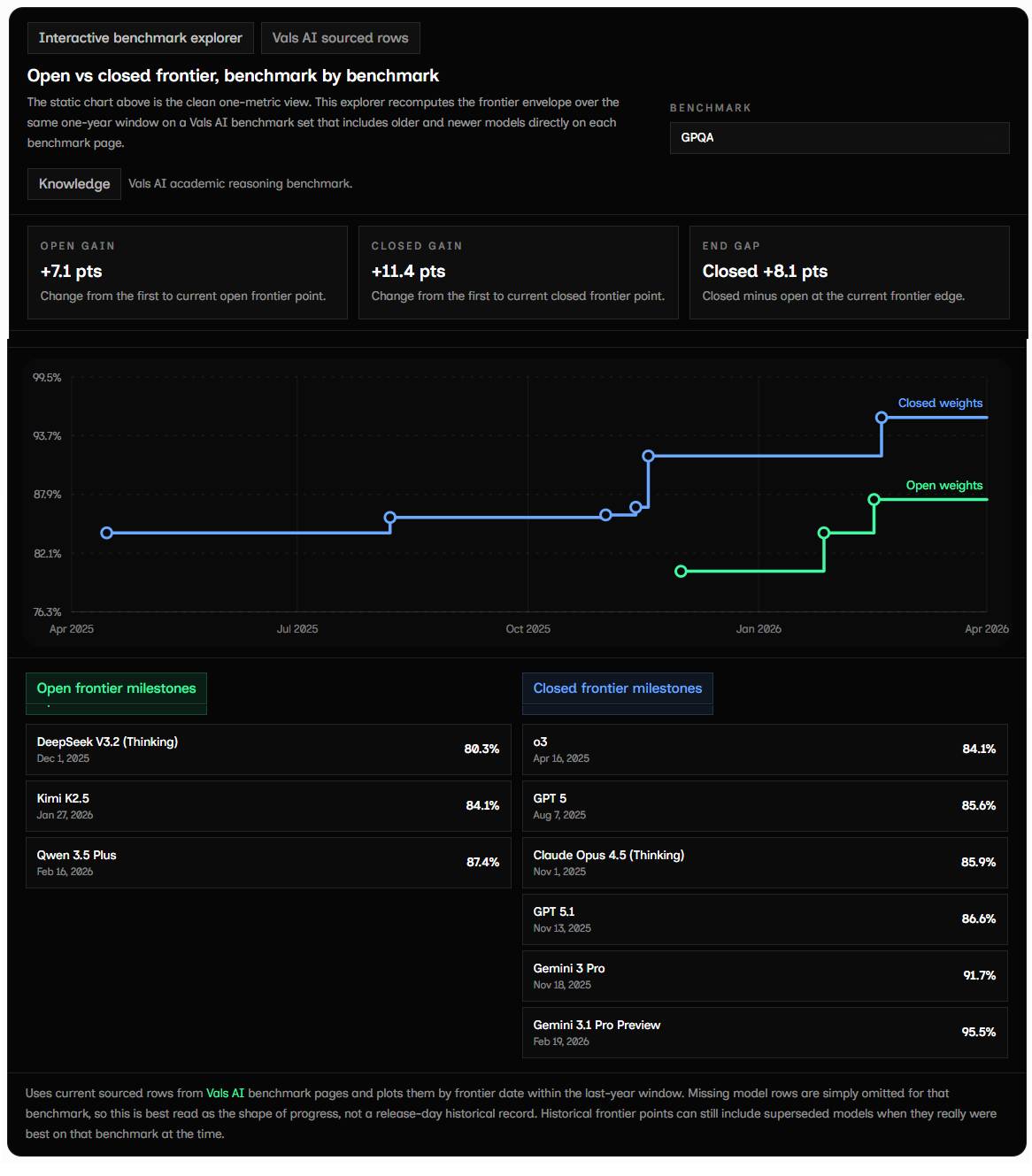
An interactive or static benchmark explorer can be useful for discovering candidates, but missing rows are not losses. A model may simply not have been evaluated under that test. Small score differences also should not be treated as decisive when evaluation uncertainty or run-to-run variation is larger than the gap.
Where each family is most compelling
Choose a Qwen 3.5 candidate when:
- you need a size tier that Gemma 4 does not offer, especially below 2B, around 9B, or above 100B;
- the official Qwen model card reports strong results for the exact coding, reasoning, vision, or agent task you plan to test;
- your preferred serving stack already has stable support for that Qwen model and quantization; or
- you want to compare dense and MoE options within the same family.
Choose a Gemma 4 candidate when:
- you are targeting Google's supported mobile or edge runtime for E2B or E4B;
- Gemma's 12B, 26B A4B, or 31B tier fits your workstation and workload;
- Google's multimodal, multilingual, or reasoning evaluations align with your use case; or
- you prefer the Gemma tooling and deployment ecosystem.
Both families use permissive licenses, but deployment still requires reviewing each model card, acceptable-use terms, third-party data licenses, and the obligations of any fine-tuned checkpoint.
A practical evaluation plan
- Set the hardware budget first. Record available RAM or VRAM, acceptable latency, and whether CPU offloading is realistic.
- Select comparable builds. Use the same precision where possible and document the exact checkpoint, runtime, and context limit.
- Create a representative test set. Include real prompts, long documents, images, code, tool calls, and failure cases from your application.
- Run repeated trials. Keep generation settings consistent and score accuracy, format compliance, latency, memory, and human preference.
- Measure total operating cost. Include idle capacity, electricity, engineering time, and monitoring—not just tokens per second.
Model families continue to evolve. Qwen has already released later-generation models, so teams choosing a new deployment should also compare the latest supported Qwen release rather than assuming Qwen 3.5 remains the best option. TipsMake's current LLM comparison can help build a broader shortlist before local testing.
Related Articles
 How to Run Qwen 3.5 Locally on a Single GPU: Step-by-Step Guide15 minutes read
 3 Local Llms That Can Run on a Phone8 minutes read
 Is Gemma 2 or Llama 3 the Best Open Source Model?8 minutes read
 5 Tasks Where Local Gemma 4 Can Beat Paid AI Services9 minutes read
 Comparing Google's Gemma 4 and OpenAI's GPT-5.3 Chat33 minutes read
 How to Setup and Run Qwen 3 Locally with Ollama9 minutes read
Reader Comments 0
Sign in with email or Google to join the discussion.