Table of Contents
Yahoo: Chat on Mobile Phones is easier to understand when the core ideas are paired with practical examples. The sections below explain the topic clearly, highlight useful steps, and point out details that can prevent common errors.
If you are logged in but do not use the service within 1 week, Yahoo! will automatically sign you out of "Messenger via SMS" mode and send you a notification message. After that, if you want to use this service, you will have to login again. Offline messages will be saved and you will receive them when you log into Yahoo! Mesenger from computer. List of friends on Yahoo! Messenger and code List of friends on Yahoo! Messenger is a message that contains your friends' names and addresses on Yahoo! Messenger and their code. This code allows you to send messages from Yahoo! Messenger via SMS for your friends online on Yahoo! faster. You will not have to type the entire Yahoo! of the person you intend to send the message to, just code it. As soon as you have signed in (sign in) to Yahoo! Messenger via SMS, you will receive a list of friends on Yahoo! Messenger and their code. See who is online To receive a list of friends online on Yahoo! Messenger, write a message with "get" and send it to 8269. Get more friends' names and codes online on Yahoo! If a message cannot list your 160-word friends list in full, your friends list will tell you how many friends you have on Yahoo! Messenger. As an example,, only 7 of 100 Yahoo! Messenger on the message, the message and you receive will be "7 out of 100" above the friends list and code. To get more friends, just reply to the message and send a friend list with "more" content. Get the full list of online and offline friends on Yahoo! To get the full list of friends on Yahoo! Messenger, both online and offline, compose a message with "get all" content and send it to 8269 Get your friends' names online on Yahoo! by letter If you have a very long list of friends on Yahoo! Messenger and need a specific Yahoo address, you can get a list of friends by the first letter of that name by writing a message that says "get [the first letter of the Yahoo! address you want to retrieve. ] "and send to 8269. As an example,, to get a list of friends' addresses on Yahoo! Messenger starts with the letter m, composes a message with the content "get m" and sends it to 8269 Send and receive messages Compose a message 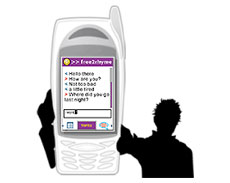 There are 3 ways to write and send a message like below. To send a message to a friend who is online or offline on Yahoo! Messenger from your mobile device, write a message with the content: " to [Yahoo Messenger Address] [Message Content] " Example: Below is an example to send a message to the user Send a message using a code (included in the newsletter) Using codes to send messages to friends is much faster. That number is the number next to the Yahoo! sent to friends list. To send a message to a friend using the code, write a message: "to [Receiver ID] [Message content]" As an example,, to send a message to a recipient with code 101, send a message starting with "to 101" and send to 8269 Send a message using a code (sent directly via the number corresponding to the code) Using codes to send messages directly via the number corresponding to the code for friends is the most convenient way. That number is the number next to the Yahoo! sent to friends list. This is the fastest way to send information with the information sent in one newsletter. To send a message to friends using code, write a message and send to 82690 [code] As an example,, to send a message to a recipient with code 101, write the message and send it to 82690101 Receive messages When signing in (sign in) to Yahoo! Messenger via SMS, you will automatically receive your friends' messages from Yahoo! Messenger is like receiving SMS messages of mobile phones. These messages will be started with Yahoo! of the sender is the same as the example below: Reply the message You can reply to messages just as easily as answering a mobile phone message by selecting the "reply" function in your phone. The message will automatically be sent to the owner of the message you just received Add and delete names Add your Yahoo! on your friends list on Yahoo! Messenger To add to your friends list on Yahoo! Messenger 1 Yahoo! Messenger, compose a mobile phone message with the following content and send to 8269: " add [Yahoo! address to add to list] " As an example,, to add to the Yahoo! Your Messenger address bigbang1973, compose a "add bigbang1973" message and send to 8269 Delete a Yahoo! out of your friends list on Yahoo! Messenger You can delete any Yahoo! any of your friends on Yahoo! Messenger by sending a message with the following content and sending to 8269: " del [Yahoo! address to delete] " As an example,, to delete Yahoo! heocon gets off the friends list on Yahoo! Messenger, write a message with the content "del heocon" and send it to 8269 Requests for confirmation Please add your address to your friends list If someone wants to add a Yahoo! Messenger to your friend's list, you will receive a request as a message in English, with the following content: " Your friend wants to add your Yahoo! address to your list. Friends, Reply with "y" if you agree, in "a" to accept and add this friend's Yahoo! address to your friends list, with "d" if you refuse " Accept requests To accept the request to add your address to your friends list, write a message with the content "y" and send it to 8269 Accept the request and add your Yahoo! of the requester to your friends list To accept the request to add someone's address to someone's friend list, add the Yahoo! on your requester's friend list, compose a message with the content "a" and send it to 8269 Reject the request When you refuse, no one will add your name to their friends list, write a message with the content "d" and send it to 8269 Expert advice for you For those who are familiar with Yahoo SMS Messenger for the first time, there may be a lot of troubles because they always receive notification messages from 8269 PBX whenever there are new messages on Yahoo Messenger. In addition, with the price is relatively high 2000 VND / news when receiving a reply message, not everyone needs to use. So when you no longer need, you can immediately stop the service by manipulating immediately in Yahoo Messenger 8.0. After logging into Yahoo Messenger. You choose Messenger > Preferences . In the General section, uncheck Always sigin in to my mobile device when i exit Messenger . Click Ok to complete the setup. Good luck! Quynh Nga
FAQ
What is Yahoo: Chat on Mobile Phones?
If you are logged in but do not use the service within 1 week, Yahoo!
Why is Yahoo: Chat on Mobile Phones important?
A clear understanding of Yahoo: Chat on Mobile Phones helps you make informed decisions, avoid common mistakes, and use the relevant tools or techniques more effectively.
How should beginners approach Yahoo: Chat on Mobile Phones?
Start with the fundamental concepts, follow the examples step by step, and test each change in a safe environment before applying it to important systems or data.
Related Articles
 How to Use Voice Chat in PUBG Mobile Game4 minutes read
 Security for Mobile Phones: Explained6 minutes read
 10 Best Mobile Phones: Digital Devices8 minutes read
 First Confirmation in the World4 minutes read
 Send, Receive Encrypted Messages, Self-destruct Messages, Secure Chat4 minutes read
 China Mobile Plans to Deploy 5 5G Cities in China4 minutes read
Reader Comments 0
Sign in with email or Google to join the discussion.