Table of Contents
This updated guide examines Changes in Windows 10 19h2 Coming Soon, Should an Upgrade? and organizes the essential facts, background, and practical takeaways in clear American English.

According to some users who have experienced Windows 10 19H2 on Microsoft's paid business channel, Windows 10 19H2 is more stable than the 1903 version.
Here are some changes in Windows 10 version 1909 (19H2)
Alexa, Cortana on the lock screen (LockScreen)

Alexa virtual assistant will appear on Windows 10 to allow users to communicate, use information lookup with Alexa by voice in English language right on the lock screen or in Windows 10.
Quick support for quick events in Calendar from Taskbar

Windows 10 version 1909 allows users to create events directly in the Calendar application from the taskbar by clicking the date and time icon in the taskbar -> click the date -> select the event, location and time settings.
Allows custom display of notifications on Windows 10

Microsoft has added to the top of the Action Center dialog the Manage notifications shortcut that leads straight to the Notifications & action settings page.
Adding an option that allows users to turn off or set the type of notification from an application / website right on the notice, including banner and Action Center.
Automatically expand the Start Menu
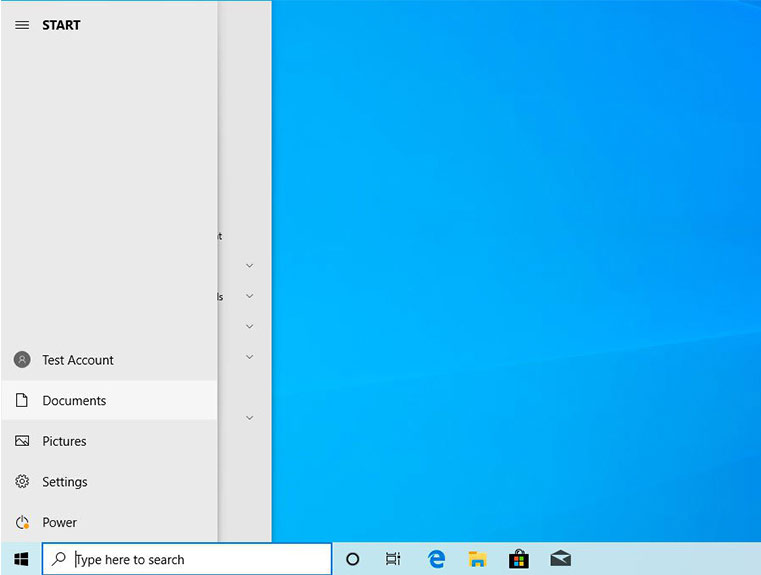
The Start Menu in Windows 10 version 1909 has been expanded to provide more information about each feature to help users choose easier.
Improved UI and search capabilities on File Explorer

In this new update of Windows 10, the File Explorer search feature has been upgraded to the user interface, added support for Windows Search and has the ability to search files on OneDrives to help bring the most appropriate results..
In addition, Windows 10 19H2 improves battery life, security mode, performance when used with heavy software, increasing performance and speed with Intel Turbo Boost Technology 3.0.
- Windows 10 1903 appears with the annoying "Try again" error, Microsoft has noted the problem
- Microsoft has integrated the FPS counter in Windows 10 October update
FAQ
What is Changes in Windows 10 19h2 Coming Soon, Should an Upgrade about?
It provides a structured overview of Windows 10 19H2, explains the main context, and highlights practical takeaways for readers.
Why does this topic matter?
Understanding the main concepts helps readers evaluate the issue, avoid common mistakes, and make better-informed decisions.
How should readers use this information?
Use the guidance as a practical starting point, confirm details that may have changed, and follow current product, safety, or security recommendations.
Related Articles
 Microsoft Shares Information About the Next Windows 10 Update4 minutes read
 The New Interface of the Start Menu in Windows 10 19H2 Might Look Like This!4 minutes read
 Instructions for Upgrading Windows 7 to Windows 8 and Windows 8.19 minutes read
 Instructions on How to Upgrade from Windows XP to Windows 85 minutes read
 DVD Upgrade to Windows 8 Costs 70 USD4 minutes read
 New Upgrade Version for Windows Phone 8.1 Is Coming Soon3 minutes read
Reader Comments 0
Sign in with email or Google to join the discussion.