Table of Contents
Boasting over 300 million active users worldwide, OPPO has officially unveiled its latest ColorOS 7 interface at an event in India. This update brings not only a minimalist user interface and new icons but also introduces several standout features. Join tipsmake.com as we explore 7 new features of OPPO's ColorOS 7 in the article below.
Article Contents:
1. Interface upgrades.
2. Built-in Dark Mode.
3. Personal information protection.
4. Focus Mode.
5. New camera features.
6. Soloop video editor.
7. Gaming experience optimization.
What's new in OPPO's ColorOS 7
1. Nâng cấp giao diện
OPPO đã "dọn dẹp" giao diện kỹ hơn và áp dụng một thiết kế giao diện trực quan và nhẹ hơn trên ColorOS 7 so với ColorOS 6.1. 913
1. Interface Upgrade
OPPO has "cleaned up" the interface and adopted a more intuitive, lightweight design for ColorOS 7 compared to ColorOS 6.1. While this is a necessary upgrade, users might not notice the difference at first glance; however, the icons appear more refined and modern than before. OPPO has also added an icon customization tool, allowing you to choose from various styles and adjust the shape, size, and color of the icons.
The blocky settings panels are gone, replaced by a neat, aesthetically pleasing layout. Smaller icons are arranged tidily and no longer clutter the entire screen. Notifications may still require some further refinement, but the "Clear" button is now conveniently placed right below the notifications for easy access.
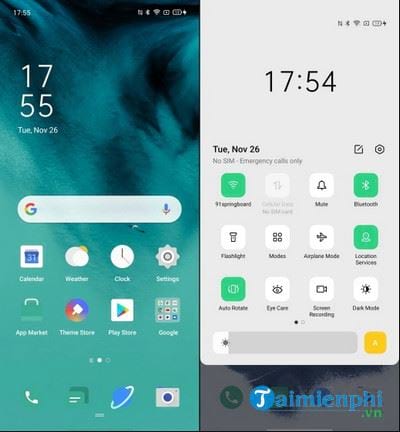
The Settings page features a streamlined, toned-down design and introduces sleek new icons. Animations feel smoother than before, the new default font is visually pleasing, and interactions within ColorOS 7 are more responsive than ever.
One notable feature of ColorOS 7 is the new partial screenshot gesture. Users can now press and hold three fingers on the screen and swipe up or down to capture a specific section of any app. The Chinese manufacturer has also introduced a new audio system, featuring ringtones and even alarms that adjust their sound based on current weather conditions.
2. Built-in Dark Mode
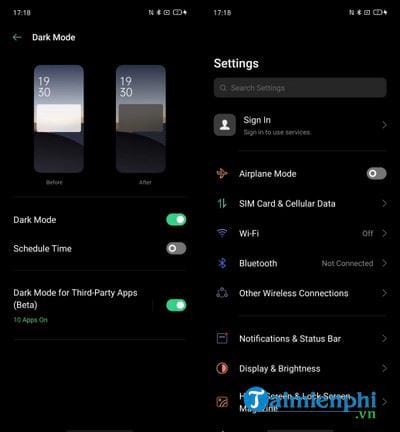
Android 10 comes with a built-in Dark Mode, which reduces eye strain and extends battery life. ColorOS 7 also has this night mode, but it builds on the feature by allowing third-party apps to display in a darker theme. This feature is currently in beta, but OPPO boasts that over 200 of the most used apps can easily adapt to the dark theme.
3. Protecting personal information
Another great addition to ColorOS 7 will be the new Personal Information Protection feature. It will protect your personal information, including contacts, messages, call history, and events, from being accessed by third-party apps.
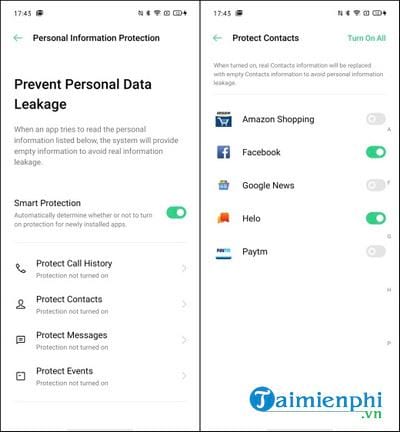
After enabling this feature in the newly added Privacy settings, third-party apps requesting your personal information will be provided with blank information instead of any actual personal details. ColorOS 7 will not reveal real information to protect you from hacking and data leaks. This means you can access specific apps, such as Truecaller, without allowing the app to read your contacts.
Additionally, there are options such as Payment Protection, File Protection, and Private Safe, where you can store photos, videos, and other data without worrying about unauthorized access.
4. Focus Mode
Remember Zen Mode, recently added to OxygenOS? ColorOS 7 introduced a similar feature called Focus Mode, but with a slight twist. You can switch between modes in the quick settings menu. There, you can set the time you intend to spend away from your phone and listen to soothing sounds while focusing on your work.
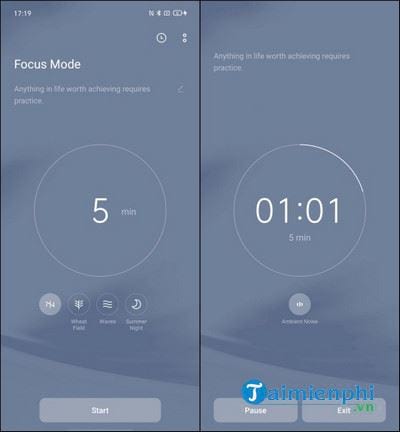
So what's the difference between Zen Mode and Focus Mode? After you activate Focus Mode, a pause button and an exit button appear on the screen. This means you won't be completely banned from using your phone for the set time; you can browse Instagram or use any app at any time.
5. New camera features
ColorOS 7 also brings some better camera improvements, thanks to a collaboration with Google's Camera X team. You'll now find AI Beautification 2.0 mode on OPPO phones, enabling better selfies, and a few new beauty options.

In addition to beauty enhancement features, OPPO also implements advanced AI noise reduction algorithms, which are very useful for taking photos in low-light conditions. With the new Ultra Night Mode, you no longer have to stand still and wait for the photo to be captured and processed. OPPO claims that processing photos taken in night mode now takes only 2.5 seconds, which is extremely fast, and the results are amazing.
In terms of video, ColorOS 7 will bring several beloved features to many phones, including Bokeh mode, currently only available on the OPPO Reno 2. This feature allows users to shoot videos with a blurred background effect and better angle detection in real time.
6. Soloop Video Editor:
Today's younger generation is incredibly creative in producing video content on YouTube, Instagram, and TikTok . OPPO has seen an opportunity in this segment and has developed a smart, "homemade" short video editing app called Soloop with ColorOS 7. It's an AI-powered short video editor that not only categorizes your videos or photos but also automatically edits them.
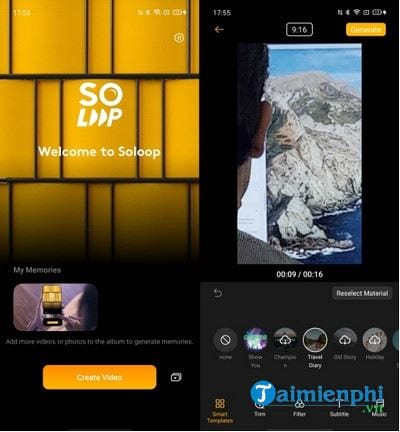
You simply select photos or video clips, and Soloop will browse through all of them, trim them into segments, and even automatically choose a template with effects, motion effects, and music to accompany the video. Soloop is a great feature for short-form content creators or vloggers who are looking for a tool to enhance the quality of their videos.
7. Optimize the gaming experience.
ColorOS 7 not only changes the surface, the tangible things, but also brings performance improvements. The optimized Hyperboost engine runs in the background, improving gaming performance by up to 20%, reducing touch response times by 35%, and lowering power consumption.
In terms of software, two key gaming components, Game Space and Game Assistant, have been significantly upgraded compared to ColorOS 6.1.
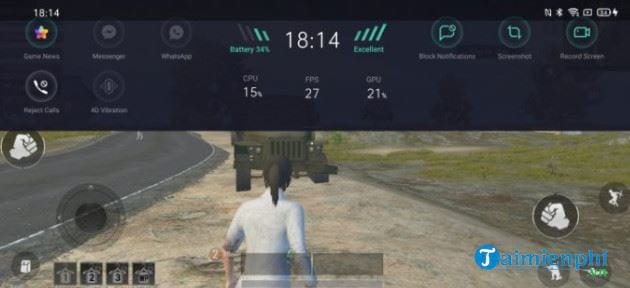
Game Assistant can now be seen as a game control center for pro gamers. It displays CPU and GPU usage levels, FPS counter, battery life, and signal strength, along with buttons to block calls or notifications, rewind gameplay, and change your voice.
To date, only Oppo's flagship Reno series has received the latest update to test the beta version of ColorOS 7. The stable version of ColorOS 7 will begin rolling out in early 2020.
Related Articles
 What's New in Oppo Coloros 7 Operating System?3 minutes read
 6 Useful Tips of Coloros 3.2 Interface on OPPO F5-series That You8 minutes read
 ColorOS 6 Was Officially Released, Improving the User Interface, Enhancing the Performance of PUBG3 minutes read
 List of Oppo Phones That Will Not Be Updated to Android 154 minutes read
 Try Heavy Gaming on the Highest Setting on OPPO Reno36 minutes read
 Few Mid-range Android Smartphones Are Favored for Gaming This6 minutes read
Reader Comments 0
Sign in with email or Google to join the discussion.