Table of Contents
This guide covers buy adapters for laptops with practical context and easy-to-follow details. Use it to understand the subject and apply the information confidently.
Adapter is probably the least noticeable part in a laptop. Therefore, the damage, loss. Very often occur for this component. In such cases, most solutions are to buy a new adapter in the same way as your laptop. On that psychology, laptop accessories stores will sell you an adapter in the right manner but at a dizzying price, especially if your device is a rare or under the latest model.
Can an equivalent replacement adapter be purchased for a lower price but still have the same quality (or more) of the adapter included with the machine? Some of the following tips can help you accomplish this:
1. Preview the voltage Before buying a new adapter: the voltage (in V) and the current consumed (in A) of the laptop's plug are indicated on the stamps below the machine. If it is not possible to find an adapter with 100% correct voltage, the adapter with a voltage of high or lower than 5% may still be an appropriate option. The power supply capacity must be equal to or higher than the maximum current consumption recorded on the machine a little (select the higher current the adapter you buy will run cooler).
2. Types of adapters for laptops are those that operate on the principle of electromagnetic energy conversion with electronic circuits in combination with switching transformers, Absolutely do not use adapters of conventional transformers (regulator ). Features that help you distinguish between light-weight switching adapters, small sizes, large currents and large supply voltages. If the specifications are equivalent to switching adapters, the regulator will be three times larger, weigh a lot more, and the input voltage is always fixed at a single level (220V or 110V).
3. The DC (jack) level of the adapter must be of size compatible with the socket of the machine and have polarity along with the polarity of the machine (usually the anode will be inside but there are still some computers used). Use an external positive so pay attention when buying. When the adapter you choose is reverse polarity, you should ask the technician to reverse polarity.
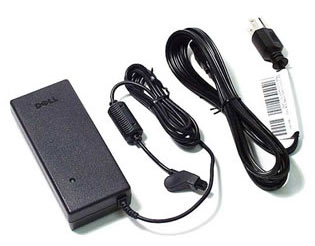 Adapter for Dell laptop (Artwork: Internet)
An adapter achieves the above selection criteria, even though it is not a laptop type (those used for monitors, scanners, etc. ) still fully meet the power requirements. Continuous for your laptop.
FAQ
What should I check before following these steps?
Confirm device and software compatibility, save important data, and make sure you have the required permissions, files, and account access.
Why might the process not work?
Common causes include outdated software, missing permissions, incompatible hardware, an unstable connection, or completing a step in the wrong order.
Can I undo the changes if necessary?
That depends on the tool or setting. Use built-in restore options when available, keep a backup, and record the original configuration first.
Related Articles
 5 Surprising Facts About Powerline Adapters6 minutes read
 ASUS Zenbook S 14 - Copilot+ PC AI with 120 TOPs5 minutes read
 Instructions on Adapters and Apple Ports for Mac, Iphone11 minutes read
 Things to Know About Powerline Adapter8 minutes read
 5 Best Budget Laptops of 20267 minutes read
 Top 5 Best Lenovo Laptops 20217 minutes read
Reader Comments 0
Sign in with email or Google to join the discussion.