Table of Contents
Overview
This guide covers curved monitors in clear, practical terms. It covers the key concepts, recommended steps, common limitations, and useful checks so you can make a better-informed decision.
Until now, curved screens have increasingly proven their position with outstanding advantages for users. Curved screens are everywhere, sold in stores, sold online. So are curved screens really good? What is the difference between curved screens and flat screens?
What Is a curved screen?
Curved monitors have become increasingly popular in recent years. Curved monitors are just like your standard computer monitor. The only difference is the degree of curvature. Different monitors have different degrees of curvature.
 Curved screens are becoming increasingly popular
The curvature of a monitor is measured by an 'R' rating. The lower the R rating, the greater the curvature. The most common curvatures today are 1800R, 3000R, and 400R. While you can find smaller curved monitors, the majority of curved monitors are on the larger side. And to get the full effect of the curvature, you'll want a monitor that's at least 32 inches.
Benefits of curved screens
- Provide good user experience
When it comes to user experience, curved screens offer some great benefits. And that's probably why curved screen products are becoming increasingly popular among users today.
For gamers, using a curved monitor will immerse you in the game in a more vivid, action-packed way, by giving the illusion of peripheral vision. But that's not all. Aside from immersion, curved monitors are also great for eliminating distortion, providing a wider field of view, and are actually better for your eyes.
 Curved screen for good user experience
- Goodbye to distortion
Flat screens have long been associated with image distortion. Fortunately, on curved screens, distortion is greatly reduced. This is because curved screens project light directly at the user. On the other hand, flat screens direct light in a straight line (through the viewer) thus creating image distortion.
- Goodbye tired eyes
Are curved screens actually better for our eyes? Yes. Because curved screens direct light towards us, this means our eyes can take in the image in front of us without straining too much. Large flat screens, on the other hand, are often beyond our natural field of vision. And when we try to take in all this information, we naturally strain our eyes.
- For a wider viewing environment
The reason curved monitors provide such an immersive experience is because they offer a much wider field of view than flat monitors. This is especially true if you opt for an ultrawide curved monitor. These ultrawide curved monitors are stretched horizontally, and this really helps to accentuate the immersive experience of using a curved monitor.
The difference between curved and flat screens
One of the main differences between curved and flat screens is immersion. Curved screens are specifically designed to provide users with a more immersive and comfortable experience.
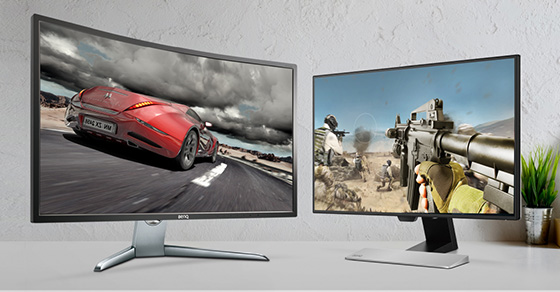 Curved screen vs flat screen comparison
Curved screens in particular use eye-sensing technology to recreate a realistic, immersive viewing experience in three-dimensional space. In the real world, we cannot see everything on a flat screen. Curved screens will give us the impression of peripheral vision when using our devices.
Technically, curved and flat monitors are almost identical. They use the same inputs and have the same resolution capabilities. Choosing between a curved or flat monitor is a matter of personal preference. If you have the space on your desk for a large piece of work to sit on, a curved monitor may be for you. If you're short on space, a flat monitor may be more suitable. With either type of monitor, you'll still have access to all the features you'd expect from any monitor you choose.
Key Takeaways
Use the guidance above as a practical reference for curved monitors. Check compatibility, follow the steps carefully, and verify important details with official documentation when software, security, accounts, health, or purchases are involved.
FAQ
What is the main point of this article?
This article explains curved vs. flat monitors, including the central facts, context, practical implications, and details needed to understand the topic.
Why does this topic matter?
It may affect performance, cost, safety, convenience, purchasing decisions, or how people understand a broader development.
Could the information change over time?
Yes. Product details, software features, prices, policies, codes, and news developments can change, so verify time-sensitive information with official sources.
Related Articles
 Top 5 Best Curved Screens4 minutes read
 How to Replace the Flat Design Icon Set for Mac OS X5 minutes read
 How Does Other Flat Design Simulate Design?9 minutes read
 To Get a Flat Stomach, Here's How Many Minutes You Need to Walk Each Day6 minutes read
 Making Informed Decisions Key Tips Before You Borrow for Your HDB Flat5 minutes read
 How to Get a Curved Border Display on Android Phones Like Samsung6 minutes read
Reader Comments 0
Sign in with email or Google to join the discussion.