Table of Contents
This curated overview of top 5 best gaming monitors 2020 focuses on useful options, standout features, and details worth checking before making a choice.
1. Dell SE2417HG 24inch Full HD Gaming Monitor
The Dell SE2417HG Gaming Monitor with TN panel has a refresh rate of up to 76Hz. With a response speed of only 2ms. Modern ultra-thin screen design is quite beautiful.
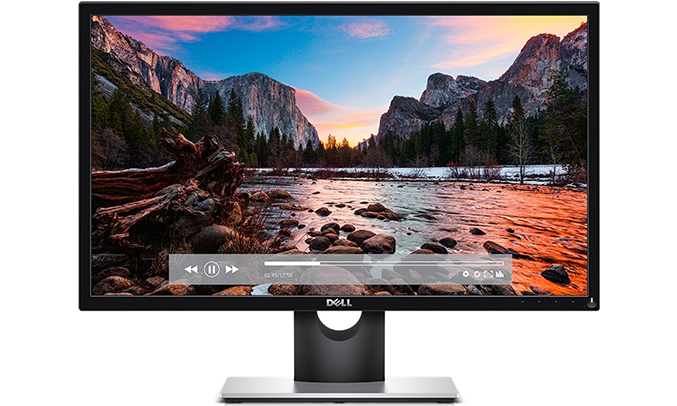
Full HD resolution for the most vivid and realistic picture for users to immerse in the playing atmosphere while playing. The monitor is also equipped with various ports such as dual HDMI and VGA. Users comfortably connect the projector to a larger screen.
2. LG 24MP59G-P 24 inch Full HD gaming monitor
LG 24MP59G-P gaming monitor measures 24 inches. With full HD resolution and 75Hz refresh rate, 5ms response speed. The screen brings a lot of very good visual experiences to the user.
Besides, it is also equipped with many other technologies such as Motion Blur Reduction, AMD Freesync, . Limit image noise and increase the quality of the most realistic image reflection.

Especially the Dynamic Action Sync feature helps to process images at high speed. Delivers the smoothest visual experience. The plus point of this monitor is that there are many professional game modes such as FPS Game, FPS Game 2, RTS Game and Custom Game.
3. ASUS ROG SWIFT PG279Q gaming monitor
The 27-inch 1440p screen is quite expensive, but it is well worth the price tag. The product is equipped with one of the best panels for gaming: AU Optronics Advanced Hyper Viewing Angle (AHVA).
Therefore, the picture quality of this monitor is something you can rest assured when buying. Extremely impressive sharpness, color, and contrast deliver the best visual experiences.
The screen bezel is also quite thin, with high scanning frequency. Not stopping there, the monitor also supports G-Sync technology. So when using the screen you will not need to worry about the image is noisy or torn.

4. ASUS ROG STRIX XG32VQR monitor best supports Freesync
The gaming monitor measures up to 32 inches with 1800R curvature - considered one of the best Freesync capable monitors. The screen uses a VA panel and the ability to contrast a large amount of light and dark, combined with a resolution of 1440p. Its refresh rate is up to 144Hz, 94% DCI-P3 color coverage and HDR content rendering for vivid images that serve the best of gamers.
5. BENQ GW2270H Gaming Monitor with Low Price
With prices ranging from 150 USB only, the BENQ GW2270H monitor is suitable for gamers with low economy. Although cheap, but still equipped with VA panel with 1080p resolution. The pixel density is on par with that of the 27 '1440p screen. So in general, this product is also quite worthy to experience for gamers.

Above are the top 5 gaming monitors that are quite popular with many different prices.
Key Takeaways
Use the information above as a practical reference for top 5 best gaming monitors 2020. Review each step carefully, confirm any requirements, and choose the option that best fits your situation.
FAQ
What does this guide explain about Best Gaming Monitors 2020?
It explains the main concepts, practical considerations, and useful steps related to best gaming monitors 2020 without requiring advanced knowledge.
Who can benefit from learning about Best Gaming Monitors 2020?
This information is useful for readers who want a clear overview, practical guidance, and reliable steps related to best gaming monitors 2020.
What should I check before applying this information?
Review the requirements, confirm that your device, software, or situation matches the instructions, and back up important data before making major changes.
Related Articles
 5 Popular 1440p Monitors for Gaming Worth Trying7 minutes read
 How to Overclock a Graphics Card for Better Gaming Performance10 minutes read
 Top 5 Gaming Monitors Worth Buying 20219 minutes read
 LG 27GP850 Monitor Review: 2K 180hz Resolution, Harmonizing5 minutes read
 ROG - World's Leading Gaming Monitor with Outstanding Performance4 minutes read
 How to Use Multiple External Monitors on Ubuntu6 minutes read
Reader Comments 0
Sign in with email or Google to join the discussion.