Table of Contents
This updated guide compares best bitwarden features you probably didn't know about and highlights the details that matter most. Think Bitwarden is just for storing and generating passwords? Think again! Bitwarden offers additional useful features that you may not know about, but should start using.
7. Secure Notes
Secure Notes in Bitwarden is a powerful way to store sensitive information beyond usernames and passwords. These encrypted notes let you store Wi-Fi passwords, software licenses, recovery codes, and thoughts that you consider too sensitive to store in your regular note-taking app.
Bitwarden also offers a folder feature to organize your notes, making it easy to find information when you need it. Instead of writing sensitive information in a notebook, store it securely in Bitwarden.
To create Secure Notes, follow these steps:
- Tap the floating plus (+) icon in the lower left corner and select Secure Notes .
- Enter a suitable name in Item Details and choose the drop-down button in Folder .
- Select the folder where you want to save the note or create a new note.
- Finally, enter the details of your note and press Save .
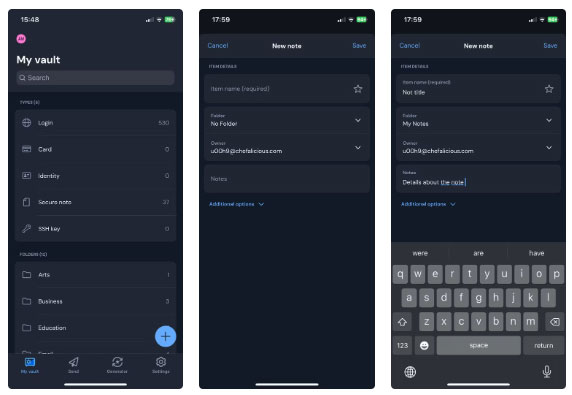
You can see all of your notes by going to the Secure Notes section. Or, type the name Secure Notes in the search bar to see a specific note.
6. Bitwarden Send
Sharing passwords with friends and family via email, text message, on paper, or instant messaging apps isn't secure. And if you use Bitwarden, there's an alternative It is best to take advantage of, called Bitwarden Send.
Bitwarden Send provides a secure way to share information online, whether it is files, text messages, or even passwords. All information is encrypted end-to-end, ensuring that only you and the recipient can see it. It also includes customizable privacy protections. You can choose deletion dates, expiration dates, maximum number of attempts, add a password, and more.
To start using Bitwarden Send, tap the Send option at the bottom of the app, select New Send , and tap Text or File at the top. From there, add your information, and when you're ready, tap Save .
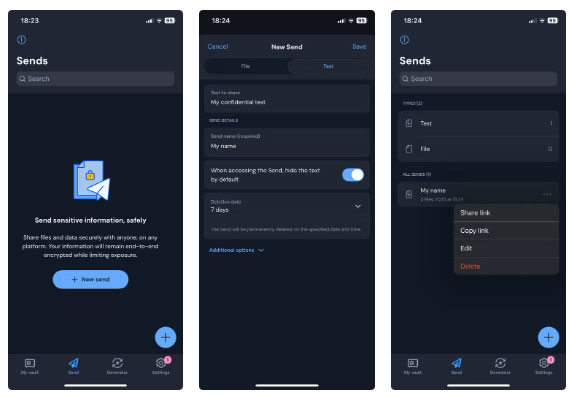
Bitwarden will provide you with a link that you can send to the recipient via text message, email, or instant messaging app.
5. Custom Fields
Custom Fields in Bitwarden let you store additional information for each saved entry, giving you much more flexibility than just saving a username and password. With custom fields, you can add answers to security questions, PINs, account numbers, or even backup codes directly to your login entries.
This way, all your important information is organized and easily accessible in one safe place. There are many different types of custom fields you can create in Bitwarden, but the main options include text, hidden, and boolean. There is a section to add notes to every item in the archive.
Instead of keeping this information scattered across different notes or apps, custom fields let you extend Bitwarden's functionality to suit your needs.
4. Username Generator
Bitwarden's username generator is a little-known tool that can significantly enhance your online security. Just like you can use Bitwarden to generate strong, random passwords, you can create unique, private usernames for each account. This makes it much harder for hackers to guess or track your account across different websites.
This tool lets you generate a variety of different usernames. You can have the tool pick a random word, use your email along with random characters, create a catch-all email, or an alias email that is forwarded from different services like DuckDuckGo and Firefox Relay.
To generate a username using Bitwarden, select Generator at the bottom. On the generator page, select Username at the top and choose the type of username you want.
3. Built - in Authenticator
Instead of using a separate app like Google Authenticator or Authy to use two-factor authentication (2FA), you can generate these codes right inside Bitwarden.
Since the 2FA token is stored securely along with your password, everything remains encrypted and easily accessible. The only downside is that you can only store the key. You need a premium account to generate timed one-time passwords (TOTP).
2. Vault Health Reports
Vault Health Reports in Bitwarden are a powerful way to stay on top of your digital security. These reports analyze your saved credentials and highlight potential issues, such as weak passwords, reused passwords, passwords exposed in data breaches, and inactive 2FA.
Regularly reviewing your Vault Health Reports lets you quickly identify and resolve any issues with your credentials. These reports also make it easy to maintain good passwords without having to manually check each account, which can be a tedious task if you have dozens of entries in your vault.
1. Store Identity and Payment Information
One of the lesser-known uses for password managers is to store your ID and payment card details. Bitwarden supports both, allowing you to store important personal information, such as your name, address, phone number, and even credit card information, in your vault.
It can automatically fill in these fields in online forms, saving time and reducing the chance of mistyped information. Instead of storing payment and identity information scattered across browsers and apps, Bitwarden provides a secure, centralized place to manage it all efficiently.
To create an identity or card, follow these steps:
- Tap the floating plus (+) icon in the lower left corner.
- Select Identity or Card , then enter the required details on the next screen.
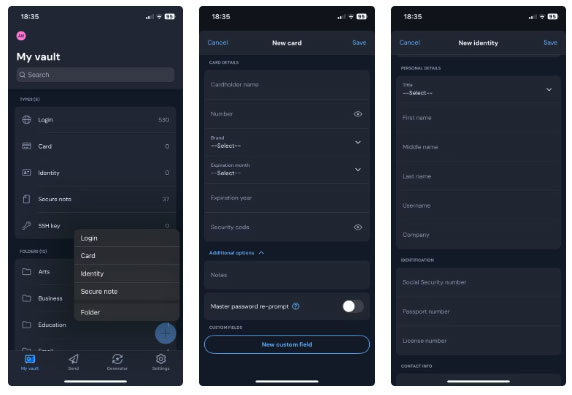
Bitwarden offers more than just password management. it is a powerful tool for protecting, organizing, and sharing all your sensitive information. From Secure Notes to Vault Health Reports, every feature is designed to simplify and enhance sensitive information management. If you're only using Bitwarden for passwords, you're missing out on its full potential.
FAQ
How were the best bitwarden features you probably didn't know about options evaluated?
The comparison focuses on practical features, ease of use, limitations, compatibility, and the type of user each option is most likely to help.
Which option is best for beginners?
Beginners should prioritize a clear interface, useful documentation, reliable support, and the core features needed for their first project.
Should I choose a free or paid option?
Start with a free option when it covers your needs. A paid plan may be worthwhile when you need advanced tools, commercial rights, collaboration, or professional support.
Related Articles
 How to Manage Passwords Using the Bitwarden Utility6 minutes read
 Why Use Bitwarden Instead of Google Password Manager?7 minutes read
 Why Should You Store Passwords in Bitwarden: What You Need to Know6 minutes read
 Reasons to Use Bitwarden Instead of Apple Passwords6 minutes read
 Why Bitwarden Is the Favorite Free Password Manager?8 minutes read
 Bitwarden Password Manager - Microsoft Edge's Latest Extension2 minutes read
Reader Comments 0
Sign in with email or Google to join the discussion.