Table of Contents
3 Best Free Codec Media Packages for Windows 7 covers the essential facts behind the topic, including what changed, why it mattered, and how it affected users.
At the time there are hundreds of Codec Audio and Video used, some are created by Microsoft Corporation and the rest are created by companies and other organizations and individuals. Installing Codec (Codec Packs) package is for your computer to be able to play any Media file, so if you are using Windows 7, please refer to the following 3 most popular Codec packages:
1. the Windows 7 Codec Pack
Windows 7 Codec Pack supports almost all compression formats, the most modern audio and video file types. Usually when you run high-quality files that already have Codecs, it can interrupt the program or even stand in the Play process. At that time, it is necessary to update the Windows 7 Codec Pack. This program installs quite easily, when using this Codec package you do not need to be online when you want to debug the hang because it already has an integrated debugger.
Windows 7 Codec Pack supports compressed formats: x264, h.264, AVC, DivX, XviD, MP4, MPEG4, MPEG2, AC3, DTS. And common formats:. Mkv |. Avi |. Flv |. Mp4 |. M4v |. M4a |. Ogm |. Flac |. Ape |. Aac |. Ogg |. Mpc.
2. K-Lite Mega Codec Pack
This is the most popular Codec package at the time used for both Windows XP and Windows Vista. The K-Lite Mega Codec is designed as a user-friendly solution to play all the audio file formats and video formats you want, it can even play some Another rare format is because it incorporates DirectShow filters necessary for encoding and decoding. The latest update is V 7.6 (integrated Media Player Classic) with support for H.264 Hi 10P decoding (H.264 encoding with 10-bit accuracy instead of 8-bit as standard). Specifically, during the installation process The K-Lite Mega Codec offers many options, allowing you to fine-tune according to your specific needs and preferences.
3. Shark007 Codec Pack
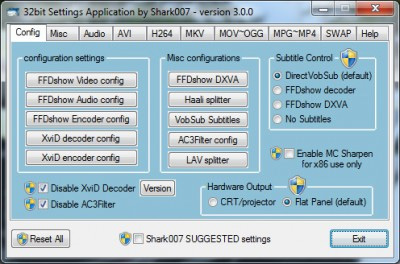
With Shark007 Codec, you can enjoy HD quality Audio and video playback in an extremely simple way. In addition, you can also watch high definition videos without the need for a high-end Play program. This Code package will give you everything you can with the ability to support file formats such as amr, mpc, ofr, divx, mka, ape, flac, evo, flv, m4b, mkv, ogg, ogv, ogm, rmvb, xvid. Shark007 Codec contains a setting window (Settings Application) to use in conjunction with your Windows Media Center settings for the purpose of providing users with different options from the corresponding cards and decoding specific file types.
FAQ
What does 3 Best Free Codec Media Packages for Windows 7 explain?
3 Best Free Codec Media Packages for Windows 7 covers the essential facts behind the topic, including what changed, why it mattered, and how it affected users.
Who is most affected by Windows 7?
At the time there are hundreds of Codec Audio and Video used, some are created by Microsoft Corporation and the rest are created by companies and other organizations and individuals.
What are the key takeaways from this topic?
Installing Codec (Codec Packs) package is for your computer to be able to play any Media file, so if you are using Windows 7, please refer to the following 3 most popular Codec packages: 1. The Windows 7 Codec Pack Windows 7 Codec Pack supports almost all.
Related Articles
 What Is the AV1 Codec? Used for What Purpose?6 minutes read
 How to Install Windows 7 Codec Pack Without Errors4 minutes read
 How to Install AV1 Codec in Windows 103 minutes read
 Install Additional Codec to See All Video Formats with Windows Media Player3 minutes read
 Microsoft Launched AV1 Codec for Windows 103 minutes read
 What Is Codec: What Is a Codec? Why Do I Need Codecs?6 minutes read
Reader Comments 0
Sign in with email or Google to join the discussion.