Table of Contents
Quick Overview
Samsung Galaxy : Compare useful Samsung Galaxy options and learn how to evaluate them, including Pop-up view for app and Edge Panel.
If you've been using a Samsung phone for a few years now, you'll find that the great features offered by the Galaxy line are hard to beat. In fact, many users wish other Android phone makers would adopt these features.
1. Pop-up view for app
While most Android phones support split-screen mode, it can only run up to two apps at once. However, running apps using One UI's pop-up view feature allows you to run multiple apps at once.
This feature essentially turns an app into a small, resizable window that floats above other apps, bringing a PC-like experience directly to your smartphone. You can adjust the size of the app window and even shrink it to a small, easily accessible icon.

2. Edge Panel
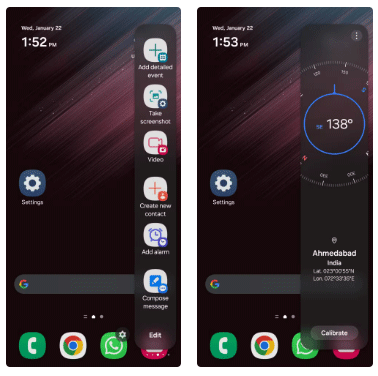
Among the standout multitasking features of Samsung Galaxy phones is the Edge Panel. Anyone who has used a Samsung device can attest to how practical and versatile this tool is.
Not only does it provide quick access to apps and contacts, it also includes a variety of useful widgets. With a simple swipe, you can access reminders, clipboard content, and even perform quick actions like taking a screenshot, composing a message, or adding a new contact.
3. Hide app option
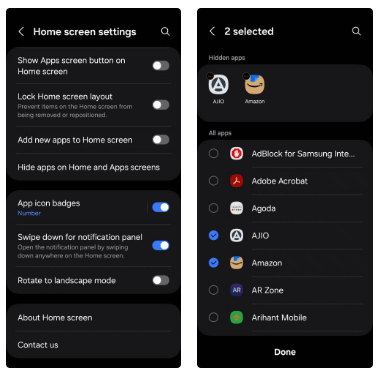
The app hiding option is a subtle but incredibly useful feature for anyone who wants privacy. You can use it to keep certain apps — be it personal finance tools, dating apps, or games — out of sight without having to uninstall them.
Samsung's One UI makes it easy to hide apps, but many Android phones, including Google's Pixel devices, don't have this feature — with the exception of OnePlus devices. As a result, users have to rely on third-party launchers, which isn't always ideal.
4. Dual Messenger
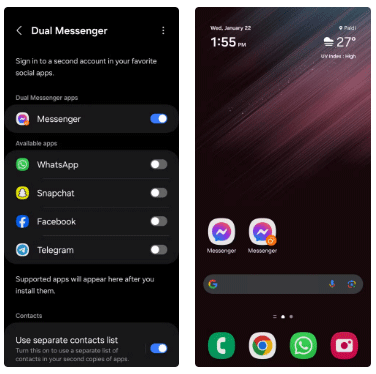
Samsung's Dual Messenger feature offers a native option to clone messaging apps like WhatsApp, Telegram, Snapchat, Messenger, and more. This feature is especially useful for anyone who needs to manage two separate accounts — such as a personal account and a work account — on a single device.
5. Secure Folder
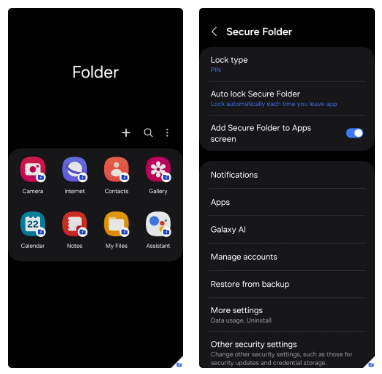
Secure Folder has to be Among the most underrated features on Samsung Galaxy phones. It's a private space where you can safely store photos, videos, files, and even apps, away from prying eyes. This data remains in local storage, protected by a PIN or password that you set.
This level of privacy should be standard on all Android devices, as it provides peace of mind for those who want to keep their personal information safe and accessible.
6. Video call effects
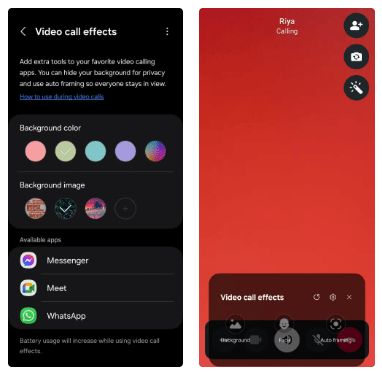
While some messaging apps like WhatsApp support video call effects like background blur, not all do. However, with One UI's video call effects, you can change the background during a call to a solid color or a custom image. There's also an auto-framing feature that adjusts the camera to keep you centered no matter how much you move around.
The best part is that these video call effects work seamlessly across all apps, including Messenger, Meet, WhatsApp, and more.
7. Modes and Routines
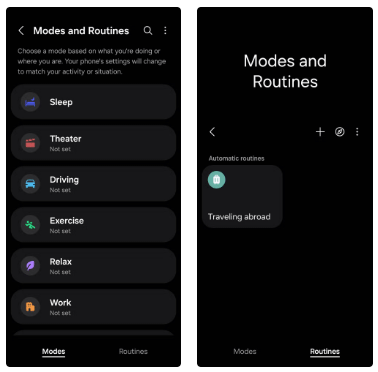
Remember automation apps like IFTTT and Tasker? Now you can use One UI's Modes and Routines feature to bring similar automation capabilities to your Samsung phone.
8. Good Lock Module
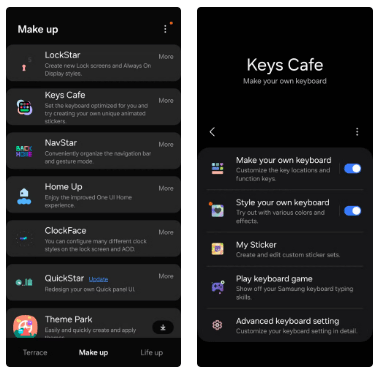
Customization is one of Android's strongest points, and while most Android phones excel in this regard, none can match the customization capabilities of Samsung's Good Lock module.
There are a variety of different Good Lock modules available that provide an unparalleled level of control over the look and functionality of your device.
9. Chat Assist
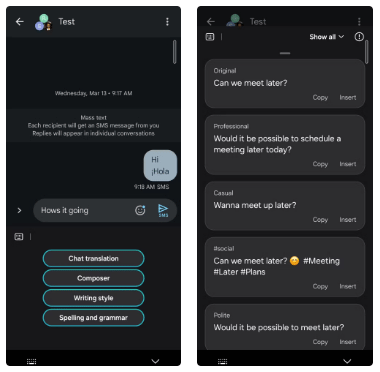
With Galaxy AI, Samsung has brought some incredibly useful features to its Galaxy phones. But if there's one feature every Android phone should adopt, it's Chat Assist.
It can automatically correct grammar and spelling errors in the text you type, as well as create messages from scratch based on the information you enter. But that's not all - Chat Assist also offers rephrasing options, allowing you to tailor your messages to different contexts, whether you want to be polite, casual, or professional.
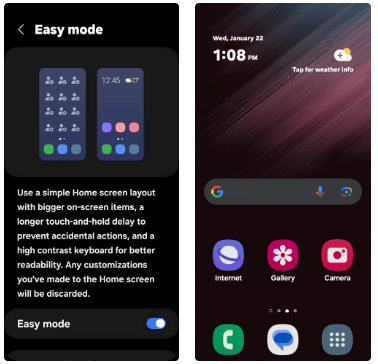
10. Easy Mode
Not everyone who uses a smartphone is tech-savvy, which is where Samsung's Easy Mode comes in. It simplifies the user interface to make the phone more accessible to those who are new to smartphones or find them too complicated.
Easy Mode enlarges text and icons, simplifies menus, and reduces screen clutter. This mode is especially beneficial for seniors, children, or anyone who prefers a less complicated device. For this reason, it is a feature that all Android phones should adopt to provide a more comprehensive and user-friendly experience for everyone.
FAQ About Samsung Galaxy
How do you choose the best Samsung Galaxy?
Edge Panel Among the standout multitasking features of Samsung Galaxy phones is the Edge Panel
Which features matter most when comparing Samsung Galaxy?
Chat Assist With Galaxy AI, Samsung has brought some incredibly useful features to its Galaxy phones
Are free Samsung Galaxy options reliable?
Now you can use One UI's Modes and Routines feature to bring similar automation capabilities to your Samsung phone
Related Articles
 8 Best Android Phones Right Now7 minutes read
 Tips for Speeding Up Samsung Galaxy Crickets3 minutes read
 Official Information About Samsung Galaxy S8, S8 Plus: Price, Date of Sale, Specifications12 minutes read
 10 Features of Samsung Galaxy S8 That the iPhone Cannot Do5 minutes read
 8 Google Pixel Features Not Available on Samsung Galaxy Phones9 minutes read
 6 Top New Features on Samsung's Galaxy S20 Flagship Device6 minutes read
Reader Comments 0
Sign in with email or Google to join the discussion.