Table of Contents
10 Reasons to Install Windows Server 2008 is easier to understand when the core ideas are paired with practical examples. The sections below explain the topic clearly, highlight useful steps, and point out details that can prevent common errors.
The new server operating system recently released by Microsoft: Windows Server 2008 (Windows Longhorn ) is it really the best, most effective and secure server operating system? The answer depends on the specific user but anyway, the following 10 reasons also make it clear whether you really need to install Windows Server 2008 on your server and what other features it has. compared to previous Microsoft server operating systems.
Windows Server Virtualization Windows Server 2008 includes Windows Server Virtualization (WSv), a powerful, efficient and virtualized technology with strong management and high security features. Windows Server Virtualization will help businesses reduce costs, increase flexibility and system availability in server consolidation, disaster recovery, testing and development, combined with System Center Virtual Machine Manager and the seamless management of dynamic data centers. World-Class Web and application background Windows Server 2008 provides security, an easy-to-manage platform for development and the ability to rely on host and service applications provided from the server or on the Web. New features include simplified management, increased security, improved performance and high scalability, providing a unified platform for Web publishing with integrated Internet Information Services 7.0 (IIS7), ASP.NET, Windows Communication Foundation and Microsoft Windows SharePoint Services. Improve network connection performance Windows Server 2008 offers the biggest change in the network stack since Windows NT 4.0. Technologies like Receive Window Auto-tuning, Receive Side Scaling and Quality of Service (QOS) allow organizations to have many advantages in connecting multiple Gigabit networks today. Integrated IPsec and the new Windows Firewall have advanced security features that allow organizations to secure and control overall network traffic. Advanced security Windows Server 2008 has been developed with the desire to create the strictest security ever. It only installs the services needed for the role the server is executing. Advanced authentication, disk encryption, event forwarding, and Rights Management Services are some of the technologies that help organizations participate in today's IT standards. Regain control on your branch offices Management servers, services and security at remote locations are one of the ongoing challenges for IT professionals. Windows Server 2008 simplifies the administration of servers in the branch office with improvements in Active Directory, including Read-Only Domain Controller and administrative role differentiation. Technologies such as the BitLocker and Server Core installation options in specific features increase security and address the only needs of branch offices. 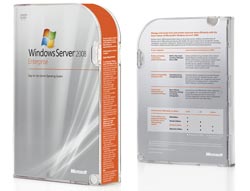 Easier server administration Simplifying the complexity of server administration is one of the key topics of Windows Server 2008. New management tools such as Server Manager Console provide a simple, unified management interface for managing. management of server configuration, system information, server status display and management of all roles installed on the server. Advanced scripting and automation tasks New technologies like Windows PowerShell, command-line utilities and scripting languages help IT professionals solve common tasks automatically. With a new centralized scripting language, with more than 120 standard command line tools, syntax and consistent utilities, Windows PowerShell is ideal for IT professionals in system administration. Access centralized applications With Windows Sever 2008, users will be safe to access internal applications through familiar firewall ports. For a remote Windows Server Terminal Services application, only the application window but not the entire remote desktop will be launched and operated in a resizable and interactive window on the machine's desktop. guest. Protect 'unsafe' computers when accessing the network Network Access Protection (NAP) addresses issues when 'unsafe' computers access and compromise an organization's network. NAP helps ensure that any computer connected to the network must have a company policy that requires 'security', which limits access to computers without policies. predefined, provides a re-adjustment service to bring computers back to a "safe" state and provide a way to closely monitor. Works better with Windows Vista Built Windows Vista and Windows Server 2008 share a number of new technologies in networking, storage, security and management. Therefore, organizations will see immediate advantages when running Windows Server 2008 and Windows Vista in their server and client solutions.
FAQ
What is 10 Reasons to Install Windows Server 2008?
The new server operating system recently released by Microsoft: Windows Server 2008 (Windows Longhorn ) is it really the best, most effective and secure server operating system?
Why is 10 Reasons to Install Windows Server 2008 important?
A clear understanding of 10 Reasons to Install Windows Server 2008 helps you make informed decisions, avoid common mistakes, and use the relevant tools or techniques more effectively.
How should beginners approach 10 Reasons to Install Windows Server 2008?
Start with the fundamental concepts, follow the examples step by step, and test each change in a safe environment before applying it to important systems or data.
Related Articles
 Instructions for Installing Windows Server 2016 on Windows 104 minutes read
 How to Installing Windows Server 2012 Step by Step6 minutes read
 How to Install Iis in Windows Server 20122 minutes read
 Steps to Install Windows Server 2022 on a Virtual Machine6 minutes read
 How to Install a VPN on Windows Server 20194 minutes read
 How to Install and Use IIS on Windows Server 20195 minutes read
Reader Comments 0
Sign in with email or Google to join the discussion.