Table of Contents
Use this guide to understand Windows 8 supports 'retina' screen and the factors that affect it. The information is organized to make the topic easier to apply in practice.
>>> Windows 8 can be released in October
How Windows 8 Supports 'Retina' Screen Works
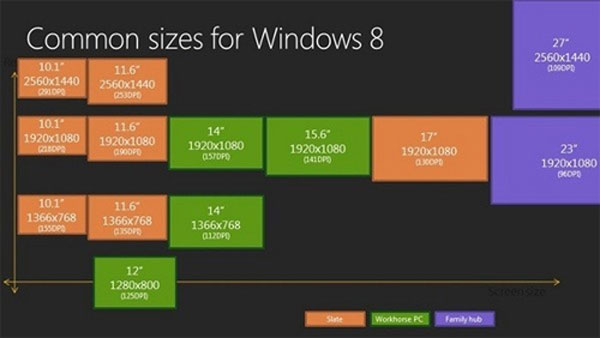 Resolution supported on Windows 8. (Photo: MSDN) .
The Windows 8 development site yesterday confirmed that Microsoft's latest operating system will support ultra-high-resolution screens close to the standard retina on Apple's iPhone 4 / 4S. Specifically, with a 10.1-inch screen, the maximum resolution supports 2,560 x 1,440 pixels with an impressive pixel density, 291 ppi.
11-inch and 27-inch screens are also two other sizes that support resolutions up to 2,560 x 1,440 pixels. While the other popular types like 14, 15.6 or 17 inches support up to Full HD.
However, with high resolution support, many people are concerned about software compatibility issues, graphics support must be compatible with this resolution. Microsoft's program is expected to use 100% for displaying standard pixel density, 140 for HD standards and 180 for quad-XGA panels.
FAQ
What is the main benefit of Windows 8 supports 'retina' screen?
The main benefit is a clearer understanding of the topic and a practical way to apply the information covered in this guide.
What should I check before using Windows 8 supports 'retina' screen?
Confirm compatibility, review the required settings, protect important data, and use the latest supported version whenever possible.
What should I do if the result is different?
Repeat the steps carefully, verify permissions and version differences, and consult the product's official support documentation for changes not shown in the article.
Related Articles
 Retina Screen Support Application for the New MacBook4 minutes read
 Imac Retina 5K Screen Is Late Because of the Shortage4 minutes read
 LG Provides a Screen for the MacBook Pro Retina3 minutes read
 MacBook Air Retina Screen Will Not Be Released This Week3 minutes read
 MacBook Retina Screen May Be More Expensive Than the Old Version of 1005 minutes read
 Why Doesn't MacBook Air Use Retina Display?5 minutes read
Reader Comments 0
Sign in with email or Google to join the discussion.