Table of Contents
Microsoft is testing a new Run interface on Windows 11 with a larger input box, live command history. Users can switch between the old and new interfaces in Settings.
New Windows 11 Run Overview
The Run dialog in Windows 11 is actually a relic of old Windows. Its current interface is over 20 years old, and the only significant change over the years has been dark mode, which has been accompanied by a fair amount of flashbangs in File Explorer. But it looks like Microsoft has finally decided to overhaul this long-standing feature.
Tech blogger @phantomofearth shared an early look at the new Run interface. While it's still in beta, the screenshots give a pretty good idea of the direction Microsoft wants to take in future updates.
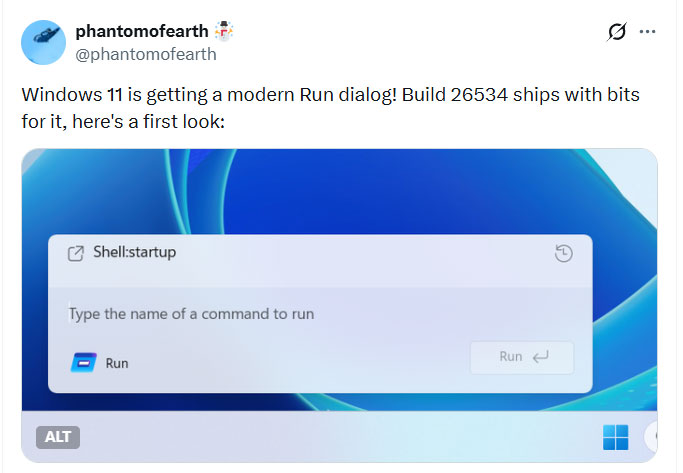
The new Run dialog has a larger command input box and a list of recently used commands at the top. According to Windows Central, the interface will also automatically display the application icon when it detects the corresponding executable file. However, the 'Browse' button – which used to open File Explorer and manually find the .exe File – is gone.
Interestingly, Microsoft intends to let users switch back and forth between the old and new versions of Run. An option in the 'Advanced' section of the Settings app will enable the modern Run interface, while Windows 11 defaults to the old version – a situation that's a lot like the 'two right-click menus' that exist side by side today.
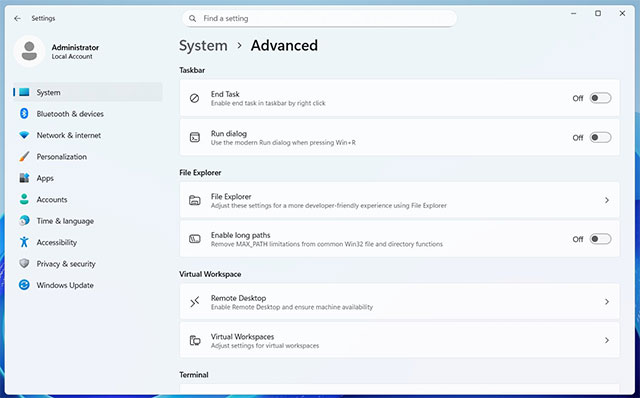
Microsoft has not officially announced any information yet, and these features are only available in the test build. Perhaps this guide will have to wait a bit longer before hearing the company confirm. In the meantime, You can try some third-party utilities to 'modernize' the Run dialog box right now.
FAQ
What is new about Windows 11 run dialog box redesign?
In practical terms, Microsoft is testing a new Run interface on Windows 11 with a larger input box, live command history. Users can switch between the old and new interfaces in Settings.
Why does this update matter?
The article highlights that the new Run dialog has a larger command input box and a list of recently used commands at the top.
Is the change available to everyone?
Availability may depend on the product version, region, account, or rollout stage described in the article.
Related Articles
 7 Ways to Open the Run Dialog Box in Windows6 minutes read
 How Does the Run Dialog Know Which Application on the System Is3 minutes read
 Dialogs - Alert, Prompt, Confirmation in JavaScript1 minutes read
 Instructions for Upgrading Windows 7 to Windows 8 and Windows 8.19 minutes read
 After 20 Years, This Is the First Time Cmd.exe Has Been Upgraded3 minutes read
 Free Upgrade: Chance to Upgrade to Windows 7 for Free5 minutes read
Reader Comments 0
Sign in with email or Google to join the discussion.