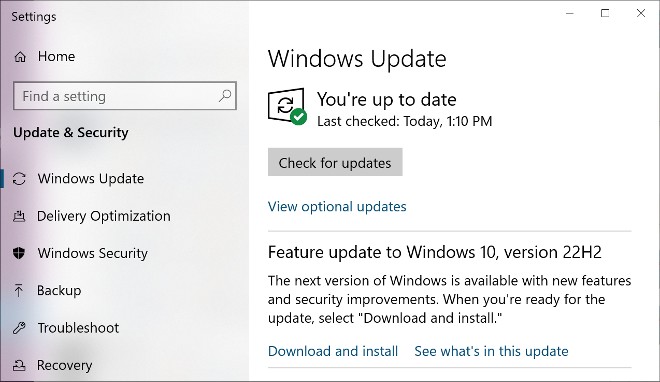
Microsoft has just officially released Windows 10 version 22H2 (also known as Windows 10 2022 Update) for eligible devices.
You can install this feature update via Windows Update by going to Settings > Update & Security > Windows Update and clicking the " Check for updates " button.
This update is only available to customers with devices running Windows 10 version 20H2 or later. The installation experience is quick because Windows 10 22H2 is designed to install like a monthly update.
If your device is eligible for Windows 11, you'll also receive an update notification.
Windows 10 22H2 is not a major release and it only has a few new features like:
- Option to receive important notifications when focus assist is on. Focus assist is like do not disturb mode with the ability to mute notifications.
- Restores functionality for Windows Autopillot deployment scenarios affected by security mitigations for hardware reuse.
Windows 10 22H2 Home and Pro will get 18 months of service support while Enterprise and Education will get 30 months of support.
Microsoft recommends that businesses check that the devices and software in their environments are compatible with the Windows 10 22H2 update before rolling it out at scale.
The software giant also warned in advance that it will implement update blocks to stop delivering updates if any compatibility issues are detected.
In TipsMake.com's opinion, Windows 10 version 22H2 is not something you should install right away. The reason is that it has too few new features and too high a risk of causing errors. Therefore, you should wait a few weeks to see if this version has any problems before deciding to update.


Reader Comments 0
Sign in with email or Google to join the discussion.