Table of Contents
It's hard to overstate the rapid growth of leading artificial intelligence applications. In just a few years, two of the fastest-growing apps – ChatGPT and Meta AI – have reached one billion users. Each app has followed a significantly different path: ChatGPT achieved resounding success from the start and had a first-mover advantage, while Meta AI leveraged the massive existing user base on platforms like Facebook, Instagram, and WhatsApp.
This article will examine ChatGPT and Meta AI based on their individual advantages and compare them to each other. Even though ChatGPT's paid plans are significantly better than Meta AI's, not everyone wants to pay $8-$20 per month, so a comparison between the two free plans is still important.
If you're trying to decide which app to choose as your virtual assistant, keep reading!
An overview comparison of Meta AI and ChatGPT
This is a quick comparison table, but read on for a more detailed analysis.
|
Meta AI |
ChatGPT |
|
|---|---|---|
|
The latest model |
Llama 4 |
GPT-5.4 |
|
Real-time web search |
Have |
Have |
|
Multimodal capability |
Have |
Have |
|
Create images and videos |
Yes (unlimited) |
Yes (with a daily limit for free users); creating videos with Sora 2 is currently free. |
|
Voice mode |
Basic voice mode, but with far fewer functions. |
Yes; paid users can use Advanced Voice Mode for real-time multimodal conferencing; free users only have more limited voice options. |
|
Deep research |
Are not |
Have |
|
Custom chatbot |
Are not |
Have |
|
Document processing |
Yes (limited, beta) |
Have |
|
Price |
Free of charge |
There is a free version; $8/month for ChatGPT Go (including ads); $20/month for ChatGPT Plus; $200/month for ChatGPT Pro |
|
Foundation |
Web and mobile; seamless integration across Meta's applications and platforms. |
Web-based, supporting both mobile and desktop devices; integrates with multiple platforms and connects to thousands of applications. |
ChatGPT's underlying models have evolved significantly – at least for now.
Meta's latest model, Llama 4, is scheduled for release in April 2025. That's a very long time in the world of AI. According to recent reports, Meta is developing a new model – codenamed Avocado – but it's underperforming in internal testing and is being delayed until mid-2026. (Even more intriguing: Meta appears to be considering licensing Gemini to power its AI products during this time).
Meanwhile, OpenAI has released over a dozen ChatGPT models since April 2025, with significant releases approximately every two months. As a result, it is far ahead of Meta in the AI model rankings: The latest ChatGPT models are almost on par with major competitors like Claude and Gemini. Meta's outdated Llama 4 model has fallen very low on the list, below even models you may never have heard of, such as Hermes 4 and Ling-1T.
However, it's still too early to rule Meta out. Artificial intelligence (AI) is at the core of their strategy: Meta is investing up to $135 billion in 2026 alone to pursue super AI, so perhaps it's more accurate to say this is just a setback rather than a permanent step backward. And with their massive existing user base, any model they implement will immediately be adopted by hundreds of millions of users by default.
If Meta's latest model has been released by the time you read this article, then all predictions could change.
ChatGPT offers more capabilities.
Both ChatGPT and Meta AI offer the basic functionalities you'd expect from an AI chatbot, including answering questions, web searching, and creating images and videos. While ChatGPT is better at each of those functions, that's not necessarily the deciding factor if you're handling simple tasks and are already familiar with WhatsApp, Instagram, or Facebook.
What truly sets ChatGPT apart, at least for this comparison, is all the capabilities it offers beyond its basic features, including:
- Agent mode : Control your browser, fill out forms, and complete multi-step tasks on your behalf.
- Advanced Voice Mode : Real-time voice conferencing with live camera recognition.
- Canvas : Collaborative document and code editor right in the chat.
- Custom GPT : Build or use pre-built chatbots that have been trained for specific tasks.
- Deep research : A multi-step research report synthesizing dozens of sources.
- Scheduled tasks : Set up AI prompts to run automatically on a schedule.
- File processing : Upload PDF files , spreadsheets, and presentations for analysis (Meta AI has a limited beta version of this feature).
- Desktop app : Native app for Mac and Windows; Meta AI is only available on web and mobile devices.
- Atlas : An AI-powered browser with continuous sidebar context.
- Codex : A specialized agent programming tool for developers.
If you use AI for work, features like agent programming, Canvas, deep research, and file processing make ChatGPT a no-brainer. But even if your AI use case is simpler and more personal—like planning a family vacation—ChatGPT's research and editing tools still offer a much better experience.
The convenience of Meta AI is undeniable.
While all of ChatGPT's features are impressive, there's one thing it lacks: direct access to Meta's billions of users. Using Meta AI through WhatsApp, Instagram, Facebook, or Messenger is a first step into the world of artificial intelligence for many, and it's incredibly easy—you don't need to actively sign up or create a new account to use it.
Want to post a funny Instagram story using AI? Clicking "Restyle with Meta AI" in the app will be better than any other workflow you can find. Sure, you could create something better with Canva or Photoshop, but for most users, it's not worth the effort.
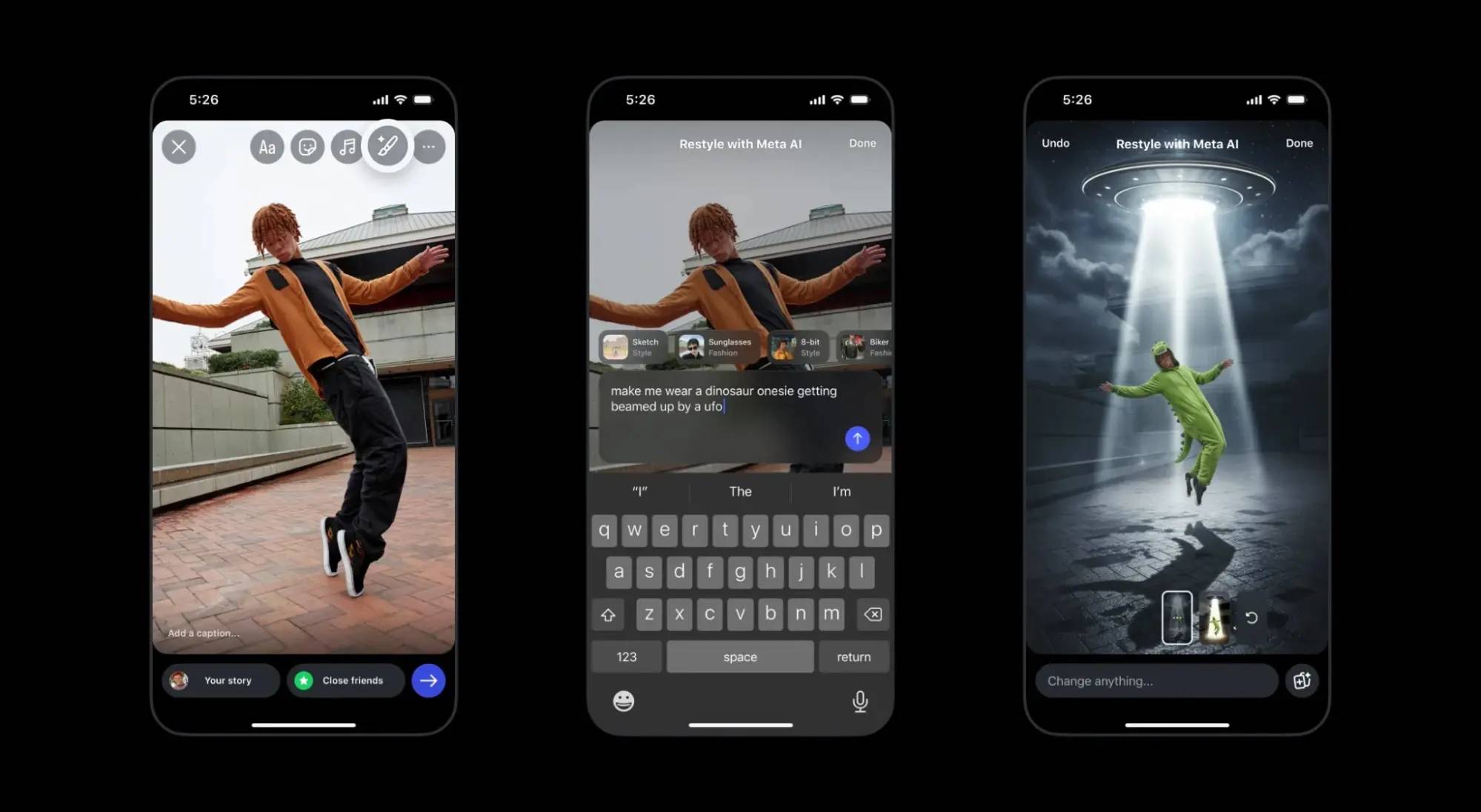
For similar reasons, Meta AI is popular for use cases such as:
- Write captions and posts for Instagram.
- Create quick images to share in group chats or Stories.
- Tag @MetaAI in the group chat to get the answer and share it with everyone.
- Search for information without leaving WhatsApp or Messenger.
- Find quick answers when you're on Facebook.
- Create short, AI-generated videos to share with friends.
Meta also launched its standalone Meta AI app in April 2025, available on the web and mobile devices. Unlike the AI features integrated into Meta's social media apps, which often appear contextually, the standalone app provides everything in one place: You can easily navigate between text, image, and video tools. Meta AI also lets you switch between a "Fast" model—which seems to be the default across its social media apps—and a "Thinking" model, which displays more thorough reasoning and thought into each query.
Meta AI has better free creative tools.
You can use both tools for creative projects, but if you're using the free plan, you'll likely make more progress with Meta AI.
In terms of pure technical power, ChatGPT's image processing model is superior: GPT-Image-1.5 consistently ranks at the top of AI charts (along with Gemini's model). Compared to Meta AI, ChatGPT is more likely to produce the results you want on the first try – especially if you want to create anything realistic.
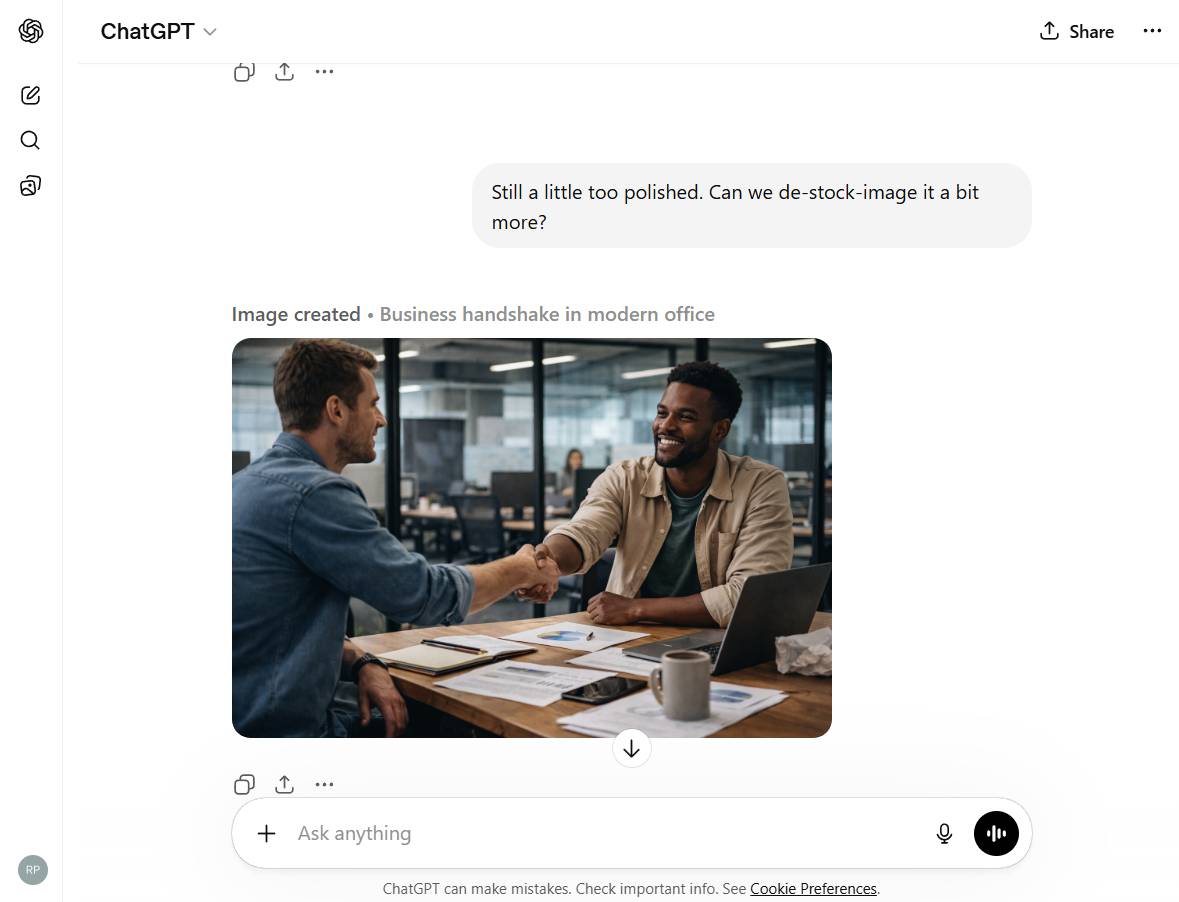
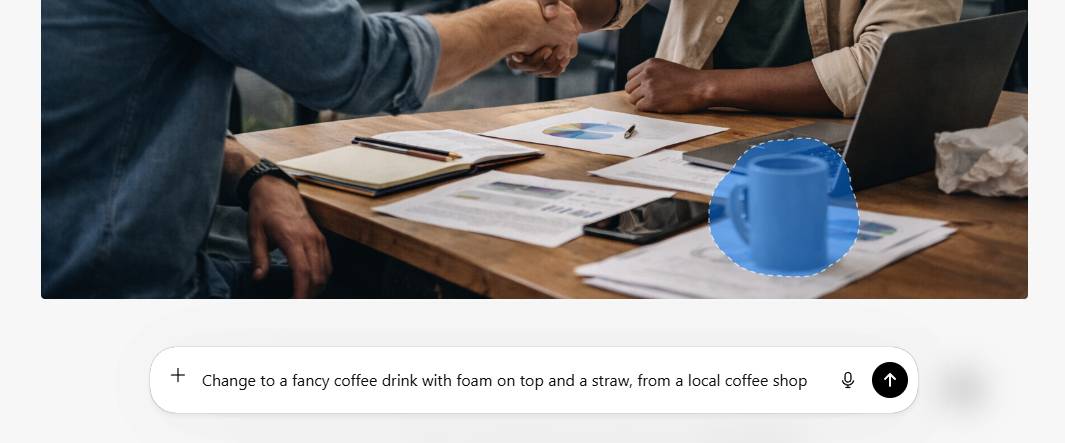
However, ChatGPT's free plan limits you to creating only a few images per day. And the editing tools are quite limited: You can select objects in the created images and replace them, but don't expect a Canva-style editing experience.
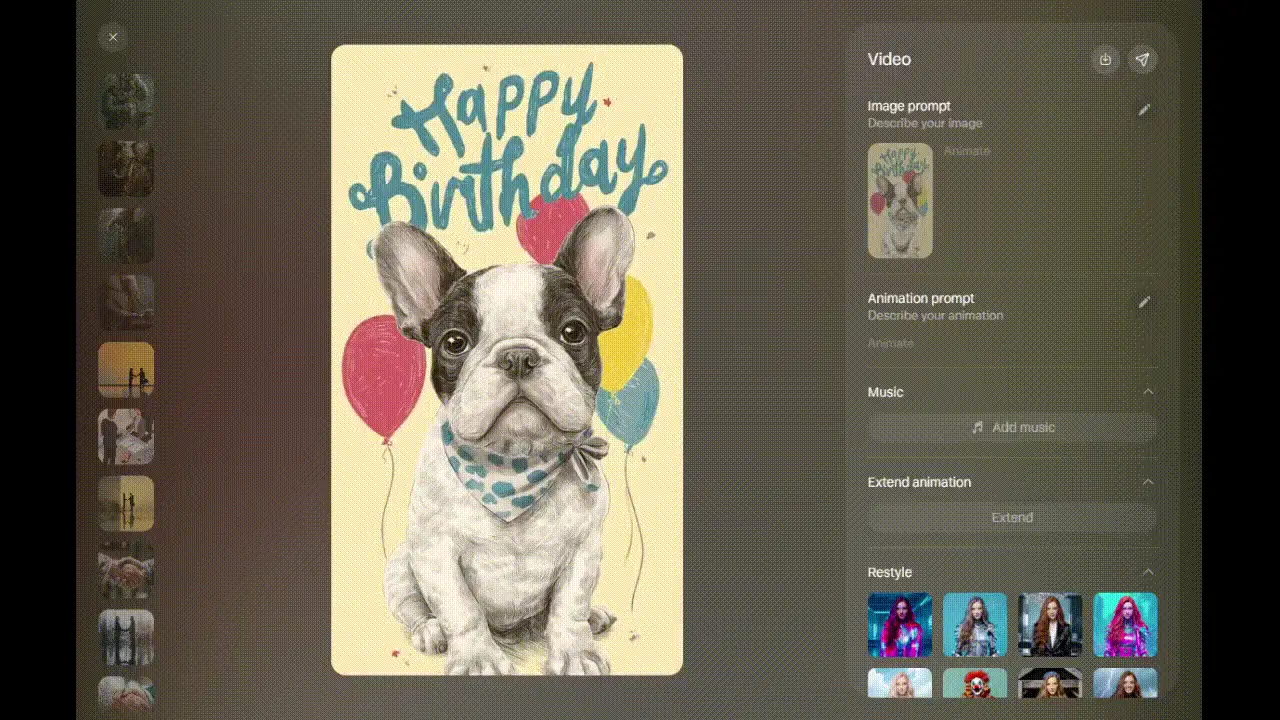
The first appealing aspect of Meta AI as a creative toolkit is its price: it's free. You can create an unlimited number of images for free. It's also a powerful photo editor that lets you edit and redesign until you're satisfied, and it has a cool one-click feature to turn your photos into animations.
Should I use ChatGPT or Meta AI?
Currently, choosing between ChatGPT and Meta AI is quite easy. While OpenAI is constantly releasing new models, features, and capabilities at a relentless pace, Meta AI has been using the same model for a year. As a result, ChatGPT has surpassed it in both features and raw processing power, and it beats Meta's outdated Llama 4 model in every important aspect.
Of course, things change very quickly in the world of AI, and all of this can change in just one weekend. Meta has invested heavily in the AI field, and their next model release could significantly alter this comparison.
Currently, this is a quick way to decide which app you should use.
Choose ChatGPT if you're using AI for work or personal productivity. Its underlying models are far superior, and features like Deep Research, Canvas, agent mode, scheduled tasks, and agent programming make it more useful in every way. Its free plan is quite good, and for $8/month for ChatGPT Go or $20/month for ChatGPT Plus, you'll get significantly more value.
Choose Meta AI if you use AI for light tasks in apps like WhatsApp, Instagram, Facebook, and Messenger. For annotating posts, gathering information without leaving WhatsApp, or creating AI-generated Stories on Instagram, it works smoothly and is completely free. And the Meta AI app itself, while not the most advanced, is still a good option for creating images and videos for free.
If you've read this far and are still unsure, perhaps you should download the free versions of both apps to your phone and try them out. You can use each app for different purposes: ChatGPT for heavy tasks, such as research and data analysis, and Meta AI for lighter, free, and fun use cases.
Related Articles
 Meta AI vs ChatGPT (2026): Which Assistant Is Better?17 minutes read
 Meta AI Is Testing a Shopping Assistant, Directly Competing with ChatGPT and Gemini6 minutes read
 6 Pros and Cons of Meta AI14 minutes read
 Meta Launched Llama 3, Claiming to Be the Top AI Platform Available: Top Picks6 minutes read
 Meta Warns of New Malware Threats, Including ChatGPT Spoofing Malware Explained5 minutes read
 Meta Introduces Ai-generated Video Identification 'Watermarking'4 minutes read
Reader Comments 0
Sign in with email or Google to join the discussion.