Table of Contents
Websocket is easier to understand when the core ideas are explained in practical terms. This guide covers what it means, how it works, why it matters, and the main details you should know.
Key Takeaways
- Understand what is websocket.
- Understand what are the advantages of websocket.
- Understand how does websocket work.
What Is Websocket?
Websocket is a type of technology that supports two-way communication between Client and server. This technology uses TCP (Transmission Control Protocol) to connect information together in the Internet environment. Currently, this technology supports many different popular browsers such as: Firefox, Google Chrome and Safari. Although it is designed specifically for web applications, programmers can still use it for any application.

Websocket is a type of technology that supports two-way communication between Client and server.
What Are the Advantages of Websocket?
Because websocket provides a very powerful two-way protocol, it has very low latency and is easy to debug. The information returned from websocket is extremely fast, so it is used in many cases that require real time such as chat, displaying charts or stock information. In these cases, you can't use HTTP to connect because if you send AJAX commands continuously to the server to get new data and update them on the screen, it will waste many resources, traffic and the return time is not accurate.
What are the other advantages of Websocket? The system doesn't need too many connections like Comet long-polling method and at the same time overcomes many disadvantages of Comet streaming method when using TCP protocol to connect via websocket. Websocket API is also quite straightforward to use directly.

Websocket provides a very robust bidirectional protocol that has very low latency and is easy to debug.
How Does Websocket Work?
WebSocket works in three main steps:
1. Set Up WebSocket Connection
Request initiation: The client sends an HTTP request to the server, including an Upgrade header, to request a switch from HTTP to WebSocket.
Server response: If the server supports WebSocket, it will respond with a message confirming the connection upgrade, allowing a WebSocket connection to be established.
2. Data Transmission via WebSockets
Two-way communication: Once the connection is established, both the client and server can send and receive data at any time without making a new HTTP request.
Framed data: Data transmitted over WebSocket is packaged in frames, which can contain text or binary data.
3. Close the WebSocket Connection
The WebSocket connection is maintained until either party decides to close it. The data transfer ends when the connection is closed.
Uses of Websocket
WebSockets were invented by developers to efficiently support real-time results. WebSockets work by initiating continuous, full-duplex communication between the client and the server. This reduces unnecessary network traffic, as data can travel both ways simultaneously over a single open connection. It also provides speed and real-time capabilities on the web.
Websockets also allow the server to keep track of clients and "push" data to them as needed, which is not possible using HTTP alone.
WebSocket connections allow streaming of text and binary data strings over messages. WebSocket messages consist of a frame, payload, and data portion. Very little non-payload data is sent over the existing network connection this way, reducing latency and overhead, especially when compared to HTTP request and streaming models.
Google Chrome was the first browser to include standard support for WebSockets in 2009. RFC 6455 — The WebSocket Protocol — was officially published online in 2011. The WebSocket protocol and WebSocket API are standardized by the W3C and IETF, and are supported in very popular browsers.

WebSockets to efficiently support real-time results.
Comparison Between Websocket and HTTP
Normally, when using the HTTP connection protocol to transmit data with Ajax technology, there will be a disadvantage of containing many unnecessary data in the header. For HTTP, a header used for request/response is usually about 871 bytes in size. This size is only 2 bytes while compared to Websocket after connection.
For instance, a developer creates a game application. It is estimated that this application has 5,000 players logging in at the same time. At the same time, they can send/receive data from the server every second. Do a simple math to compare the amount of header data transmitted between the HTTP and Websocket protocols per second as follows:
You can see the outstanding advantages of Websocket compared to HTTP in terms of Header data transmission after reading this simple example. This advantage helps to better understand what websocket is and why it is increasingly widely used by professional programmers.
Websocket Communication Protocol
The client must send a WebSocket handshake request to the server to initiate the connection. The server will then return the result from the handshake request sent from the Socket as shown below.
Clients Request
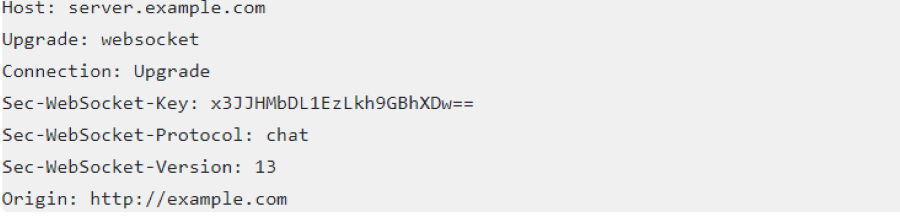
Server response:(Server Architecture).

The client will send a Based64-encoded Sec-WebSocket-Key value to the server to confirm the connection. The server will append a fixed string '258EAFA5-E914-47DA-95CA-C5AB0DC85B11″ to the Sec-WebSocket-Key.
The newly generated string has the following structure: 'x3JJHMbDL1EzLkh9GBhXDw==258EAFA5-E914-47DA-95CA-C5AB0DC85B11″. The string is then SHA-1 hashed to produce the following result: '1d29ab734b0c9585240069a6e4e3e91b61da1969″.
Next, the result will be encoded using Base64 to get the final result as 'HSmrc0sMlYUkAGmm5OPpG2HaGWk='. The server will send a response back to Client Sec-WebSocket-Accept which is the result string just created after having the final result.
The client will check the status code (101), also check Sec-WebSocket-Accept to see if it matches the expected result, and finally make the connection.
What Is the Structure of Websocket?
Similar to (http:// and https://) websocket also has 2 common standards: ws:// and secure standard: wss://.
The communication standard is String (Message data types). Currently this communication standard supports buffered arrays and blobs. However, it doesn't support JSON yet. However, it is still possible to serialize to String.
Because up to now, not all Browsers support Websocket. So to know if the browser supports it or not, you can use the check below.
We use the code below. This helps you initialize and establish a connection to the socket.
What Are the Properties of Websocket?
ReadyState: represents the connection state. Here are the values of this property:
- WebSocket.CONNECTING: A value of 0 indicates that the connection has not yet been established.
- WebSocket.OPEN: A value of 1 indicates that the connection is established and communication is possible.
- WebSocket.CLOSING: A value of 2 indicates that the connection is undergoing a closing handshake.
- WebSocket.CLOSED: A value of 3 indicates that the connection has been closed or can't be opened.
Buffered Amount: is a read-only property that represents the number of UTF-8 bytes that have been queued using the websocket send method.
What Are Websocket Events?
1. Open: Event occurs when a Socket connection is established (onopen).
2. Message: Event occurs when the client receives data from the server (onmessage).
3. Error: Event occurs when there is any error in communication (onerror).
4. Close: Event occurs when the connection is closed (onclose).
What Are the Websocket Methods?
Websocket currently has 2 basic methods as follows:
- Send: This is the send (data) method used to send data to the server.
- Close: This is the Close() method for existing connections only.
There are also other additional methods that apply on a case-by-case basis.
What Are the Disadvantages of Websocket?
Because Websockets is a new technology in HTML5, it is not yet supported by all browsers.
It is not straightforward to use services that provide scoped requests like Hibernate's Session In View Filter. Hibernate is a popular framework that provides a filter around an HTTP request. So it will set up a contest (containing transactions and JDBC connections) that is bound to the request thread at the beginning of any request. It will eventually use the filter to abort this contest when the request ends. Because Websocket is a TCP and not an HTTP request, this lack of ease of use is the biggest drawback of websocket to date.
Limitations of Websocket
1. Old Browsers Are Not Supported
WebSocket is a new feature of HTML5, so it is not supported by all older browsers.
2. System Resource Consumption
WebSocket uses a persistent open connection, which results in more resource consumption than HTTP. The server needs to maintain connection state for each client, which increases memory usage and poses scalability challenges.
3. Security Issues
Although WebSocket provides some basic security features like SSL/TLS encryption, it can still be vulnerable to attacks like Cross-Site WebSocket Hijacking (CSWSH) if not configured properly.
4. Proxy and Firewall Limitations
Some proxy servers and firewalls may block or interfere with WebSocket connections, leading to connection issues.
5. Complexity in Implementation
WebSocket implementations are often more complex than traditional communication protocols like HTTP, requiring higher overhead and deeper technical knowledge to handle issues like load balancing and state management.
At this point, you probably have a basic understanding of what websocket is and its advantages and disadvantages in using it as an Internet connection protocol. Hopefully this article can give you an overall and useful view of websocket so that you will not be confused when you start using it in the future. In the future, it is likely that this protocol will develop further to overcome its inherent disadvantages and become a perfect replacement for old connection protocols such as HTTP. Thank you and wish you success.
Final Thoughts
The most reliable way to handle websocket is to follow the process in order, verify each important setting, and test the result before moving on. Use the guidance above as a practical reference, then adjust the details for your device, software version, or specific goal.
FAQ
What is Websocket?
This hypertext transfer protocol is responsible for transmitting data between web servers to web browsers and vice versa.
Why is Websocket important?
Understanding websocket helps you evaluate its purpose, requirements, limitations, and practical impact before you use it or make a related decision.
Who should understand Websocket?
It is useful for beginners who need a clear overview and for experienced users who want to confirm terminology, requirements, or best practices.
Related Articles
 What Is HD-SDI Camera? Pros, Cons, and Key Features4 minutes read
 Advantages and Disadvantages of Dual Boot (Dual Boot)7 minutes read
 What Is VPN? Advantages and Disadvantages of VPN Virtual Private50 minutes read
 What Is AMD CPU? Advantages and Disadvantages of AMD CPU9 minutes read
 Advantages and Disadvantages of the Internet: What You Need to Know8 minutes read
 Advantages and Disadvantages of Pascal Compared to Other Programming Languages4 minutes read
Reader Comments 0
Sign in with email or Google to join the discussion.