Table of Contents
HTML, short for HyperText Markup Language, defines the structure and meaning of content on a web page. It tells a browser which content is a heading, paragraph, link, image, list, table, form, or another type of element.
HTML is a markup language, not a programming language. It organizes content; CSS controls most visual styling, while JavaScript adds behavior and interactivity.
How HTML works
An HTML document is made from elements. Most elements use an opening tag, content, and a closing tag:
<p>This is a paragraph.</p>The opening tag is <p>, the closing tag is </p>, and the text between them is the element's content. Some elements, including <img>, do not wrap text. They use attributes to provide information such as an image URL and alternative text.
<img src="photo.jpg" alt="A description of the photo">Attributes appear inside an opening tag. They configure an element or provide extra information that is not displayed as ordinary page text.
Basic HTML document structure
A minimal modern HTML page looks like this:
<!doctype html>
<html lang="en">
<head>
  <meta charset="utf-8">
  <meta name="viewport" content="width=device-width, initial-scale=1">
  <title>My first page</title>
</head>
<body>
  <h1>Learn HTML</h1>
  <p>HTML gives a web page its structure.</p>
</body>
</html>
<!doctype html>tells the browser to use modern standards mode.<html>is the root element. Thelangattribute identifies the page language.<head>contains metadata and resources that are not the main page content.<meta charset="utf-8">sets the document's character encoding.<meta name="viewport">helps the layout adapt to mobile screens.<title>sets the text commonly shown in the browser tab and used as an important search-result signal.<body>contains the content displayed in the page.
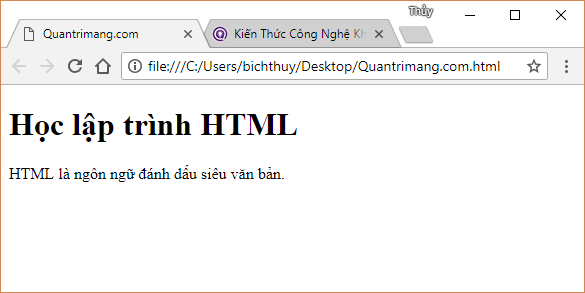
A browser interprets HTML and displays the resulting page.
Elements, tags, and nesting
The terms tag and element are related but not identical. Tags are the markup characters, such as <h1> and </h1>. The complete unit, including tags and content, is the element.
Elements can be nested inside other elements. Close nested elements in the reverse order in which they were opened:
<p>Read the <a href="/guide">beginner guide</a>.</p>Correct nesting helps browsers, assistive technologies, and search engines understand the page. Use headings in a logical order and choose elements for their meaning, not only for their default appearance.
The head and body of a page
The <head> holds information about the document, such as its title, character encoding, stylesheet links, and certain metadata. The <body> holds the visible content readers interact with.
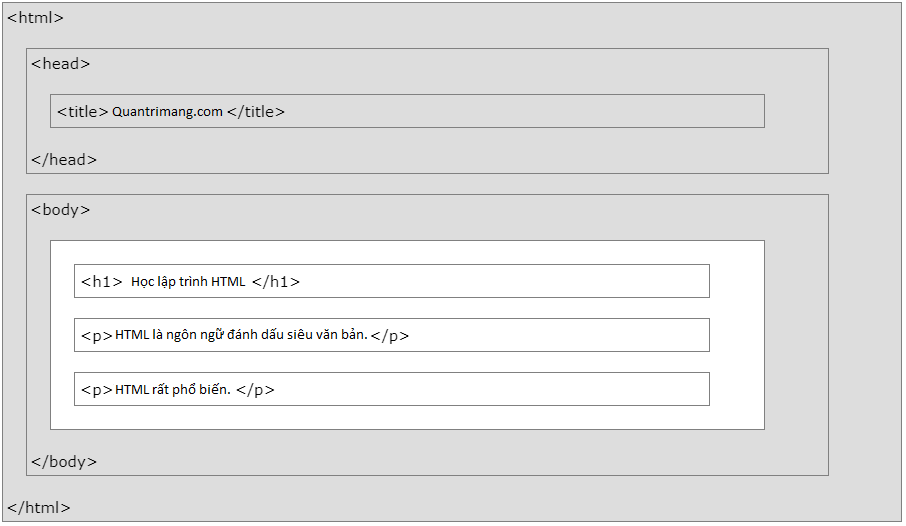
The main parts of a simple HTML document.
A brief history of HTML
Tim Berners-Lee developed HTML as part of the early World Wide Web. The language expanded over time from a small set of document-markup features into the foundation for modern web pages. Current HTML is maintained as a living standard, so developers generally write modern HTML instead of targeting a numbered HTML version.
How to start learning HTML
Create a file named index.html, paste the basic document example into it, save the file, and open it in a browser. Change the heading, add paragraphs and links, and refresh the browser to see the result.
When working with an old website, see how to convert HTML4 markup to HTML5. You can also compare free HTML editing tools before choosing an editor for practice.
Related Articles
 What Is HTML: Introduction to HTML4 minutes read
 What Is HTML: Basic HTML Examples for Beginners3 minutes read
 5 Steps to Learn a Dynamic HTML Web Component Profile10 minutes read
 Title in HTML5 minutes read
 17 Simple HTML Codes You Can Learn in 10 Minutes13 minutes read
 Why You Should Go Gmail Basic HTML: Why and How4 minutes read
Reader Comments 0
Sign in with email or Google to join the discussion.