Table of Contents
This guide covers style properties in HTML with practical context and easy-to-follow details. Use it to understand the subject and apply the information confidently.
To define the style for the element in HTML, we use the style attribute, which has the following structure.
- Dactinh is the property (property) of CSS
- Giri is the value of CSS
See also: How to use CSS to style HTML pages
Background Color in HTML
Thebackground-colorIs used to define the background color for elements in HTML. This is an example of setting a blue background color for the page.
Tipsmake Network Administrator
Network administrator
Text Color in HTML
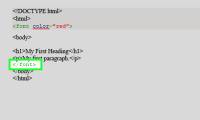
ThecolorFeature is used to define the font color for elements in HTML.
N Hoc HTML
Paragraph h
Font in HTML
Thefont-familyIs used to define the font used for HTML elements.
Learn HTML Tren Tipsmake.
Study HT
Font Size in HTML
Thefont-sizeIs used to define the font size for HTML elements.
Hoc HTML Tren Tipsmake.
They
Align Text in HTML
Thetext-alignIs used to align text for elements in HTML.
Van Ban Nam Giua Trang. Text Is in the Middle of the Page.
Text is in the middle of the page.
 Show all the above code on Chrome browser
Last lesson: Text in HTML
The following article: Format text in HTML
FAQ
What should I check before following these steps?
Confirm device and software compatibility, save important data, and make sure you have the required permissions, files, and account access.
Why might the process not work?
Common causes include outdated software, missing permissions, incompatible hardware, an unstable connection, or completing a step in the wrong order.
Can I undo the changes if necessary?
That depends on the tool or setting. Use built-in restore options when available, keep a backup, and record the original configuration first.





Reader Comments 0
Sign in with email or Google to join the discussion.