Table of Contents
This guide covers quote elements in HTML with practical context and easy-to-follow details. Use it to understand the subject and apply the information confidently.
Element for Short Quotes
PeoplethườngSay:Love is a little dead in the heart.
Element
For quotes
ElementDefine an excerpt from another source. The browser will often back up.
This is a quote from iSEE website:
The Institute for Social, Economic and Environmental Studies (iSEE) is a science and technology organization. We work for the rights of minority groups in society, aimingđếnA civilized, prosperous, free, equal society where everyone is treated fairly and respected human values.
Element for Abbreviation
ElementUsed to define acronyms or words created with the first letter of other words.
Indicate very useful acronyms for browsers, language translation software and search engines.
title="Tổ chức y tế thế giới">WHO được thành lập vào năm 1948.
Element
For contact informationElement
Used to define contact information (owner / author) of text or article. This element is usually displayed in italics. Most browsers will break the line before and after this element.
Viếtby Vu An. Access at: TipsMake.com Hanoi Vietnam
Element for the Title of the Work
ElementOften used to define the title (name) of a work. Usually the browser displays this element in italics.
diênIs the work of Vincent van Gogh. Drawn in 1889.
Element for
ElementBi-directional override (bi-directional override) is used to define directional override, used to override the direction of the current text.
dir = "rtl"> This sentence will be written from right to left.
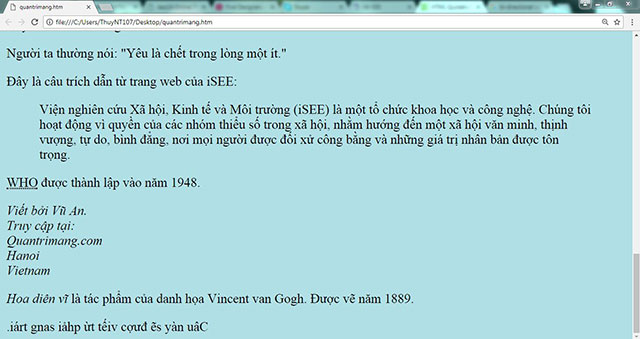 The browser displays the HTML code fragments written above
Previous article: Formatting text in HTML
The following article: Comment tags in HTML
FAQ
What should I check before following these steps?
Confirm device and software compatibility, save important data, and make sure you have the required permissions, files, and account access.
Why might the process not work?
Common causes include outdated software, missing permissions, incompatible hardware, an unstable connection, or completing a step in the wrong order.
Can I undo the changes if necessary?
That depends on the tool or setting. Use built-in restore options when available, keep a backup, and record the original configuration first.
Related Articles
 HTML Elements: Tags, Nesting, and Structure4 minutes read
 Elements of the Form in HTML: A Practical Guide3 minutes read
 Image Img in HTML8 minutes read
 Block and Inline Elements in HTML: What You Need to Know3 minutes read
 Introduction to HTML5: Explained3 minutes read
 Input Element Attributes in HTML: A Practical Guide8 minutes read
Reader Comments 0
Sign in with email or Google to join the discussion.