Here's what you need to know about this feature.
What Is an Instagram Broadcast Channel?
Instagram introduced broadcast channels in February 2023 and began rolling out the feature worldwide throughout the year. Creators now have the option to invite followers to their broadcast channel.
Broadcast channels allow you to have a more exclusive and personalized experience with your favorite creators, with access to a special feed dedicated to followers not on your Instagram page creator's own. Think of a broadcast channel as a variation of exclusive content but at no cost.
What Can You Do in Instagram Broadcast Channels?
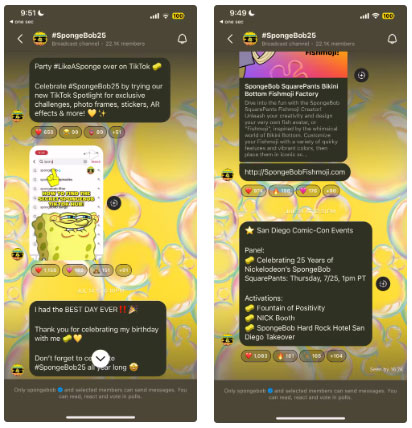
As a member of a broadcast channel, you can receive exclusive messages from your favorite creators. These messages can range from creators sending feed posts to increasing engagement or revealing information about upcoming collaborations or product launches.
You can also participate in polls and respond to messages, but you cannot reply to creators. For example, broadcast channel SpongeBob SquarePants shared information about events at San Diego Comic Con.
How to Join Instagram Broadcast Channel
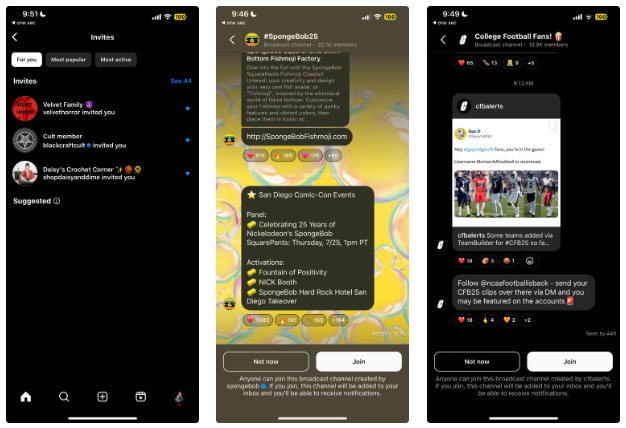
If you want to join the broadcast channel, go to your Instagram notification by clicking the heart in the upper right corner of the screen and click broadcast channel invite. From here, you can see the accounts that sent you invitations, the most popular and most active broadcast channels.
Click on the broadcast channel you want to join and select Join . Now, you will receive notifications from the broadcast channel. You can also check if an account has a broadcast channel by visiting the account's page and looking for the option to join a community or channel at the bottom of their profile.



Reader Comments 0
Sign in with email or Google to join the discussion.