Table of Contents
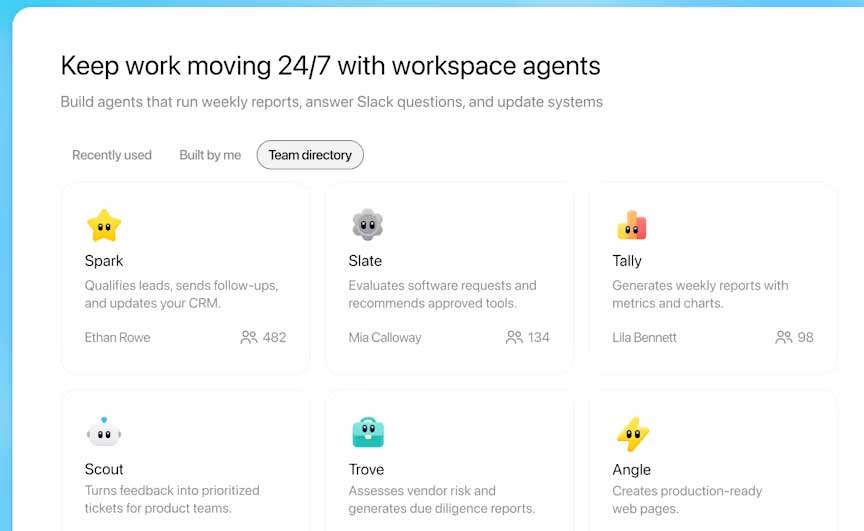
ChatGPT workspace agents are shared agents that can carry out repeatable, multi-step work using connected apps, skills, memory, schedules, and team sharing. Instead of only answering a prompt, an agent can gather authorized information, transform it into a defined output, and deliver or save that result through an enabled app.
OpenAI currently describes workspace agents as a research preview for ChatGPT Business, Enterprise, and Edu. Availability depends on the workspace, rollout, administrator settings, role-based access, and enabled apps. If the Agents area is missing, an administrator may need to enable the feature or grant the appropriate role.
How a workspace agent differs from a normal chat
| Normal chat | Workspace agent |
|---|---|
| Instructions are usually given for the current conversation. | Reusable instructions define a repeatable job. |
| The user starts each request manually. | The agent can also run on a schedule or through a supported channel. |
| Tools are chosen for that session. | Apps and permitted actions are configured as part of the agent. |
| Output format can vary unless the user specifies it again. | A skill can package a consistent method, template, files, and scripts. |
| Sharing means sharing a conversation or result. | The agent itself can be shared or listed in the workspace directory when allowed. |
Workspace agents are described by OpenAI as an evolution of GPTs for work across tools. They are not employees, and a role name such as “sales analyst” does not establish professional judgment or accountability. A person or team should own each agent's instructions, access, tests, and outputs.
Example: a meeting-preparation agent
A sales team could create an agent that checks tomorrow's authorized calendar events, skips internal meetings, reads relevant customer notes from SharePoint, searches for recent public company information, writes a meeting brief, saves it to SharePoint, and emails a summary. OpenAI uses this workflow in its official workspace-agent cookbook.
The useful part is not the “digital colleague” label; it is the explicit workflow. Every source, action, output, and delivery channel can be reviewed separately.
Before you build
Ask the workspace administrator to confirm:
- Workspace agents are enabled for the organization.
- Your role is allowed to create agents and, if needed, publish or share them.
- The required apps—such as Google Calendar, Gmail, SharePoint, or Slack—are approved and enabled.
- The connected systems contain the accounts, folders, channels, and records the workflow actually needs.
Do not begin by connecting every available tool. Write down the minimum data and actions required for one useful outcome.
How to create a workspace agent
1. Define one repeatable job
Open the Agents area in ChatGPT and start a new agent or a suitable template. In the conversational builder, describe:
- Trigger: on demand, a schedule, Slack, or an external event.
- Inputs: which calendar, folder, channel, record type, or user request it should use.
- Rules: what to include, exclude, and never do.
- Output: the exact document, summary, table, message, or update expected.
- Destination: where the result should be saved or sent.
- Failure behavior: when to stop, ask a person, or report missing data.
A bounded instruction such as “prepare tomorrow's external-customer meeting briefs and save them to this SharePoint folder” is easier to test than “help the sales team.”
2. Review the generated configuration
The builder can draft a name, description, instructions, connected apps, and a skill. Treat that first draft as configuration to inspect, not as a finished deployment. Remove unnecessary permissions, ambiguous wording, and unsupported assumptions.
3. Configure app authentication and actions
Open each app configuration and review both the account type and the allowed actions:
- End-user account: each user authenticates their own account, so the agent works with that person's authorized data.
- Agent-owned account: the agent uses a shared or service account. Anyone allowed to use the agent may be able to reach resources available to that account, subject to the configured actions and source-system permissions.
Use the least access necessary. A calendar-reading workflow needs read access, not permission to delete events. If an agent only summarizes records, do not give it bulk write or delete actions. OpenAI notes that administrators can enforce connector-action restrictions at workspace level.
4. Add a skill for consistent output
A skill packages instructions, resources, and optional scripts for a reliable workflow. For example, a meeting-brief skill can include the required headings, research checks, tone, source rules, and a sample brief. In the agent view, use Add skill to upload an existing skill or create one with the built-in builder.
Skills should contain durable process guidance, not passwords, access tokens, or customer data copied merely for convenience. If you are comparing no-code approaches, see our overview of no-code AI agent platforms.
5. Decide whether the agent needs memory
Workspace-agent memory provides a persistent folder where the agent can save notes, drafts, and outputs across its runs. OpenAI's current example says this memory is per end user rather than shared among everyone using the agent. Enable it only when the workflow benefits from continuity, and define what may be retained and when it should be removed.
6. Test in Preview
Use Preview or Try in ChatGPT before scheduling or sharing. Test more than the happy path:
- normal input with complete data;
- missing files, empty calendars, and duplicate records;
- an unauthorized folder or action;
- conflicting or malicious instructions inside connected content;
- a write action aimed at the wrong destination;
- a source that is stale or unavailable.
Compare outputs with a trusted human-created example, inspect the actions and sources used, and revise the instructions, app scopes, or skill. When first created, an agent is available only to its creator.
7. Add a schedule only after tests pass
From the agent screen, choose Schedule and define the cadence and run instructions. Schedule a time that leaves room for human review before the result is needed. Include behavior for holidays, empty input, and partial failure so a recurring run does not quietly produce misleading output.
8. Share through approved channels
In Channels, enable ChatGPT sharing if your role permits it. You can distribute a link or list the agent in the company directory. Colleagues may be allowed to chat with the agent or duplicate it into an editable copy; OpenAI's current documentation says multiple users cannot edit the same agent simultaneously.
Slack requires approval in both the ChatGPT workspace and the Slack workspace. Connected accounts still matter after sharing: end-user connections require each colleague to authenticate, while an agent-owned connection exposes the capabilities granted to the shared account.
Trigger a published agent from another system
OpenAI also documents a Workspace Agents API for server-side triggers. It uses a Workspace Agent access token provisioned through the ChatGPT admin flow, not an ordinary OpenAI Platform API key. The token is scoped to Workspace Agents API operations.
A published agent can accept an asynchronous trigger at api.chatgpt.com. The API returns 202 Accepted and a ChatGPT conversation URL. Run-status polling is currently beta, and the agent's response cannot currently be retrieved directly through the API. See the official guides to triggering workspace-agent runs and workspace-agent access tokens before building an integration.
Security and governance checklist
- Name an owner: someone must maintain instructions, skills, connections, schedules, and tests.
- Separate read and write access: start read-only and add specific actions only when the business value justifies them.
- Use narrowly scoped accounts: a service account should not inherit broad folders or administrative rights unrelated to the workflow.
- Require human review where consequences matter: especially before sending external communications, deleting data, changing financial records, or publishing decisions.
- Test connected-content attacks: documents, messages, or webpages can contain instructions that conflict with the agent's job.
- Audit failures and changes: review run outcomes, connector changes, shared access, and unexpected data sources on a defined cadence.
- Provide a stop path: document how to disable a schedule, revoke a token, disconnect an account, and replace an owner.
Do not assume that every sensitive action automatically requires confirmation. Actual behavior depends on workspace policy, connector configuration, the action, and the channel. Configure and test the approval boundary you need.
Choose the right automation surface
Workspace agents are a good fit when a team wants to build through natural language, share the result inside ChatGPT, use approved connected apps, and repeat the workflow. A visual API Agent Builder or a coded Agents SDK may be a better fit when developers need application-specific interfaces, typed inputs and outputs, custom deployment, or deeper programmatic control.
For a broader view of business products, compare AI workspace platforms and AI agent-building software. Whatever surface you choose, the quality of the workflow depends on clear scope, least-privilege access, realistic tests, and accountable human ownership.
Related Articles
 TOP best AI Workspace platforms16 minutes read
 Overview of AI-Based Agent Creation7 minutes read
 7 Essential Google Workspace Features to Help You Work Faster8 minutes read
 Google Launches New Tool to 'Woo' Business Users from Microsoft: Key Details4 minutes read
 How Real Estate Agents Can Benefit from CRM8 minutes read
 How to Work with Workspace in GNOME5 minutes read
Reader Comments 0
Sign in with email or Google to join the discussion.