Table of Contents
This guide provides a clear, practical overview of vulnerabilities discovered in many web browsers that allow, with useful context, important details, and straightforward takeaways for everyday readers.
In fact, certain apps, when installed, create a custom URL scheme that the browser can use to launch URLs in those specific apps.
For example, the custom URL scheme for the popular online conferencing application Zoom is zoommtg:// which, when opened, prompts the browser to launch the Zoom client, as shown in the illustration below. .

There are over a hundred different custom URL handlers configured by the apps, including many well-known names like Slack, Skype, Spotify, Zoom, vscode, Epic Games, Telegram, Discord, Slack , Steam, Battle.net, Xcode, NordVPN, Sketch, Teamviewer, Microsoft Word, WhatsApp, Postman, Adobe, Messenger, Figma, Hotspot Shield, ExpressVPN, Notion or even iTunes.
Browser tracking using URL scheme
A team of security researchers from FingerprintJS recently found a vulnerability that allows websites to track users across many different browsers, including popular names like Chrome, Firefox, Microsoft Edge , Safari and even Tor.
To perform cross-browser tracking by taking advantage of the URL scheme, a website would have to build a profile of the apps installed on the target's device by attempting to open handlers Their known URL, and especially check if the browser launches the prompt.
If a prompt is given to open the application, it can be assumed that a particular application is already installed. By testing different URL handlers, a script can use detected apps to create a unique profile for your device.
Since the apps installed on the device don't change no matter what browser you're using, this could allow the script to track the user's browser usage on both Google Chrome and the hidden browser name like Tor.
To test this vulnerability, researchers at BleepingComputer tried accessing a demo website at Schemeflood.com with Microsoft Edge - where a script launches URL handlers for multiple applications to determine if they installed or not.
The results showed that a unique identifier was displayed on the user's profile. In particular, this identifier is completely null for tests using other browsers such as Firefox, Google Chrome and Tor. This is the code that websites can use to track users.
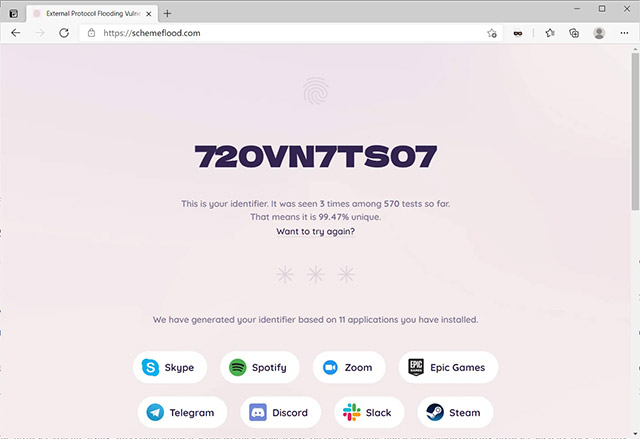
Notably, out of the four major browsers tested, only Google Chrome has added mitigations to prevent this type of attack. Specifically by preventing multiple attempts to use URL handlers without user action (interaction). However, researchers have also found that activating a built-in Chrome extension, such as PDF Viewer, bypasses this mitigation effort.
In related news, Microsoft Edge program manager Eric Lawrence acknowledged the existence of this attack, and said that Chromium and Microsoft engineers are actively working on fixing the bug.
Key Takeaways
Use the information above as a practical reference for vulnerabilities discovered in many web browsers that allow. Review each step carefully, confirm any requirements, and choose the option that best fits your situation.
FAQ
What does this guide explain about Vulnerabilities Discovered in Many Web Browsers That Allow?
It explains the main concepts, practical considerations, and useful steps related to vulnerabilities discovered in many web browsers that allow without requiring advanced knowledge.
Who can benefit from learning about Vulnerabilities Discovered in Many Web Browsers That Allow?
This information is useful for readers who want a clear overview, practical guidance, and reliable steps related to vulnerabilities discovered in many web browsers that allow.
What should I check before applying this information?
Review the requirements, confirm that your device, software, or situation matches the instructions, and back up important data before making major changes.
Related Articles
 The Mail App on iOS Has Serious Vulnerabilities3 minutes read
 28 Harmful Applications That Need to Be Immediately Removed from Your5 minutes read
 Protect Your Web Browser15 minutes read
 The Computer Is Capable of Being Hacked with Just 1 Click If4 minutes read
 Microsoft Expert Discovered a Series of Serious Code4 minutes read
 5 Types of Mobile Applications Should Not Be Installed on10 minutes read
Reader Comments 0
Sign in with email or Google to join the discussion.