Table of Contents
BitTorrent is a peer-to-peer protocol for distributing files among many computers. Instead of every recipient downloading the entire file from one central server, participants exchange pieces of the file with one another. The technology has legitimate uses, including distributing open-source software, public datasets, and files you own or are authorized to share.
BitTorrent itself does not determine whether shared material is lawful or safe. Before downloading anything, confirm that you have permission to obtain it and that the publisher or project provides the torrent. Avoid third-party indexes that advertise unauthorized media, use deceptive download buttons, or ask you to disable security protections.
How BitTorrent differs from a direct download
With a conventional web download, your device typically requests a file from a particular web server. If many users request a large file at once, that server and its connection carry the load.
With BitTorrent, the file is divided into pieces. A client can obtain different pieces from multiple participants and can upload pieces it already has. This distributes the transfer workload across the swarm. A torrent still needs discovery and coordination mechanisms, but it does not require one participant to send every byte to every downloader.
Torrent files and magnet links
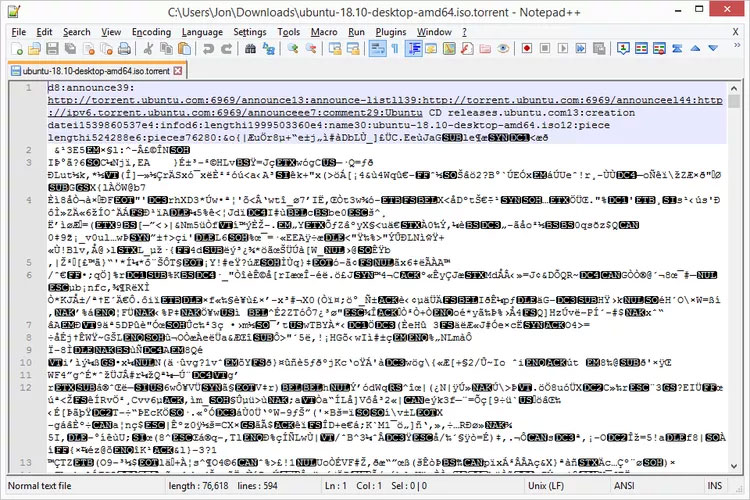
A .torrent file contains metadata that a BitTorrent client uses to identify and verify the shared content. It can include filenames, sizes, piece hashes, and tracker information. It does not normally contain the actual payload files.
A magnet link identifies content through a hash and can give the client enough information to discover peers and retrieve the remaining metadata. Clicking either format requires a compatible client; compare established options in this guide to BitTorrent clients for Windows.
The screenshot below shows why opening a torrent file in a normal text editor is not a useful way to download or inspect its payload.
What happens after you add a torrent
- The client reads the torrent metadata or magnet identifier.
- It discovers other participants through the mechanisms available for that torrent, which may include trackers, a distributed hash table, or peer exchange.
- The client requests available pieces from peers and verifies received pieces against the torrent metadata.
- As pieces are completed, the client may upload them to other peers.
- Once every verified piece is present, the client assembles the complete file or files and can continue sharing them.
Availability depends on the swarm. If no participant has a complete copy—or the missing pieces are not available—the download may never finish. A high peer count also does not guarantee that a torrent is authentic or safe.
Common BitTorrent terms
- Peer
- A participant connected to the swarm. A peer may download and upload pieces at the same time.
- Seed or seeder
- A participant that has a complete copy of the shared content and continues uploading it.
- Swarm
- All peers participating in the same torrent.
- Tracker
- A service that helps clients find peers. A tracker generally coordinates discovery; it does not necessarily host the payload.
- Client
- The application that opens torrent metadata, joins the swarm, verifies pieces, and manages downloads and uploads.
- Piece
- One block of the shared content. Piece hashes help the client detect corrupted or altered blocks during transfer.
Legal and security risks
A torrent may point to copyrighted material shared without authorization, malicious software, or a file that does not match its description. Laws and licenses vary, so use torrents supplied by the rights holder or another source that clearly authorizes distribution.
Public BitTorrent participation can also expose a participant’s network address to other peers in the swarm. Treat the activity as public and do not assume that a torrent client makes you anonymous.
Checks to make before downloading
- Verify the publisher: begin from the project’s official website and follow its torrent or magnet link.
- Confirm the license: check that the file is public domain, openly licensed, your own work, or otherwise authorized for distribution.
- Inspect the expected contents: review the file list before starting and avoid unexpected executables or scripts.
- Reveal full extensions: a name such as
movie.mp4.exeis an executable, not a video. See how Windows handles file extensions. - Verify a published checksum: if the official source provides a SHA-256 value, compare it with the completed download.
- Scan before opening: keep security software enabled and scan downloaded files, while remembering that a clean scan is not a guarantee.
Choose sources, not “top torrent sites”
A fixed ranking of torrent indexes becomes unreliable quickly: domains change, sites close, clones appear, and old reputation claims stop being meaningful. A “verified” badge or a large number of comments cannot establish that a file is licensed, authentic, or malware-free.
Use the official download page for the software, dataset, archive, or other content you actually need. When that publisher offers BitTorrent, its link gives you a stronger basis for checking provenance and any published checksum. If the rights holder does not offer or authorize the download, look for a lawful source rather than a mirror or index.
Sharing your own files
When you have the right to distribute a file, create torrent metadata with a reputable client, keep the original data in place, and seed it long enough for other authorized recipients to obtain every piece. Provide a clear filename, description, license, and checksum through a trusted channel so recipients can confirm what they are downloading.
Related Articles
 Top 22 Most Popular Torrent Sharing Sites15 minutes read
 5 Best Torrent Clients for Windows8 minutes read
 9 Tools to Download the Best Torrent Files: Torrent Download Site6 minutes read
 4 Ways to Bypass Blocked Torrent Connection5 minutes read
 The Pirate Bay Hack: What Happened to 4 Million Users3 minutes read
 Instructions for Creating Torrent Files with Utorrent: Tutorials3 minutes read
Reader Comments 0
Sign in with email or Google to join the discussion.