Table of Contents
AI meeting assistants can transcribe calls, draft summaries, extract action items, and make past conversations searchable. The best tool depends less on a generic ranking than on how it captures audio, which meeting platforms it supports, where notes need to go, and what privacy controls your organization requires.
Quick comparison
| Tool | Best fit | Capture approach | Important consideration |
|---|---|---|---|
| Fireflies.ai | Shared meeting library, collaboration, topic tracking, and broad integrations | Meeting bot, uploads, and supported apps | Advanced AskFred and AI Skills can consume separate AI credits |
| Granola | People who write their own notes and want AI to expand them | Bot-free device audio | No participant bot, but local capture still requires consent |
| Avoma | Sales and customer-success coaching | Meeting and calling integrations | Conversation and revenue intelligence are paid add-ons |
| tl;dv | Searching and reporting across many recorded meetings | Bot/extension integrations for Meet, Teams, and Zoom | Check plan limits for storage, integrations, and AI reports |
| Krisp | Bot-free notes plus real-time noise cancellation | Virtual audio device and optional meeting capture | Test audio latency and voice quality on your hardware |
Before recording: consent, privacy, and accuracy
Recording laws and workplace policies vary. Tell participants that the meeting will be recorded or transcribed, obtain any required consent, and provide a non-recorded alternative where appropriate. Do not invite a notetaker bot to a confidential call until the host and data owner have approved it.
Review data retention, model-training choices, regional hosting, encryption, deletion, SSO/SCIM, audit logs, and whether links are public by default. A “bot-free” recorder is less visible to participants, not exempt from consent rules.
Transcripts can misidentify speakers, names, numbers, and decisions. A human owner should verify the summary and action items before they are distributed or written into a CRM.
Fireflies.ai: shared meeting knowledge and collaboration
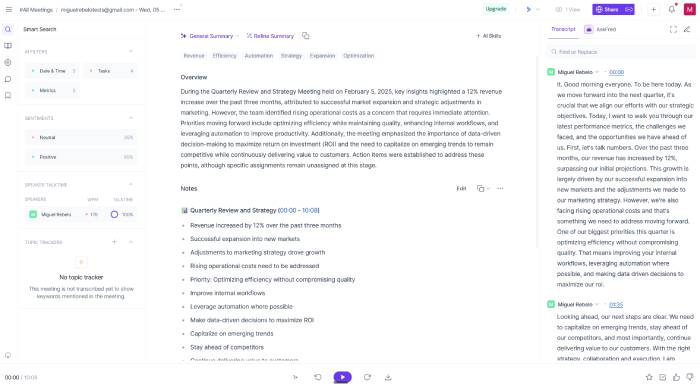
Fireflies.ai records or imports conversations, produces transcripts and summaries, and organizes meetings in a searchable team workspace. It is a strong fit when colleagues need comments, clips, topic trackers, CRM sync, and a shared archive rather than private notes on one device.
AskFred can answer questions about a meeting, while AI Skills automate specialized outputs. Check the credit model: Fireflies documents core transcription and summaries separately from some advanced AI actions. Also review which meeting platforms require a bot and how that bot appears to guests.
Granola: manual notes enhanced by the transcript
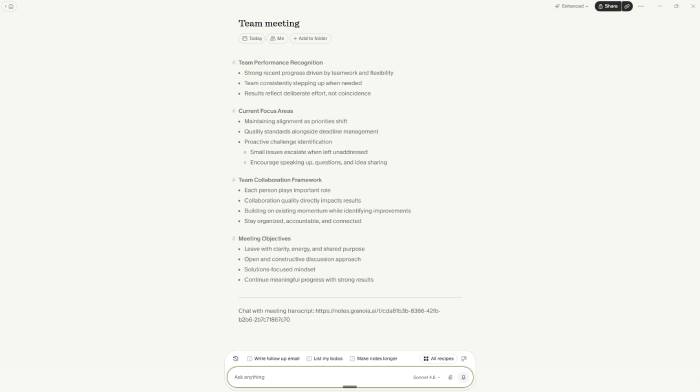
Granola is designed for people who want to stay in control of the notes. You can jot down an agenda, decisions, or questions during the call, then use the captured transcript to expand those notes into a structured summary.
Granola captures device audio without joining as a visible meeting bot and works across meeting platforms. This reduces bot-management friction, but you must still notify participants. It is a good choice for interviews, one-to-ones, and research calls where your own observations matter as much as the transcript.
Avoma: conversation intelligence for revenue teams
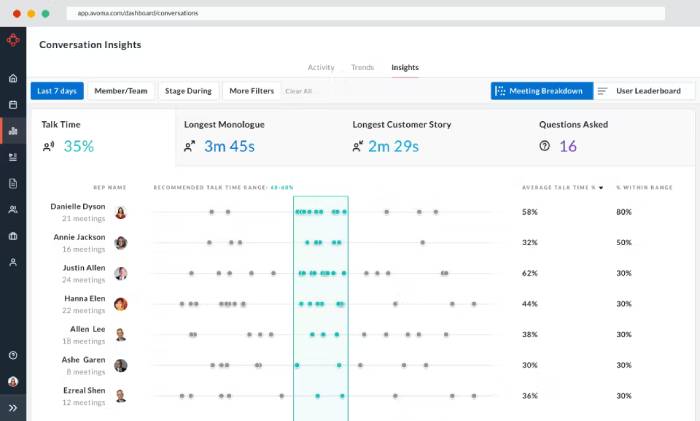
Avoma goes beyond personal notes. Its conversation-intelligence features help sales and customer-success managers review talk ratios, topics, objections, competitor mentions, and coaching examples across many calls.
That depth can be excessive for someone who only needs a weekly meeting summary. Avoma is easier to justify when its outputs feed a CRM, coaching process, forecasting workflow, or standardized scorecard. Confirm which capabilities require the base meeting-assistant plan and which are separate add-ons.
tl;dv: cross-meeting search and recurring reports
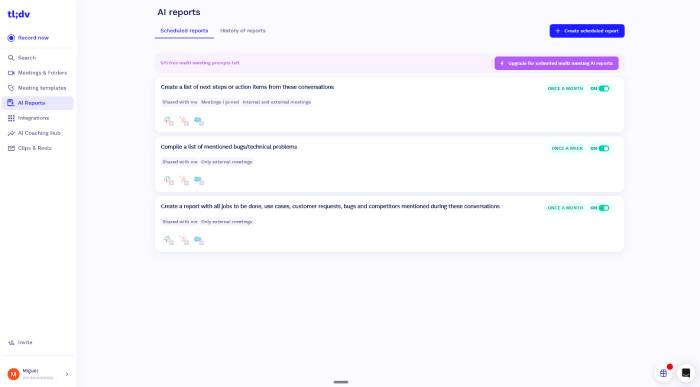
tl;dv focuses on Zoom, Google Meet, and Microsoft Teams recordings that can be searched and analyzed together. Its AI tools can answer questions across several meetings and create recurring reports for selected folders or customer groups.
This is useful for product research, sales reviews, and teams that repeatedly ask the same questions of calls. During a trial, test speaker labels, exact-quote search, filters, CRM mapping, and what happens when a bot cannot join. Do not assume every “unlimited” claim includes every AI analysis or storage feature.
Krisp: clearer audio and bot-free capture
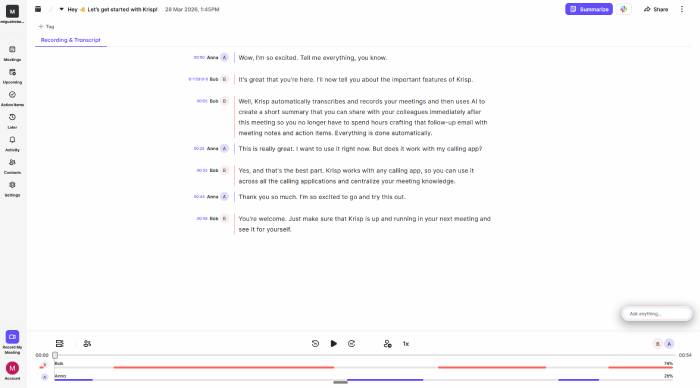
Krisp installs virtual microphone and speaker devices that can remove background noise during calls. Its Meeting AI plans also cover bot-free transcription, recording, summaries, and action items.
Krisp is especially useful when poor audio is the main problem. Test it with your headset, laptop, conferencing app, and typical background noise. Aggressive filtering can occasionally soften speech or add latency, so compare a short recording with and without processing before deploying it broadly.
How to choose the right meeting assistant
- Choose the capture method: visible bot, browser extension, desktop audio, phone app, or uploaded recording.
- List the required destinations: calendar, Slack, Notion, CRM, task manager, or document repository.
- Test real audio: accents, technical vocabulary, several speakers, background noise, and screen-sharing discussions.
- Verify the output: speaker labels, decisions, dates, owners, exact quotes, and action-item deadlines.
- Check governance: consent, retention, deletion, administrator controls, and guest access.
- Calculate total cost: seats, storage, AI credits, integrations, revenue-intelligence add-ons, and annual commitment.
A short pilot with two or three meeting types is more reliable than a feature checklist. Keep the tool that produces notes people actually review and reduces follow-up work without creating a privacy or accuracy problem.
Related Articles
 7 Useful Things AI Assistants Can Do—Safely13 minutes read
 Instructions on How to Use the Zoom Meeting Application from a to Z6 minutes read
 Click: How to Record a Zoom Meeting on PC or Mac6 minutes read
 Why Granola Is the Perfect AI-Powered Meeting Assistant: Explained7 minutes read
 Everything About the Emergency Meeting Button in Among Us4 minutes read
 Top 5 Best Genuine Online Meeting Microphones: Guide7 minutes read
Reader Comments 0
Sign in with email or Google to join the discussion.