Table of Contents
This updated guide examines The Edge Chromium Browser Will Be Released on January 15, and Is and organizes the essential facts, background, and practical takeaways in clear American English.
New features of the Edge Chromium browser will support the business. For example, to find a colleague, an office address or even define an acronym for a company name, users simply enter the keyword into the address bar of the browser.
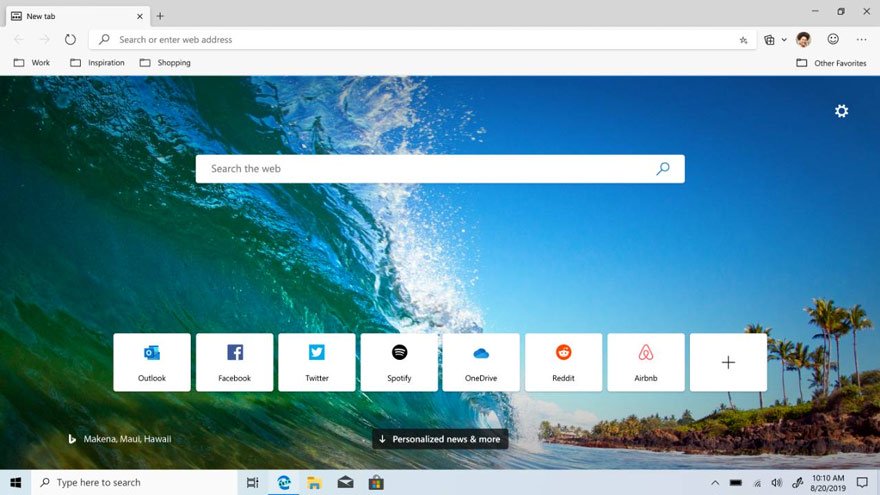
One of the notable new features on the new Edge is called 'Collections', which allows users to export collected content from the internet to Excel or Word. This feature will be useful for online shoppers who want to compare multiple products in an Excel table.
Edge Chromium will support platforms including Windows 7, Windows 8, Windows 10 and Mac OS.
Today, Microsoft has allowed users to download the version of Edge Chromium 'release candidate' to try the session by following the link below. Please download and experience.
https://www.microsoftedgeinsider.com/en-us/Earlier, Microsoft also announced the new Edge browser logo.
- Please download the all-new Microsoft Edge stable version of Chromium 78 from the official Microsoft website
- Edge Chromium has supported Vietnamese, installed the Chrome extension
- Users cannot uninstall Edge browser on Windows 10
FAQ
What is The Edge Chromium Browser Will Be Released on January 15, and Is about?
It provides a structured overview of Edge Chromium, explains the main context, and highlights practical takeaways for readers.
Why does this topic matter?
Understanding the main concepts helps readers evaluate the issue, avoid common mistakes, and make better-informed decisions.
How should readers use this information?
Use the guidance as a practical starting point, confirm details that may have changed, and follow current product, safety, or security recommendations.
Related Articles
 Microsoft Edge May Rise to Second Place, Behind Google Chrome3 minutes read
 There Is an Edge Chromium Browser, Invite Download and Experience3 minutes read
 The Newly Launched Edge Chromium Browser Has an Installation3 minutes read
 Microsoft Edge Chromium Has Added Support for Arm643 minutes read
 Leaks Microsoft's New Chromium Edge Download Link4 minutes read
 Edge Chromium Is Adding Many Useful New Features3 minutes read
Reader Comments 0
Sign in with email or Google to join the discussion.