Table of Contents
This updated guide examines Radix 2: Switch from Base 2 to Base 16 and organizes the essential facts, background, and practical takeaways in clear American English.
Binary system (base system 2)
The numerical system based on 2 characters is a counting system that uses a quantitative position, has a base of 2. Each digit is called a bit. Due to the simple deployment of digital electronic circuits using logic gates, the binary system is used by almost all modern computers and computer-based devices.

Hexadecimal (base number 16)
Hexadecimal, often shortened to "hex", is a digital system made up of 16 characters. The standard number system is called a decimal number (base 10) and uses 10 characters: 0, 1, 2, 3, 4, 5, 6, 7, 8, 9. Hexadecimal uses numbers decimal and 6 extra symbols. No numerical symbols represent values greater than 10, so 6 sub-symbols are taken in the English alphabet, namely A, B, C, D, E and F.
Example of converting base 2 system to radix 16:
- (1110)2= 0Eh
- (111001)2= 39h
- (10011100)2= 9Ch
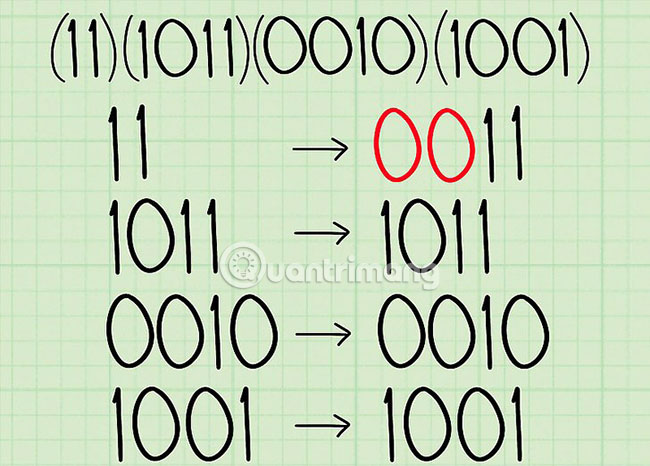
Table converts base 2 system to radix 16
System number 2 System number 160000 0 0001 1 0010 2 0011 3 0100 4 0101 5 0110 6 0111 7 1000 8 1001 9 1010 A 1011 B 1100 C 1101 D 1110 E 1111 F
Explore more:
- Switch from base 16 to base 2
FAQ
What is Radix 2: Switch from Base 2 to Base 16 about?
It provides a structured overview of radix 2, explains the main context, and highlights practical takeaways for readers.
Why does this topic matter?
Understanding the main concepts helps readers evaluate the issue, avoid common mistakes, and make better-informed decisions.
How should readers use this information?
Use the guidance as a practical starting point, confirm details that may have changed, and follow current product, safety, or security recommendations.
Related Articles
 Transfer from Base 10 to Base 163 minutes read
 Transfer from Radix 16 to Base 10: Switch from Base 16 to Base 103 minutes read
 How to Build an Effective Knowledge Base for AI Models25 minutes read
 Switch in C: What to Know5 minutes read
 Shift from Radix 16 to Radix 2: Switch from Base 16 to Base 23 minutes read
 Minecraft: a Must-Have in Every Survival Base4 minutes read
Reader Comments 0
Sign in with email or Google to join the discussion.