Table of Contents
This guide covers scratch protection for laptop covers with practical context and easy-to-follow details. Use it to understand the subject and apply the information confidently.
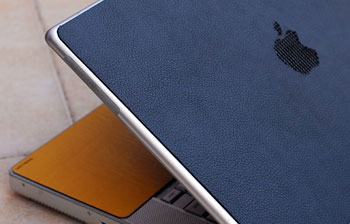 Cover the MacBook with leather Photo: Handheldvn .
There are many ways to prevent scratches such as plastic stickers, decals, decorative drawings. According to the experience of many people, to prevent scratches and still retain the original beauty of the machine, it is best to paste the plastic on the case. After the plastic paste, the laptop also looks glossy and cleaner. Currently, the cost of sticking a machine is quite cheap, about 30, 000-50, 000 VND. You can bring your device to stores that sell laptops, laptop accessories, or even motorbike stickers stores do this. The market also sells some Chinese laptop stickers, large panels of VND 80, 000. However, this type is usually not designed specifically, users have to bite themselves so the aesthetic is not high.
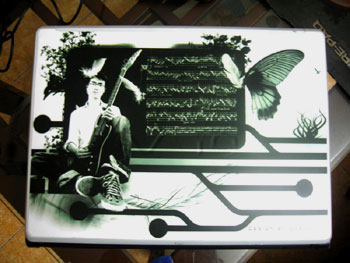 Draw the back of the machine.
The second way can be both scratch-resistant and decorative by sticking the decals. Some shops on Tue Tinh Street, Hue City (Hanoi) also let guests "design" the decals form for themselves, then print the grid of such patterns to fit the machine. The cost of decorating a laptop is pre-designed from 300 to 500, 000 VND, depending on the quality and area of print. Currently, there is a trend that many young people are being sucked into "drawing" laptop covers. As well as drawing phones, shoes, clothes, music players, you can bring your laptop to the store so they can decorate the entire exterior and around the screen, where the hands are placed in front of the keyboard. The designs are usually in advance, or the machine owner designs. The cost per drawing is equivalent to printing the decals or may be higher depending on the difficulty of the painting.
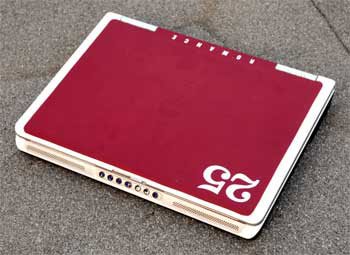 Dell laptop has been pasted Photo: Gizmodo .
Paste or draw does not affect the heat transfer of the machine much. According to Mr. Pham Van Quang, Aqua Laptop store technician (Nguyen Thai Hoc - Hanoi), stickers and decorative drawings do not affect much on the machine. He said that most of the current laptop lines are transferring heat through the fan, the casing is only hot in some areas, so the points sticking behind the screen, the place in front of the keyboard does not affect much. However, there are also some types of heat transfer through the casing. Therefore, when trying to paste a laptop, users also need to see where their computers transfer heat to determine the form of scratch protection accordingly. In addition, if the machine is concerned, users can buy heat sinks, priced at VND 150, 000 or more. The best way, according to Mr. Quang, is that users need to be careful, because anyway 'is durable at people'. Huy Nguyen
FAQ
What should I check before following these steps?
Confirm device and software compatibility, save important data, and make sure you have the required permissions, files, and account access.
Why might the process not work?
Common causes include outdated software, missing permissions, incompatible hardware, an unstable connection, or completing a step in the wrong order.
Can I undo the changes if necessary?
That depends on the tool or setting. Use built-in restore options when available, keep a backup, and record the original configuration first.
Related Articles
 Points to Know About the New Scratch 3.0 Version7 minutes read
 Basic Scratch Tutorial for Beginners5 minutes read
 Link Download Scratch 4616 minutes read
 13 Ways to Protect Laptops That Everyone Needs to Know7 minutes read
 Scratch: a Guide to Creating an Opening for a Project5 minutes read
 How to Make Snow Fall in Scratch9 minutes read
Reader Comments 0
Sign in with email or Google to join the discussion.