Table of Contents
You can remove a credit or debit card from your Apple Account in Settings > [your name] > Payment & Shipping on an iPhone or iPad. Select Edit, delete the payment method, and confirm. Removing a card does not cancel subscriptions or remove the same card from Apple Pay.
Remove a card on iPhone or iPad
- Open Settings and tap your name.
- Tap Payment & Shipping and authenticate if requested.
- Tap Edit, tap the delete button beside the payment method, and choose Remove.
Apple's current payment-method removal guide also covers Mac, Windows, and the web.
Remove a card on Windows
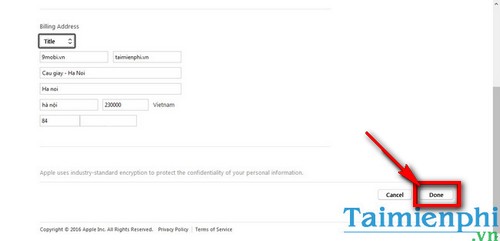
In the current Apple Music or Apple TV app, click your name at the bottom of the sidebar, choose View My Account, and sign in. Beside Payment Information, choose Manage Payments, edit the card, and select Remove Payment Method.
If your PC still uses iTunes, the older workflow is similar:
- Sign in to the correct Apple Account in iTunes.
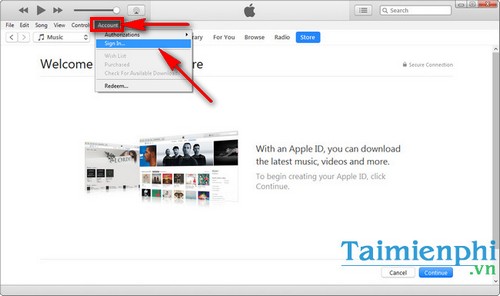
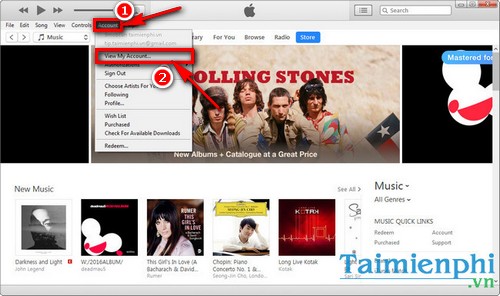
- Choose Account > View My Account.
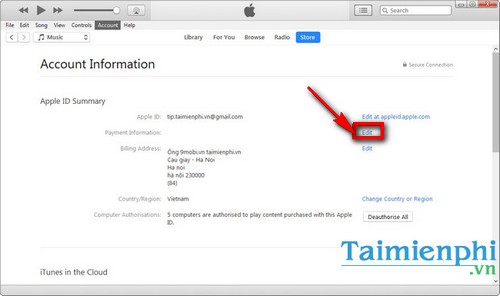
- Open the payment information controls.
Older iTunes versions displayed a None payment-type option; current screens normally show a Remove command instead.
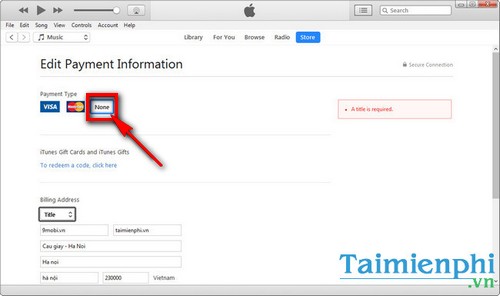
Save the change after confirming that the selected account and billing details are correct.
Why you may be unable to remove the card
- An unpaid balance: pay the outstanding charge or replace the card with another valid method.
- An active subscription: you may need to keep a payment method on file. Canceling a subscription and removing its payment card are separate actions.
- Family Sharing: a family organizer using purchase sharing may be required to maintain a valid method.
- A pending purchase or pre-order: wait until the transaction is settled or add another payment method first.
- Regional or installment requirements: some services and plans require an accepted payment method.
If the old card is invalid but Apple will not let you delete it, add the replacement first, move it to the top of the payment list, and then remove the old card. Apple's payment update instructions explain that order.
Important distinctions
Removing a payment method from the Apple Account stops it from being used for App Store, media, iCloud, and subscription billing on that account. It does not automatically cancel services already subscribed to. It also does not delete a card from Wallet; manage Apple Pay cards separately in Wallet or device settings.
If you do not recognize a charge, review purchase history and contact Apple or the card issuer instead of assuming that removing the card reverses the transaction. If the whole account is no longer needed, see how to delete an Apple Account. For account-security concerns, also review devices signed in to the Apple Account.
Related Articles
 Alibaba and Wechat Are About to Add a Feature That Will Allow3 minutes read
 Visa Launches Cryptocurrency Advisory Service3 minutes read
 Instructions for Registering an Apple Account Do Not Need to Enter a4 minutes read
 Getting 5 'Anonymous' Suspects in Ddos Attack4 minutes read
 Instructions for Opening Visa Prepaid Card, Registering for Paypal8 minutes read
 Disable the Icloud Account Change Function on iOS3 minutes read
Reader Comments 0
Sign in with email or Google to join the discussion.