Table of Contents
Hurry Up and Buy Data Packages on My Viettel to Receive Great Deals from Grab is easier to approach with a clear overview and reliable steps. This guide organizes the essential information, highlights practical details, and explains what to check along the way.
Key Takeaways
- Review information on receiving grab data purchase incentives on my viettel.
- Follow the steps to receive grab promotions from my viettel.
- Follow the recommended steps in order to avoid common mistakes with hurry up and buy data packages on my viettel to receive great deals from grab.
Information on Receiving Grab Data Purchase Incentives on My Viettel
Viettel and Grab offer subscribers who purchase a 7-day cycle package on the My Viettel app with package 4 incentives of up to 50% (maximum discount of 40,000 VND) to use GrabBike and GrabCar services. Applicable to mobile subscribers who successfully register for a 7-day cycle package on the My Viettel app (excluding the SD30S package).
Applicable subjects: All active prepaid and postpaid mobile subscribers.
Scope of application: Nationwide.
Offer expiry date: 31/07/2025
Promotion applies when customers successfully register for the package via Original Account / Bank Account / Original Account and Viettel++ points.
Each subscriber is entitled to the offer once during the entire program.
Promo code applies to customers using Grab's transportation service for the first time.
How to Receive Grab Promotions from My Viettel
Step 1:
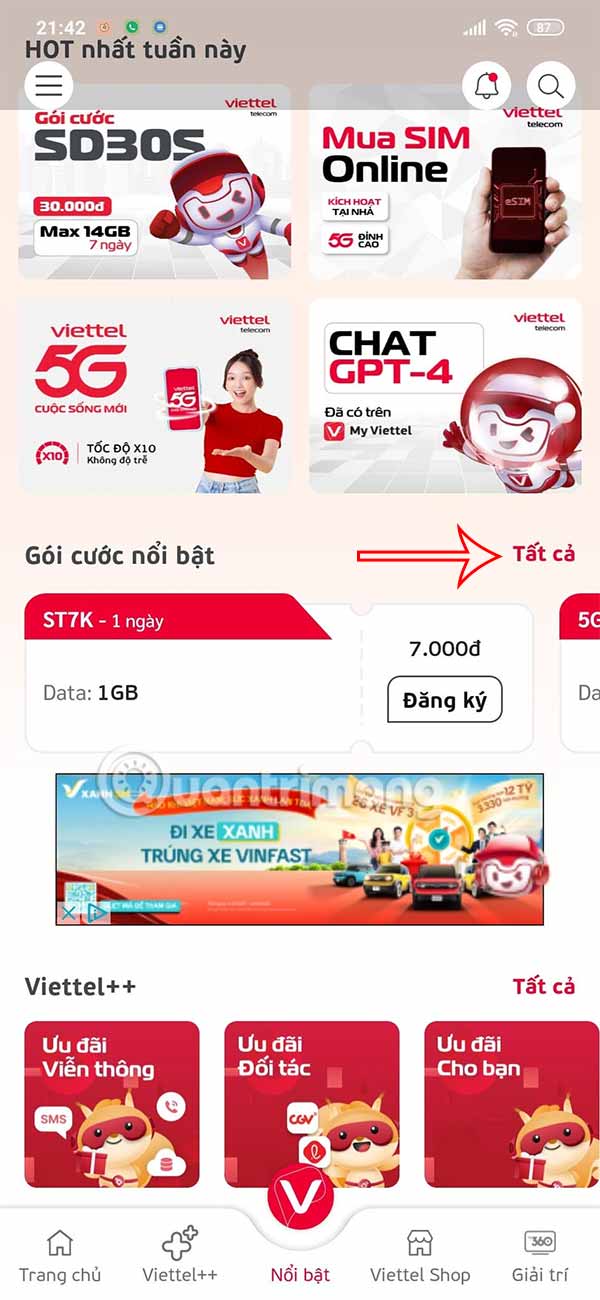
Access the My Viettel application, in the Featured Packages section, select All.
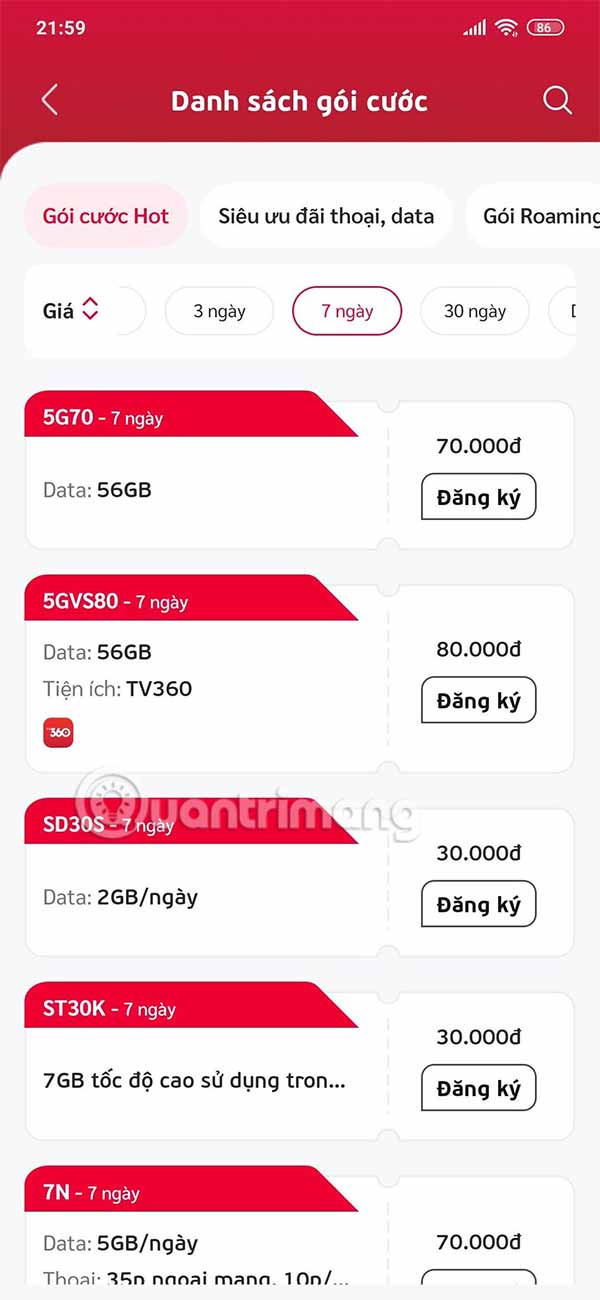
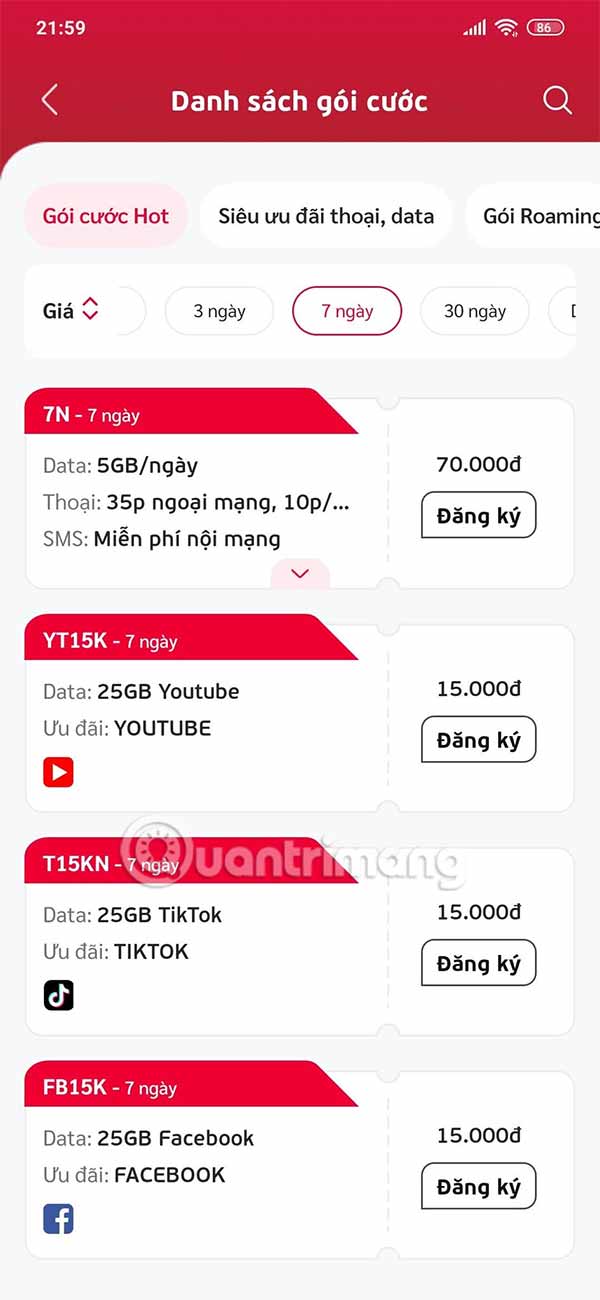
Find and select a 7-day subscription package (except SD30S package) and click Register. Then make payment as usual.
Step 2:
You select the registration link sent from Viettel's message after successfully registering for the data package as required by the program. Display the Grab application interface, click Redeem points. Here you click Confirm. At this time, the promotion code is sent to the My Promotions section.
Users click Use Now to book their first ride and use the promotional code they just received.
The promotion link is valid until July 15, 2025 and the promotion code expires on July 31, 2025. Customers need to install the Grab app before receiving the promotion.
Final Thoughts
The most reliable way to handle hurry up and buy data packages on my viettel to receive great deals from grab is to follow the process in order, verify each important setting, and test the result before moving on. Use the guidance above as a practical reference, then adjust the details for your device, software version, or specific goal.
FAQ
What should I know first about Hurry Up and Buy Data Packages on My Viettel to Receive Great Deals from Grab?
Viettel and Grab are collaborating to launch a program to give customers attractive gifts when purchasing data packages on the My Viettel app.
How do I get the best results with Hurry Up and Buy Data Packages on My Viettel to Receive Great Deals from Grab?
Use current software or equipment, follow the steps in order, review the recommended settings, and test one change at a time so you can identify what improves the result.
What should I do if Hurry Up and Buy Data Packages on My Viettel to Receive Great Deals from Grab doesn't work as expected?
Check compatibility, permissions, connectivity, and version-specific settings. Restart the relevant device or app, then repeat the process carefully before trying a more advanced fix.
Related Articles
 How to Register for 3G Viettel Packages6 minutes read
 Instructions for Registering V90 Package Is Only 90k to Receive the5 minutes read
 Instructions for Shooting Viettel Data for Other Subscribers5 minutes read
 How to Receive 10GB of Free Data When Changing SIM 4G Viettel5 minutes read
 How to Receive Free 15GB 4G, High Speed from Viettel, for All Subscribers?3 minutes read
 How to Check the Capacity of 4G Viettel Package5 minutes read
Reader Comments 0
Sign in with email or Google to join the discussion.