Table of Contents
This guide covers panasonic's first touch screen ultrabook with practical context and easy-to-follow details. Use it to understand the subject and apply the information confidently.
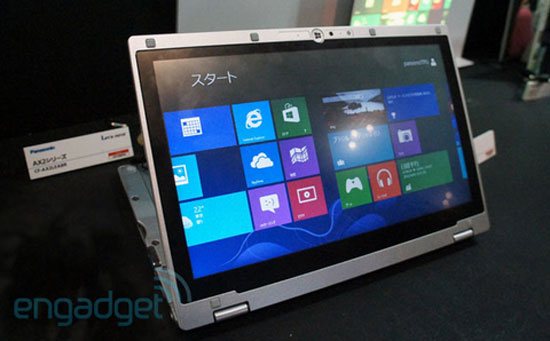 The AX series display has the ability to flip backwards flexibly (Photo: Engadget).
The product has two versions running Windows 8 and Windows 8 Pro. The AX series tap screen measures 11. 6 inches and has a resolution of 1, 366 x 768 pixels. Users can choose Core i5 processors with speeds of 1. 7 GHz or 1. 8 GHz or Core i7 1. 9 GHz. RAM and SSD of this model are 4 GB and 128 GB respectively. Support connections on Panasonic AX series include USB 3. 0, HDMI, headphone jack, Ethernet. In addition, this product is also integrated microphone and memory card reader.
According to Engadget , Panasonic also allows customers to choose to use hybrid hard drives instead of SSDs. In the AX series version, a hybrid hard drive is available, and the battery comes with a removable and larger capacity than usual.
Information on release dates in other markets has not been announced yet.
Actual Photo Panasonic AX Series Ultrabook
Panasonic's Ultrabook uses an 11. 6-inch screen.
The front panel has a built-in webcam.
The integrated connection ports focus on the left side
The machine can flip backwards in a V-shape.
. Thanks to flexible swivel joints.
1111111111111111
Real video Panasonic AX series ultrabook
FAQ
What should I check before following these steps?
Confirm device and software compatibility, save important data, and make sure you have the required permissions, files, and account access.
Why might the process not work?
Common causes include outdated software, missing permissions, incompatible hardware, an unstable connection, or completing a step in the wrong order.
Can I undo the changes if necessary?
That depends on the tool or setting. Use built-in restore options when available, keep a backup, and record the original configuration first.
Related Articles
 Sony Announced the Price of Ultrabook Vaio T14 and T15 Touch Screens4 minutes read
 Samsung Touch Screen Ultrabook Price from 16. 7 Million3 minutes read
 Ultrabook Touch Running Sony's Windows 8 Appears4 minutes read
 Panasonic Introduces Ultrabook Ultra-durable Flip Screen3 minutes read
 Aspire S7 Can Be Sold in the UK in Late September3 minutes read
 New Generation Ultrabooks Will Have 3D Touch Screens4 minutes read
Reader Comments 0
Sign in with email or Google to join the discussion.