Table of Contents
This guide covers panasonic's three-laptop battery pack with practical context and easy-to-follow details. Use it to understand the subject and apply the information confidently.
Japanese electronics maker has unveiled three more durable computers of the popular ToughBook series, including the ultra-portable W-series, the T series tap screen and the CF-F8 with straps. Easy to move. Like 'senior' CF-Y7, CF-F8 is equipped with a 14. 1-inch widescreen monitor. It uses an Intel Core 2 Duo SP9300 processor at 2. 26GHz. The total weight of the machine is 1. 66kg.
As its name suggests, the ToughBook CF-F8 can withstand the weight of 100 kgs on top and still work well if dropped from a height of 76cm. Panasonic designed for F8 set of keyboard and touchpad with water spill resistance. The CF-F8 supports Wi-Fi connectivity, Bluetooth, equipped with DVD card reader, integrated TMP security chip. Battery life is 6 hours after each charge.
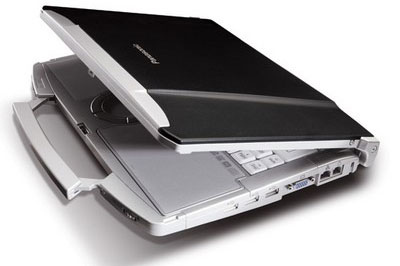 Panasonic ToughBook CF-F8
The highlight of this new line of laptops is that it has a strap, which makes it easy for users to move around without needing a bag. The CF-F8 is also the first ToughBook to use the WXGA screen. F8 will ship at about $ 2, 870. Also in the "salute" to welcome the shopping season later this year, Panasonic expanded its line of W-series and T-series. The CF-W8 has a 12. 1-inch XGA screen and is equipped with SU9300 power-saving processor. Meanwhile, the CF-T8 has a 12. 1-inch touchscreen (touchscreen) for users in the healthcare, service and financial sectors.
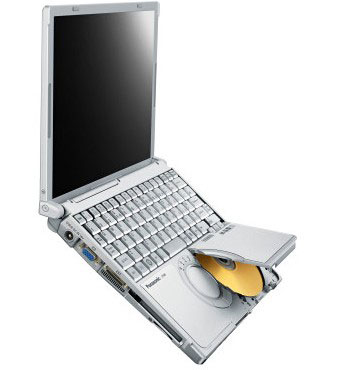 Panasonic ToughBook CF-W8
Nor is the 'name' of the laptop 'stone-pot', the CF-W8 and CF-T8 all have a durable magnesium alloy outer cover that can withstand the weight of 100 kgs on top, with battery life up to 7 hours.
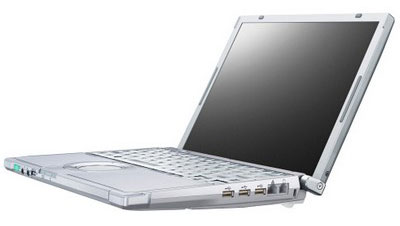 Panasonic ToughBook CF-T8
W8 will ship with unique silver color. Price is about 2, 428 USD. And T8 only sells through order channel. Panasonic ToughBook trio will be available in Asia next December.
FAQ
What should I check before following these steps?
Confirm device and software compatibility, save important data, and make sure you have the required permissions, files, and account access.
Why might the process not work?
Common causes include outdated software, missing permissions, incompatible hardware, an unstable connection, or completing a step in the wrong order.
Can I undo the changes if necessary?
That depends on the tool or setting. Use built-in restore options when available, keep a backup, and record the original configuration first.
Related Articles
 How to Recover and Improve Performance for Battery-powered Laptop11 minutes read
 Extend the Life of Laptop Batteries16 minutes read
 How to Discharge Laptop Battery Properly and Effectively5 minutes read
 8 Tips to Extend Laptop Battery Life: Top Picks and Buying Guide10 minutes read
 5 Simple Ways to Extend Laptop Battery Life6 minutes read
 How to Discharge Laptop Battery, Protect Laptop Battery Properly6 minutes read
Reader Comments 0
Sign in with email or Google to join the discussion.