Allows iPhone users to try another reliable alternative to Apple's Safari browser.
Opera Releases Opera One for iOS
In an August 13 Opera Blog post, Opera announced the stable version of Opera One for iOS. Opera describes Opera One as an "innovative AI-powered browser" that allows iPhone users to "enhance their web browsing experience with Opera's signature style and functionality."
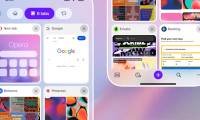
The new Opera One for iOS has Aria, Opera's AI assistant, built-in, with improved search functionality with predictive keyword suggestions, a Start page carousel, and design changes including view mode. Full screen automatically when scrolling the page.
Aria is the main attraction because it can assist you with a variety of tasks. This includes completing search queries as you type them, and generating text and image generation (using Google's Imagen2 model) from simple prompts. Aria has been part of the Opera browser on iOS since 2023, but is now more integrated than ever.
The big design change with Opera One is full-screen browsing mode, which provides a distraction-free environment when reading web pages. All unnecessary elements are hidden from view, with top and bottom bars adapting to match the background. The Start page carousel works on the same principle, matching the phone wallpaper color.
Opera One for iOS also places the search button at the bottom of the screen, making it easier to navigate with one hand. However, you can switch to Standard or Fast Action if you want. You can also activate the search function with a swipe-to-search gesture similar to Apple's Spotlight function.
Whichever mode you choose, Opera provides autocomplete suggestions designed to help you find what you're looking for with fewer keystrokes. As anyone who has ever used Google will know, this means you will be presented with the most relevant options as you type.
Is Opera One for iOS Worth Downloading?
Opera One for iOS offers something different for those who aren't fans of Safari or Chrome. However, it's more of an evolution from the previous Opera for iOS release, rather than a revolution. Many elements, including Aria, have been present for some time. And Opera One is available on desktop starting April 2023.
Like banks and insurance providers, too many of us get so comfortable with our browser choice that we never try alternatives. However, even if you're happy with the web browser you use, you should check out the competition from time to time. And Opera One on iOS provides the perfect opportunity to do this.





Reader Comments 0
Sign in with email or Google to join the discussion.