Table of Contents
This guide covers new hp pavilion x2: 10. 1 ', ', removable keyboard dock, atom x7 chip with practical context and easy-to-follow details. Use it to understand the subject and apply the information confidently.
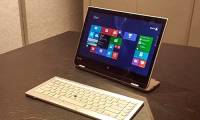
The 10. 1 "tablet will attach to the base via a magnet mount. The appearance of the product is also less rounded, more robust. Atom Bay Trail processor has also been replaced by Atom x7 ( Cherry Trail). ), in addition to 2GB of RAM, 32GB of internal memory, battery life of up to 12 hours.
In particular, the Pavilion x2 has a USB-C port that is both for charging and data transmission, as well as a normal fullsize USB port, microHDMI and microSD card reader slot. Running along the left and right edges are dual speakers. It is unknown when the new Pavilion x2 will be sold and how much it will cost. We only know that it will run Windows 10 as Soon as it reaches the user.
Basic Configuration of HP Pavilion x2 (2015)
- Screen: 10. 1 "unknown resolution (maybe 1280 x 800)
- CPU: Intel Atom x7
- RAM: 2GB
- Battery: 12 hours
- Operating system: Windows 10
- Special feature: with keyboard dock, attached to the tablet part by magnet, dual speakers Bang & Olufsen
- Connection: Bluetooth 4. 0, Wi-Fi a / b / g / n, USB 3. 0, USB-C, microHDMI, microSD card reader
- Internal memory: 32GB
- Size: unknown
- Weight: about 820g (both tablet + dock)
FAQ
What should I check before following these steps?
Confirm device and software compatibility, save important data, and make sure you have the required permissions, files, and account access.
Why might the process not work?
Common causes include outdated software, missing permissions, incompatible hardware, an unstable connection, or completing a step in the wrong order.
Can I undo the changes if necessary?
That depends on the tool or setting. Use built-in restore options when available, keep a backup, and record the original configuration first.
Related Articles
 Ultrabook Full HD Screen, Removable Keyboard of Toshiba4 minutes read
 How to Lock the Laptop Keyboard to Use the Removable USB Keyboard4 minutes read
 Toshiba Keyboard Ultrabook Cost 36 Million5 minutes read
 Scoring CPU for Netbook3 minutes read
 Review Hp Pavilion X360: Performance, Keyboard 'Quality'9 minutes read
 Toshiba Demonstrated a Hybrid Computer with a Removable Keyboard3 minutes read
Reader Comments 0
Sign in with email or Google to join the discussion.