Table of Contents
This guide provides a clear overview of microsoft: tpm 2.0 in windows 11 is mandatory, including how it works, key details, and practical considerations that can help you use the information effectively.
Overview
When Microsoft announced Windows 11 more than three years ago, it was immediately met with controversy. Not only because of its unconventional interface, but also because of its high hardware requirements, which meant that many systems still might not be able to run Windows 11 properly. One of those requirements was TPM 2.0, and Microsoft recently reminded everyone why this security chip is so essential.
If you don't know, TPM 2.0 can be a dedicated hardware chip or firmware built into your PC's motherboard. TPM stands for Trusted Platform Module, which is the component responsible for storing encryption keys, passwords, certificates, and other sensitive data.
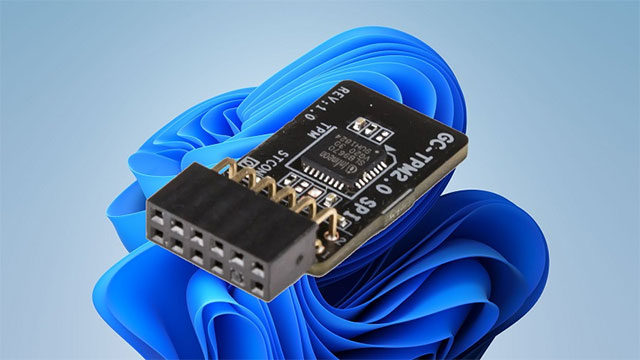
Unlike the previously popular TPM 1.2, the new version 2.0 works with additional features like Secure Boot (another Windows 11 requirement) and Windows Hello. However, Microsoft admits that implementing it requires 'a fundamental change to the system,' in other words, buying new hardware:
While implementation may require changes to your organization, TPM 2.0 represents an essential step toward more effectively combating today's complex security challenges.
As for the actual benefits of using TPM 2.0, Microsoft cites better encryption standards, which separate encryption and storage processes from the main processor, and better integration with additional Windows 11 security features like Credential Guard and Windows Hello for Business. TPM 2.0 is also used for BitLocker encryption keys (with Windows 11 version 24H2, BitLocker is enabled by default for all users), Secure Boot, which ensures the operating system you try to boot into hasn't been tampered with, and multi-factor authentication.
Microsoft reaffirms that TPM 2.0 is an essential tool to combat today's security risks and keep your data safe in the future. The company even calls Trusted Platform Module 2.0 a "non-negotiable standard" for the future of Windows, so don't expect Microsoft to lower Windows 11's hardware requirements just to get more users to upgrade their systems from Windows 10 to 11.
In short, TPM 2.0 is more than just a recommendation—it's essential to maintaining a secure Windows environment and adapting to future gadgets.
FAQ
What is Windows 11?
It is the main topic covered in this guide, including the relevant tools, settings, features, or steps connected with microsoft: TPM 2.0 in Windows 11 Is Mandatory.
Why is Windows 11 useful?
It can make microsoft: TPM 2.0 in Windows 11 Is Mandatory easier to understand, compare, configure, or troubleshoot by organizing the most important information in one place.
What should I check before using this guide?
Confirm that the instructions match your device, software version, region, and intended use, then back up important data before making major changes.
Related Articles
 Microsoft Will Make the New Outlook Mandatory4 minutes read
 Microsoft Lists Why TPM, Secure Boot Are Mandatory on Windows 116 minutes read
 How to Turn Off Automatic App Updates in Microsoft Store4 minutes read
 This Is Why Windows 64-bit Is More Secure Than 32-bit Windows7 minutes read
 Microsoft Confirms Launch of Exclusive Office Apps for Windows 113 minutes read
 Microsoft Proves Windows 10 Computers Are Vulnerable to3 minutes read
Reader Comments 0
Sign in with email or Google to join the discussion.